kachaka-api (gRPC)
The simulator serves the kachaka-api gRPC API on port 26400, like the real robot. Install the official client on the host (no ROS needed) and connect to the simulator:
pip install kachaka-api
from kachaka_api import KachakaApiClient

client = KachakaApiClient("127.0.0.1:26400")
print(client.get_robot_pose())
client.update_resolver()
client.speak("hello")
client.move_to_location("L01")
client.move_shelf("S01", "L01")
client.return_shelf("S01")
client.return_home()
Commands and the locations need the ROS 2 side (slam.launch.py nav:=true
or navigation.launch.py), since command_server runs them. The robot pose
is in the map frame of slam_toolbox or AMCL. AMCL starts at the map
frame's origin, the spawn pose on the saved maps; give it another start
on /initialpose (RViz's 2D Pose Estimate).
Every RPC of the KachakaApi service (kachaka-api 3.17.5.0) is implemented.
The client methods are the RPC names in snake_case
(GetRobotPose → get_robot_pose). Where the simulator differs from the robot:
| Area | RPCs | In the simulator |
|---|---|---|
| Robot info | GetRobotSerialNumber, GetRobotVersion, IsReady, GetError, GetRobotErrorCodeJson, GetRobotPose, GetBatteryInfo |
GetError lists −14 (emergency stop), 21051 + 21052 (paused at a step) and −18 (collision with collision.stop), see Steps and collisions |
| Sensors | GetRosImu, GetRosOdometry, GetRosWheelOdometry, GetRosLaserScan, Get{Front,Back,Tof}CameraRos{CameraInfo,Image,CompressedImage}, GetStaticTransform, GetDynamicTransform |
|
| Map | GetPngMap, GetMapList, GetCurrentMapId, LoadMapPreview, ExportMap, ImportMap, ImportImageAsMap |
see Maps |
| Map (saved map) | SwitchMap, SetRobotPose |
need navigation.launch.py (map_server and AMCL); fail with −16 under SLAM. inherit_docking_state_and_docked_shelf is Kachaka Pro only (−17) |
| Commands | StartCommand, CancelCommand, GetCommandState, GetLastCommandResult, Proceed, GetHistoryList |
history keeps the last 100 commands, until the simulator stops |
| Shortcuts | GetShortcuts, StartShortcutCommand |
defined in config/robot.yaml (api.shortcuts) |
| Layout | GetLocations, GetLocationsDigest, GetShelves, GetShelvesDigest, GetMovingShelfId, ResetShelfPose |
ResetShelfPose puts the shelf back at its home; fails while the robot tows it |
| Control | SetManualControlEnabled, GetManualControlEnabled, SetRobotVelocity, SetAutoHomingEnabled, GetAutoHomingEnabled, SetSpeakerVolume, GetSpeakerVolume |
|
| Safety | SetEmergencyStop, RestartRobot |
the emergency stop halts the wheels, cancels all commands and refuses new ones (−14) until RestartRobot, which clears it and also resumes from a pause after a step or a collision; the simulator itself does not restart |
| Sound | GetSoundList, PlaySound, StopSound, AddSound, DeleteSound |
no audio: the sound name goes to sim/sound; added sounds live until the simulator stops |
| Torches | SetFrontTorchIntensity, SetBackTorchIntensity |
a spotlight at each camera, see Torch lights; levels are clamped to 0-255 and published on sim/torch |
| Object detection | GetObjectDetection, GetObjectDetectionFeatures |
people, shelves and the charger from the scene; the features come from an ImageNet MobileNetV3, not the robot's detector; see Object detection |
| No-ops | ActivateLaserScan |
All StartCommand commands of kachaka-api 3.17.5.0 are implemented (see
Commands). DEPART_FROM_CHARGER is newer than that release, so
it can be sent only through the ROS 2 action (command_type: 23) until a
kachaka-api release includes it.
Simulator error codes, shown by get_robot_error_code like the robot's own:
| Code | Meaning |
|---|---|
| −1 … −11 | command errors from command_server (unsupported, no charger, docking failed, canceled, navigation failed, blocked, …) |
| −12 | manual control is disabled |
| −13 | not on the charger |
| −14 | emergency stop |
| −15 | map error (unknown id, bad file) |
| −16 | needs a saved map (navigation.launch.py) |
| −17 | Kachaka Pro only |
asyncio client
The asyncio client (kachaka_api.aio.KachakaApiClient) works too. Create it
inside the event loop. Commands wait for completion unless
wait_for_completion=False, and the streams yield while a command runs:
import asyncio
from kachaka_api.aio import KachakaApiClient

async def main():
    client = KachakaApiClient("127.0.0.1:26400")
    await client.update_resolver()

    async def watch():
        async for pose in client.robot_pose.stream():
            print(pose.x, pose.y, pose.theta)

    watcher = asyncio.create_task(watch())
    print(await client.move_to_location("L01"))
    watcher.cancel()

asyncio.run(main())
scripts/aio_demo.py does this with the command state as well.
The stamps (stamp_nsec) are wall clock time, as on the robot, where the
demo notebooks compare them with time.time(). The ROS topics keep simulation
time (/clock). The server converts each stamp with the offset between wall
clock and simulation time at the /clock tick at or before it
(kachaka_isaac_sim/wall_clock.py), so one sim time gives one wall time in
every stream, and stamps keep their order. When the simulation runs slower
than real time, stamps fall behind the wall clock and jump forward at each
tick.
All of the client's streams work against the simulator: robot_pose, ros_odometry, ros_wheel_odometry, ros_imu, ros_laser_scan, front_camera_ros_image, front_camera_ros_compressed_image, object_detection, object_detection_features, png_map, command_state, last_command_result, shelves, moving_shelf_id, locations, map_list, current_map_id, history_list, auto_homing_enabled, manual_control_enabled, error.
They follow the server's cursor long-poll:
- The sensor streams and the pose yield at the publishing rate.
png_mapyields whenever slam_toolbox publishes the map.- The others yield their current value first, then again on a change.
shelvesandlocationschange only with the layout, not when a shelf is towed; usemoving_shelf_idorget_shelves()for that.
The set_*_callback form works too. With kachaka-api 3.17.5.0,
set_*_callback(None) stops it but then logs one TypeError: 'NoneType'
object is not callable from the client library ("Task exception was never
retrieved"). It is harmless. Setting a new callback right after stopping one
leaves the old loop running too, so the callback runs twice per value; wait for
the next value before setting it again. Both are client-side bugs (still in
kachaka-api 3.18.1).
Maps
Maps are Nav2 map pairs in maps/ (mounted at /maps in the containers):
<id>.yaml plus its <id>.pgm, as map_saver_cli writes them. The id is
the file name. The yaml may also hold name (shown by get_map_list) and
charger_pose: [x, y, yaw] (the default pose after switch_map).
- Under SLAM the current map is
sim, slam_toolbox's live/map. Export it to keep it:export_map("sim", "slam.zip")thenimport_map("slam.zip")writesmaps/slam.yaml. The idsimis never given to a saved map. - Under
navigation.launch.pythe current map is the one it was started with;get_map_listlists the files inmaps/andswitch_maploads another one into map_server and sets the initial pose. export_mapwrites a zip of the two files, whichimport_mapreads back.import_image_as_maptakes a PNG (Kachaka's palette, or any image: dark is occupied, light free, mid gray unknown) with the origin at its bottom-left corner.
Web dashboard
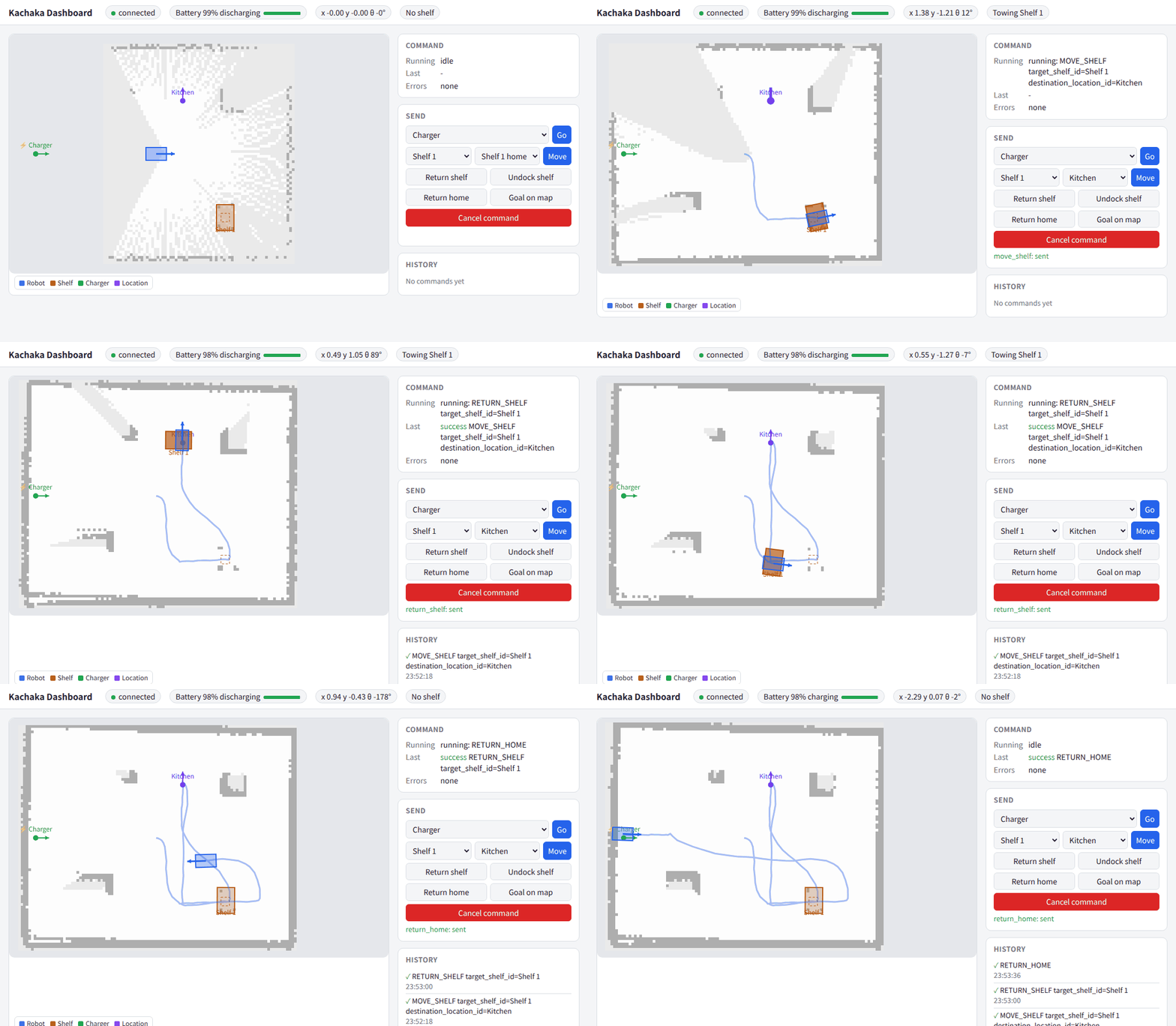
A small web page that shows the robot on the map and sends commands. It is a separate process on the host that only talks kachaka-api, so it needs no ROS and works with a real Kachaka too. It is off by default; start it next to the simulator:
uv run --no-project --with kachaka-api==3.17.5.0 python scripts/dashboard.py
# then open http://127.0.0.1:8080/
# options: --target <robot>:26400 (default 127.0.0.1:26400), --host 0.0.0.0 to reach it
# from other machines, --port 8080
- Map: the robot's map (
GetPngMap, reloaded every 10 s so a SLAM map grows), the robot, the shelves (dark while towed), the charger and the locations. Wheel to zoom, drag to pan. kachaka-api has no path RPC, so the blue line is the trail of poses the page has seen, not the planned path. - State: battery and charging, pose, the towed shelf, the running
command, the last result and the active errors, with their titles from
get_robot_error_code; the command history below. - Commands: move to a location, move a shelf to a location, return the
shelf, undock it, return home, "Goal on map" (click a point and drag to set
the heading, sent as
move_to_pose) and cancel. They need the ROS 2 side with Nav2, as for any kachaka-api client.
There is no login: anyone who can open the page can drive the robot, so keep
the default --host 127.0.0.1 unless the network is trusted.
Demo notebooks
The demo notebooks of kachaka-api (python/demos/*.ipynb in
pf-robotics/kachaka-api) run
against the simulator. scripts/demo_notebooks.sh runs them headless: it
starts the simulator, saves a SLAM map, restarts Nav2 on it, and runs each
notebook in a fresh kernel with its client pointed at 127.0.0.1:26400
(the notebooks default to the robot's own address). It takes about 10 min
and needs the ROS 2 image and uv:
scripts/demo_notebooks.sh                    # all of them
scripts/demo_notebooks.sh speak robot_pose   # some
The executed notebooks are written to build/demo_notebooks/. Notebooks that
loop forever (camera, scan and error streams) are stopped after a while and
pass if they showed something; the HTTP server notebooks are sent requests
while they serve. With kachaka-api 3.17.5.0:
| Notebook | Result | Notes |
|---|---|---|
| get_front_camera | OK | |
| get_front_camera_continuous | OK | |
| undistort | OK | the simulated camera has no distortion, so both images are the same |
| feature_matching | OK | nothing is held up to the camera, so there are few matches |
| qrcode | OK | there is no QR code in the simulated rooms |
| get_object_detection | OK | |
| get_imu | OK | the plot is a widget: drawn only in a live JupyterLab |
| get_laser_scan | OK | |
| error_code | OK | lists the simulator's error codes, not the robot's |
| speak | OK | no sound: the text goes to the log and sim/speech |
| template | OK | |
| teleop, command_gui | OK | the buttons and forms are built; nobody clicks them headless |
| plot_map_robot_lidar | OK | the animation is a widget: drawn only in a live JupyterLab |
| http_server | OK | /run returns {"success":true} |
| url_kachaka_api | OK | serial number, pose and camera image over HTTP |
| follow_path | OK | |
| robot_pose | OK | set_robot_pose moves the pose that get_robot_pose returns |
| switch_map | OK | switches to a second saved map and back |
| install_libraries | skipped | pip installs only |
| save_object_detection_features | OK | saves p4, p5, p6 and the image; the features are the simulator's, not the robot's detector's |
| run_custom_object_detection | OK | with a stand-in predictor.onnx (one fixed box) that has the official inputs; see below |
To run your own detector in the simulator: save images and features with
save_object_detection_features, train with kachaka-transfer-learning and put
its predictor.onnx next to run_custom_object_detection. The notebook scales
the boxes for a 1280×720 image, presumably the robot's camera (scale_h = 720.0 / 224,
scale_w = 1280.0 / 398); the simulated camera is 640×480, so use
480.0 / 224 and 640.0 / 398. The check above uses a stand-in model
(stand_in_predictor in tests/demo_notebooks_check.py) that only proves
the features fit the official inputs.
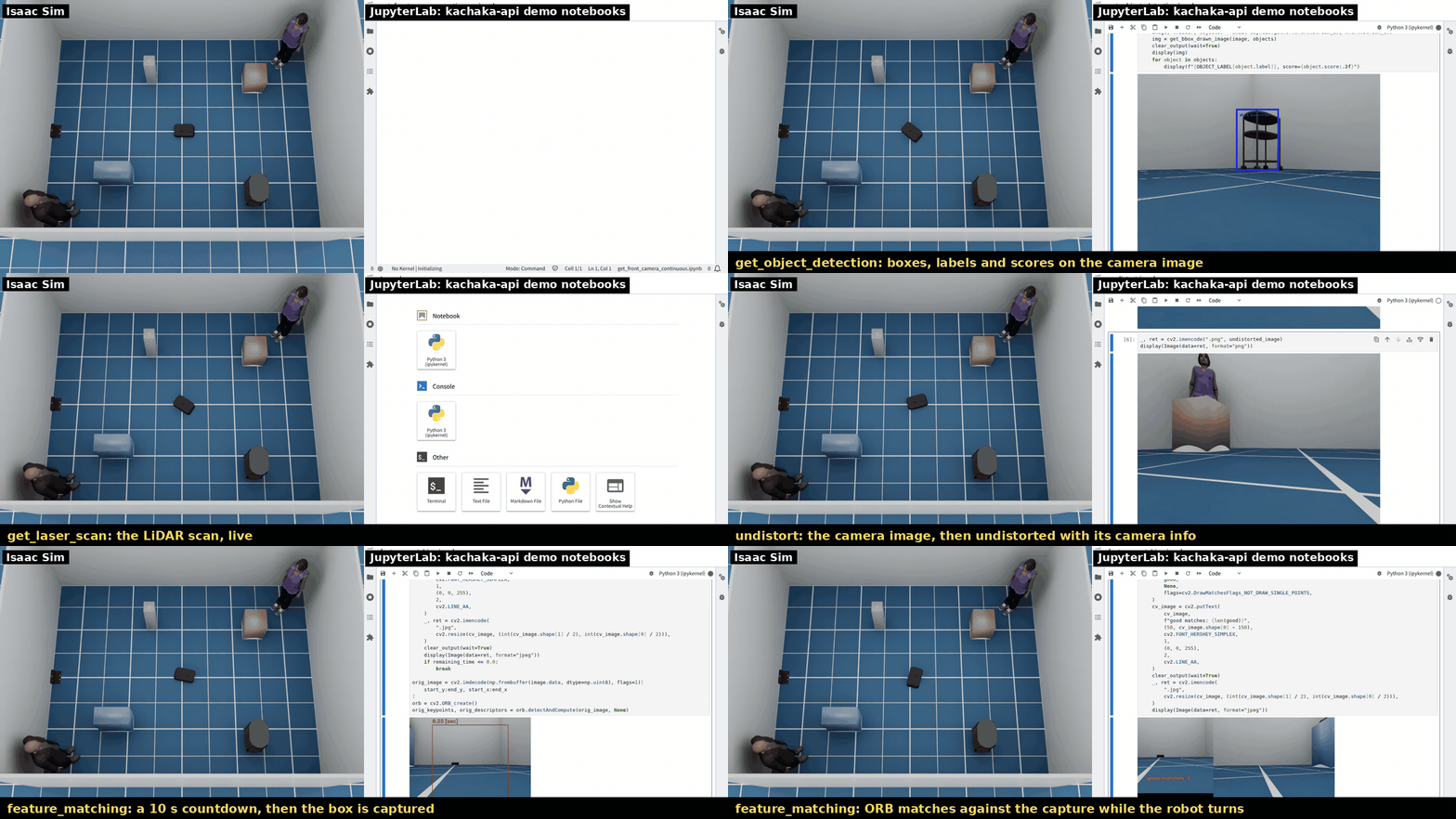
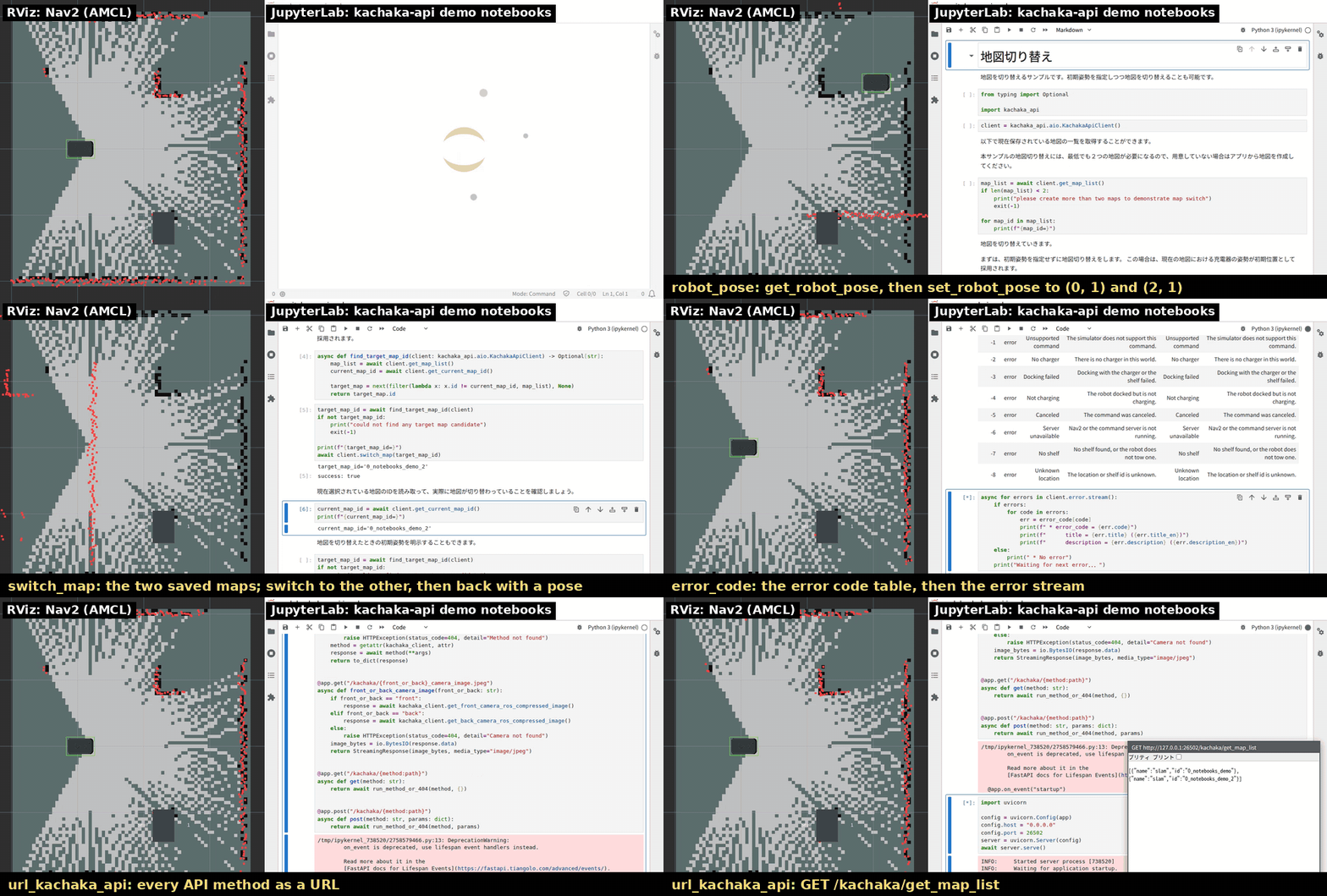
The same notebooks in a live JupyterLab, driven by scripts/record_demo.sh notebooks sensors|control|map|detection
(the recorder clicks the buttons and the plot, and turns or drives the robot during the sensor streams):
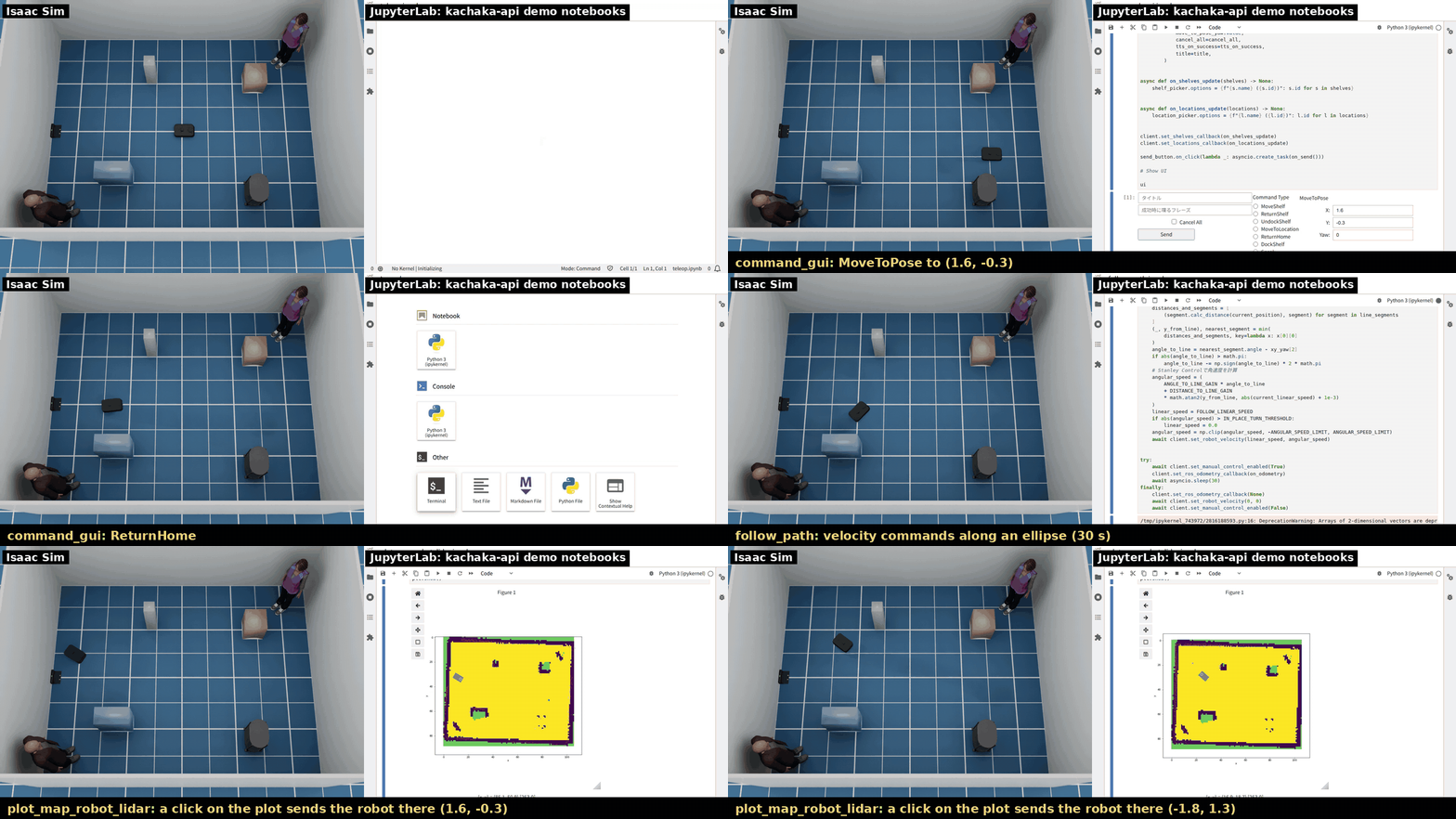
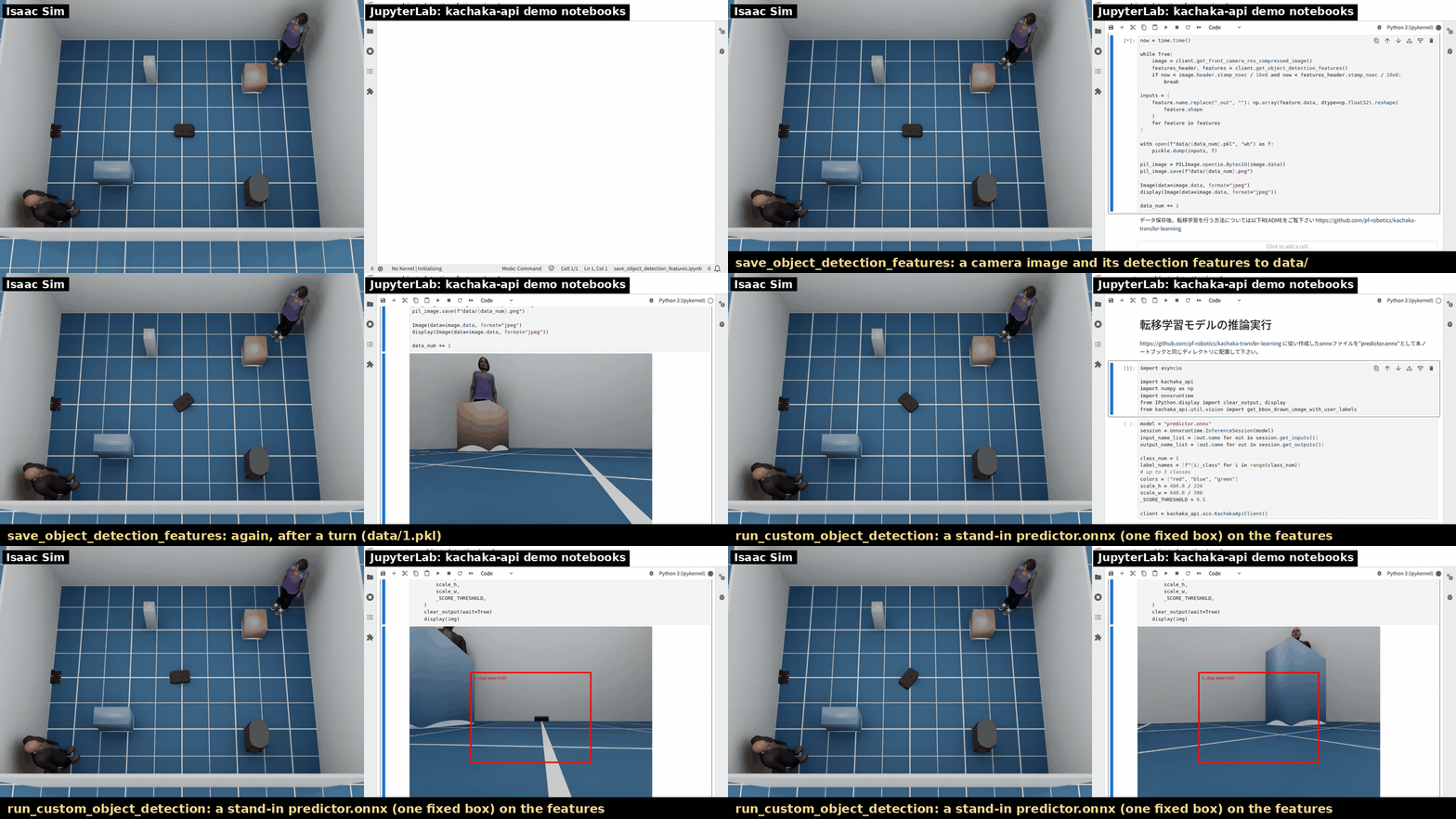
The map that get_png_map returns is grayscale, so plot_map_robot_lidar draws it in
matplotlib's default colormap (yellow); the real robot's PNG format is not checked here.