kachaka_isaac_sim
A simulator for the Kachaka home robot on
NVIDIA Isaac Sim 6.1, with the same ROS 2 interface as the official
kachaka-api bridge. Code written
for a real Kachaka (topics under /kachaka) runs against the simulator unchanged.
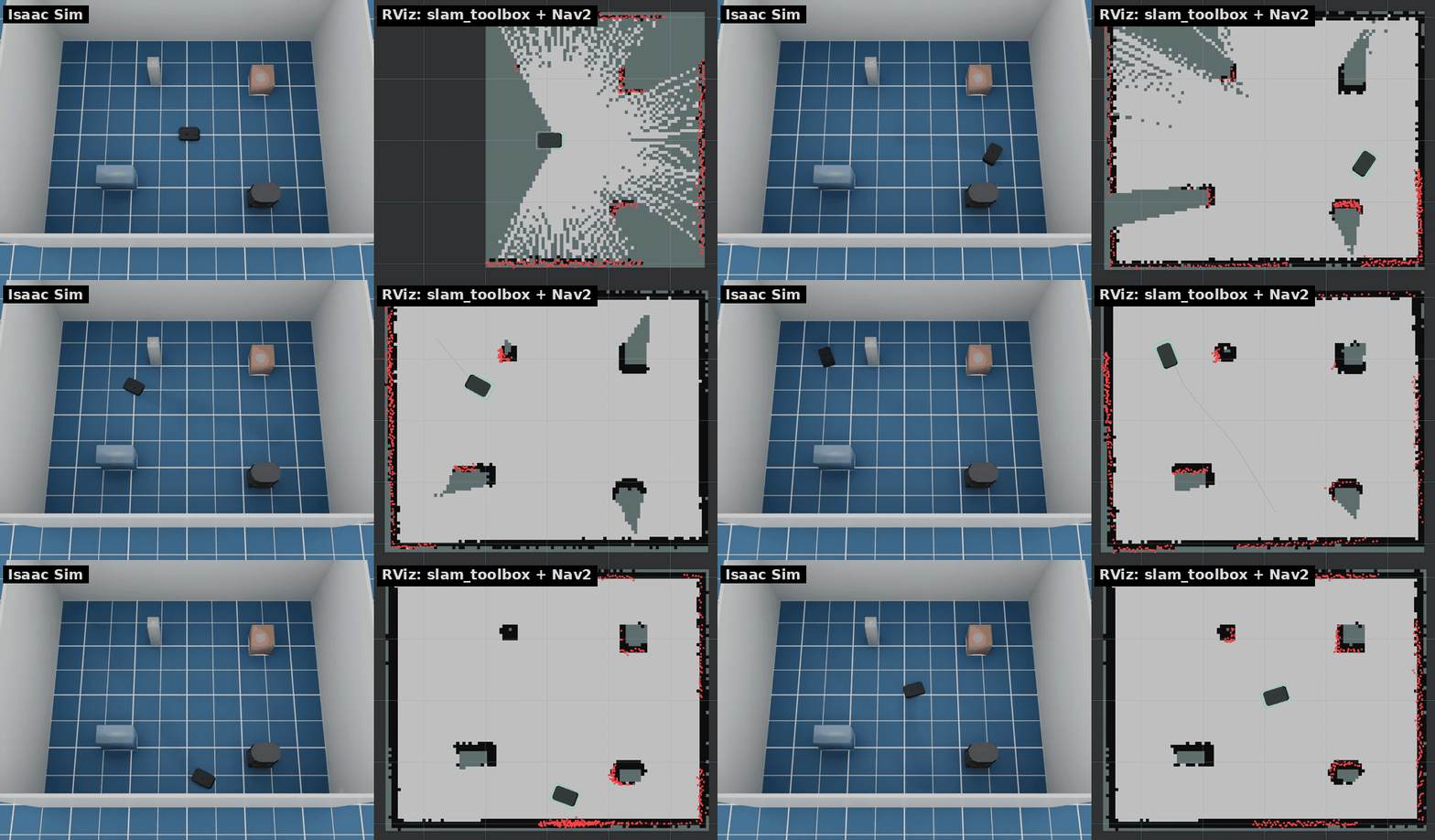
Left: Isaac Sim. Right: RViz with slam_toolbox and Nav2 (2× speed).
Features
- Robot model converted from the official URDF and meshes.
- Differential drive with torque-limited wheels and casters; manual cmd_vel at the real bridge's 0.3 m/s, autonomous motion faster (see Speed limits).
- Sensors: 2D LiDAR, front/back RGB cameras, ToF depth camera, IMU.
- Odometry (fused and wheel), TF,
joint_states,robot_description, version stub. - Charging dock and battery: it drains a little standing and more while driving, more again with a shelf, and charges on the dock, fast up to 80 % and slower to full (Battery).
- Front obstacle stop, as on the real robot: forward motion brakes in front of an obstacle, from any source (teleop, Nav2, kachaka-api). It can be switched off, like in the smartphone app.
- Front and back torch lights, set through kachaka-api like on the real robot.
- Object detection (people, shelves, the charger) on the front camera, from the scene's ground truth.
- Step sensors: the robot stops and pauses at a drop (errors 21051/21052, as on the real robot);
collisions of the body are counted and published.
--dropcuts a hole in the floor. - Same topic names, message types and QoS as the real bridge.
- Worlds: a walled room with a Kachaka Shelf, or Isaac Sim scenes (office, hospital, warehouse, five kitchens). Layout files place the charger, shelves, locations, people, boxes, walls and doors, optionally at random; people and boxes can walk routes, wander and come and go.
- A scenario runner: batches of Nav2 and kachaka-api scenarios, headless, with success, time, path length, collisions, clearance and recoveries per run, in CSV/JSON (see Scenario runner).
- Docker image with slam_toolbox, Nav2, RViz and teleop, set up for Kachaka. Nav2 never drives backwards, since Kachaka has no rear range sensor.
kachaka_command/executewith every command type of the real bridge: MOVE_TO_POSE, MOVE_TO_LOCATION, RETURN_HOME, SPEAK (text only), the Kachaka Shelf commands (DOCK_SHELF, UNDOCK_SHELF, MOVE_SHELF, RETURN_SHELF) and the motion commands (MOVE_FORWARD, ROTATE_IN_PLACE, …), built on Nav2. Alsogoal_poseand auto homing.- The kachaka-api gRPC API on port 26400,
with every RPC, so the official Python client (
KachakaApiClient) works without a robot. - A web dashboard (off by default): the map with the robot, shelves and charger, the robot's state and command buttons, all through kachaka-api, so it also works with a real Kachaka.
Requirements
- Ubuntu 24.04, x86_64
- NVIDIA RTX GPU and driver supported by Isaac Sim 6.1 (tested on an RTX 2080 Ti, driver 595)
- uv, Docker with Compose, git, and about 40 GB of disk
Quick start
The short version. Getting started walks through each step, what to expect and what to do when something goes wrong.
# 1. Install Isaac Sim 6.1 into .venv (large download)
uv sync

# 2. Fetch the official Kachaka description and build the robot USD
uv run python scripts/fetch_assets.py
uv run python scripts/build_usd.py

# 3. Start the simulator (GUI; add --headless for no window)
scripts/run_sim.sh
scripts/run_sim.sh sets OMNI_KIT_ACCEPT_EULA=YES. By running it you accept
the NVIDIA Isaac Sim license.
The first start compiles shaders and takes a few minutes.
In another terminal, run the ROS 2 tools in Docker:
docker compose -f docker/compose.yaml build
xhost +local:            # allow RViz windows from containers

# Drive with the keyboard
docker compose -f docker/compose.yaml run --rm teleop

# Build a map with slam_toolbox (add NAV=true to also send Nav2 goals from RViz)
NAV=true docker compose -f docker/compose.yaml up slam

# Save the map, then navigate on it
docker compose -f docker/compose.yaml run --rm shell \
    ros2 run nav2_map_server map_saver_cli -f /maps/map
docker compose -f docker/compose.yaml up navigation
The containers use host networking, so they find the simulator on the same machine through DDS discovery.
RViz colours
| Colour | What | Topic |
|---|---|---|
| Red dots | LiDAR scan | /kachaka/lidar/scan |
| Blue line | Nav2's global plan | /plan |
| Green outline | robot footprint | /local_costmap/published_footprint |
| Dark grey / blue | shelf / towed shelf | /shelf_markers |
| Orange cylinder / brown box | moving person / box (red while waiting for the robot), green arrow for its velocity | /mover_markers |
| Violet / yellow / faint grey panel | door closed / opening or closing / open | /door_markers |
| Faint orange rectangle on the floor | an automatic door's sensor area | /door_markers |
Yellow / blue outline (record_demo.sh fleet) |
another robot now / 0.5 s ahead | {namespace}/other_robots |
The costmaps (off by default) use RViz's costmap scheme.
Documentation
Also on the project site, https://atinfinity.github.io/kachaka_isaac_sim/, built from these pages with
Zensical (python3 scripts/build_site.py).
- Getting started: install, first map, Nav2 goals, kachaka-api, troubleshooting
- Robot features: commands, front obstacle stop, torch lights, reset, charger and battery, shelves, speed limits, object detection, steps and collisions
- Worlds and layouts: doors, elevator, layout files, moving people and boxes
- Several robots: several Kachakas in one world, Nav2 for each on a shared map
- Scenario runner: batches of Nav2 and kachaka-api runs with metrics
- Simulator options: command-line options, sensor degradation, Isaac Sim scenes, worlds from a map
- ROS 2 interface: topics, services and actions
- kachaka-api (gRPC): the gRPC API, asyncio client, maps, web dashboard, demo notebooks
- Performance
- Tests
- Design notes
License
Apache License 2.0. See LICENSE and NOTICE. This is an unofficial project, not affiliated with Preferred Robotics, Inc., the maker of Kachaka.
The robot model comes from pf-robotics/kachaka-api
(Apache-2.0), the shelf model from GAI-313/kachaka_shelf_description
(MIT). Both are downloaded by scripts/fetch_assets.py and not redistributed here.