Robot features
Commands
ros2 action send_goal /kachaka/kachaka_command/execute kachaka_interfaces/action/ExecKachakaCommand \
    "{kachaka_command: {command_type: 13, move_to_pose_command_x: 1.0, move_to_pose_command_y: 0.5,
      move_to_pose_command_yaw: 1.57}, cancel_all: true}"   # MOVE_TO_POSE_COMMAND
ros2 topic pub --once /kachaka/goal_pose geometry_msgs/PoseStamped \
    "{header: {frame_id: map}, pose: {position: {x: 1.0, y: 0.5}, orientation: {w: 1.0}}}"
| Command | What it does |
|---|---|
| MOVE_TO_POSE | Nav2 goal in the map frame |
| MOVE_TO_LOCATION | Nav2 goal to a location from layout/locations/list; the charger (home) runs RETURN_HOME |
| SPEAK | no audio: the text goes to the log and to sim/speech |
| MOVE_FORWARD, ROTATE_IN_PLACE | drives the distance or turns the angle on odometry; MOVE_FORWARD stops (−9) at an obstacle ahead |
| MOVE_BY_VELOCITY_WITH_MUTED_SENSORS | drives at the velocity for the duration, with the front obstacle stop muted |
| LOCK | holds the robot still for the duration |
| DOCK_ANY_SHELF_WITH_REGISTRATION | docks the shelf nearest to the location (within 0.5 m) |
| LOCALIZE | succeeds at once: the simulator never loses its pose |
| DEPART_FROM_CHARGER | drives 0.3 m off the charger; fails (−13) when not on it |
As on the real robot, cancel_all: true stops the running command; without
it a command waits until the earlier ones finish. tts_on_success is sent to
sim/speech after a successful command. goal_pose sends MOVE_TO_POSE
without cancel_all, like the real bridge.
Front obstacle stop
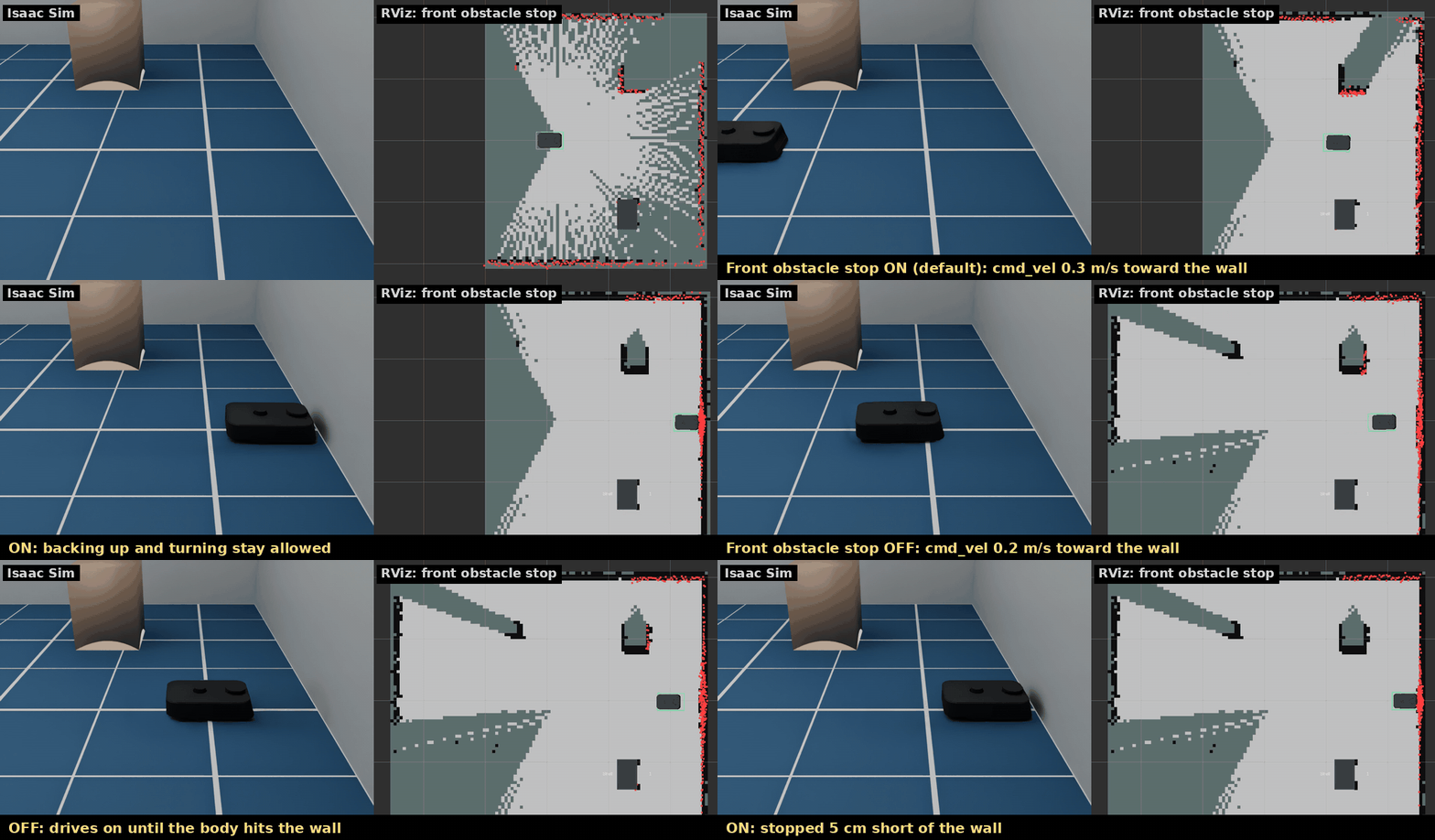
The real Kachaka stops by itself when something is just in front of it; its
smartphone app turns this off. The simulator does the same for every velocity
command, whatever sends it (teleop, Nav2, set_robot_velocity, commands):
- Forward motion brakes when the LiDAR clearance ahead of the body, in a lane
0.30 m wide, falls to
margin + v * scan period + v² / (2 * deceleration). At rest the robot keeps 3 cm (front_stop.margin). Turning and backing up stay allowed, and the robot drives on once the way is clear. - The lane is narrower than a shelf's legs, so the robot still drives under a Kachaka Shelf; a towed shelf is not seen.
- MOVE_BY_VELOCITY_WITH_MUTED_SENSORS and MOVE_FORWARD with
mute_sensorsturn it off while they run. MOVE_FORWARD fails with −9 when the stop holds the robot for 1 s. config/robot.yaml(front_stop) sets the initial state and the zone. The app setting is not part of kachaka-api, so the simulator-only servicesim/front_stop/set_enabledswitches it at run time:
ros2 service call /kachaka/sim/front_stop/set_enabled std_srvs/srv/SetBool "{data: false}"
ros2 topic echo /kachaka/sim/front_stop/state   # {"enabled": false, "muted": false, "blocked": false}
The real stop distance and zone are not published; the values are estimates. The LiDAR scans at 10.5 cm, so lower obstacles are not seen.
Torch lights
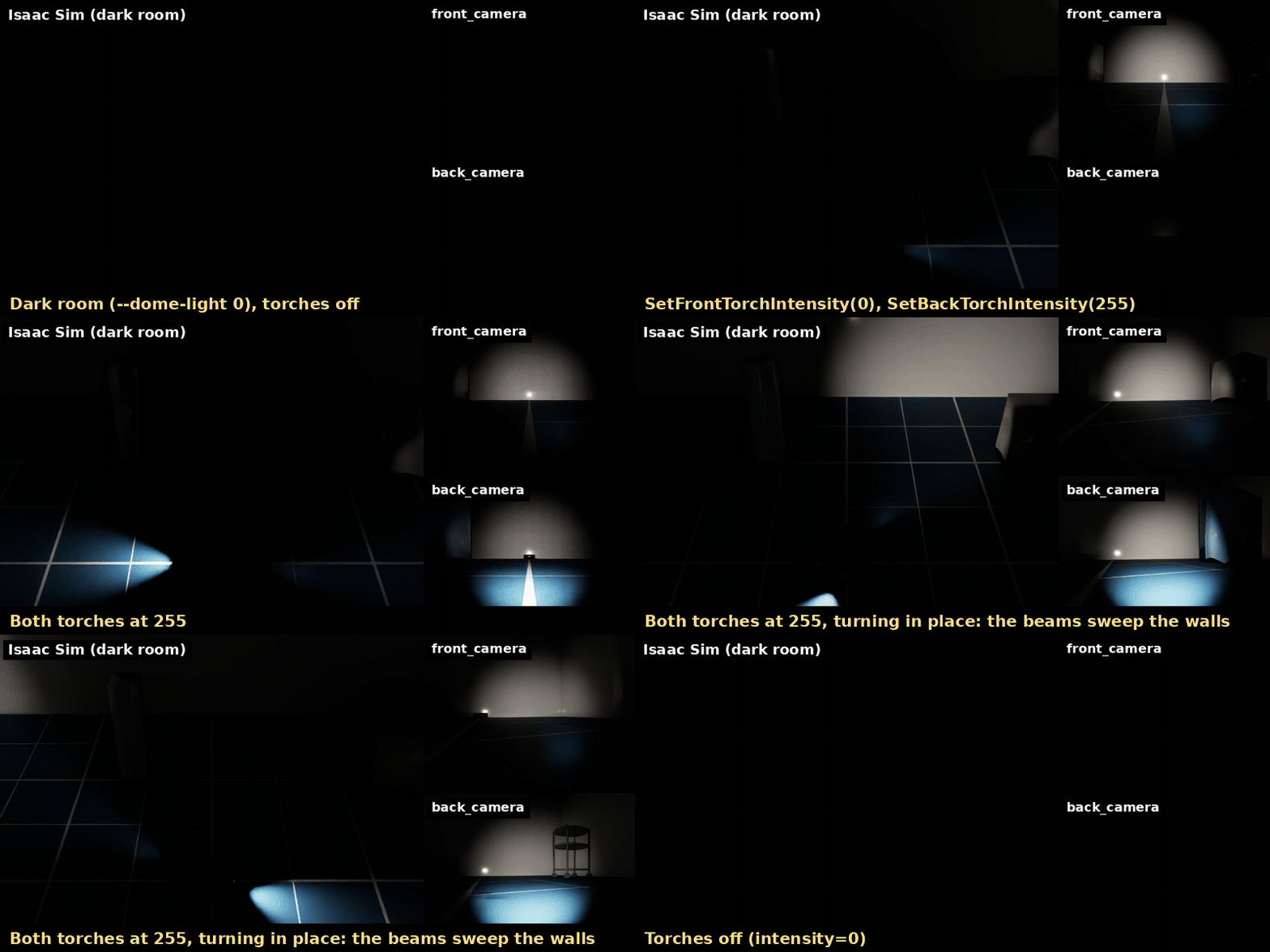
kachaka-api has a front and a back torch, set with SetFrontTorchIntensity /
SetBackTorchIntensity (0-255, 0 is off). Where the torches sit on the real
robot is not documented and the URDF has no frame for them, so the simulator
assumes they light the camera views: each is a spotlight at the front or back
camera, aimed along it.
The Python client has no wrapper for them, so call the gRPC stub:
from kachaka_api import KachakaApiClient
from kachaka_api.generated import kachaka_api_pb2 as pb2

client = KachakaApiClient("127.0.0.1:26400")
client.stub.SetFrontTorchIntensity(pb2.SetFrontTorchIntensityRequest(intensity=255))
- The real robot has no RPC to read the levels back; the simulator publishes
them on
sim/torch(latched JSON{"front", "back"}). - The default scenes are bright, so the torches barely show.
--dome-light 0turns the ambient light off in the default room (Isaac Sim scenes bring their own lights). - Brightness, beam and colour are guesses (
torchinconfig/robot.yaml).
Resetting the simulator
sim/reset (simulator only) puts everything back to the start without
restarting the simulator:
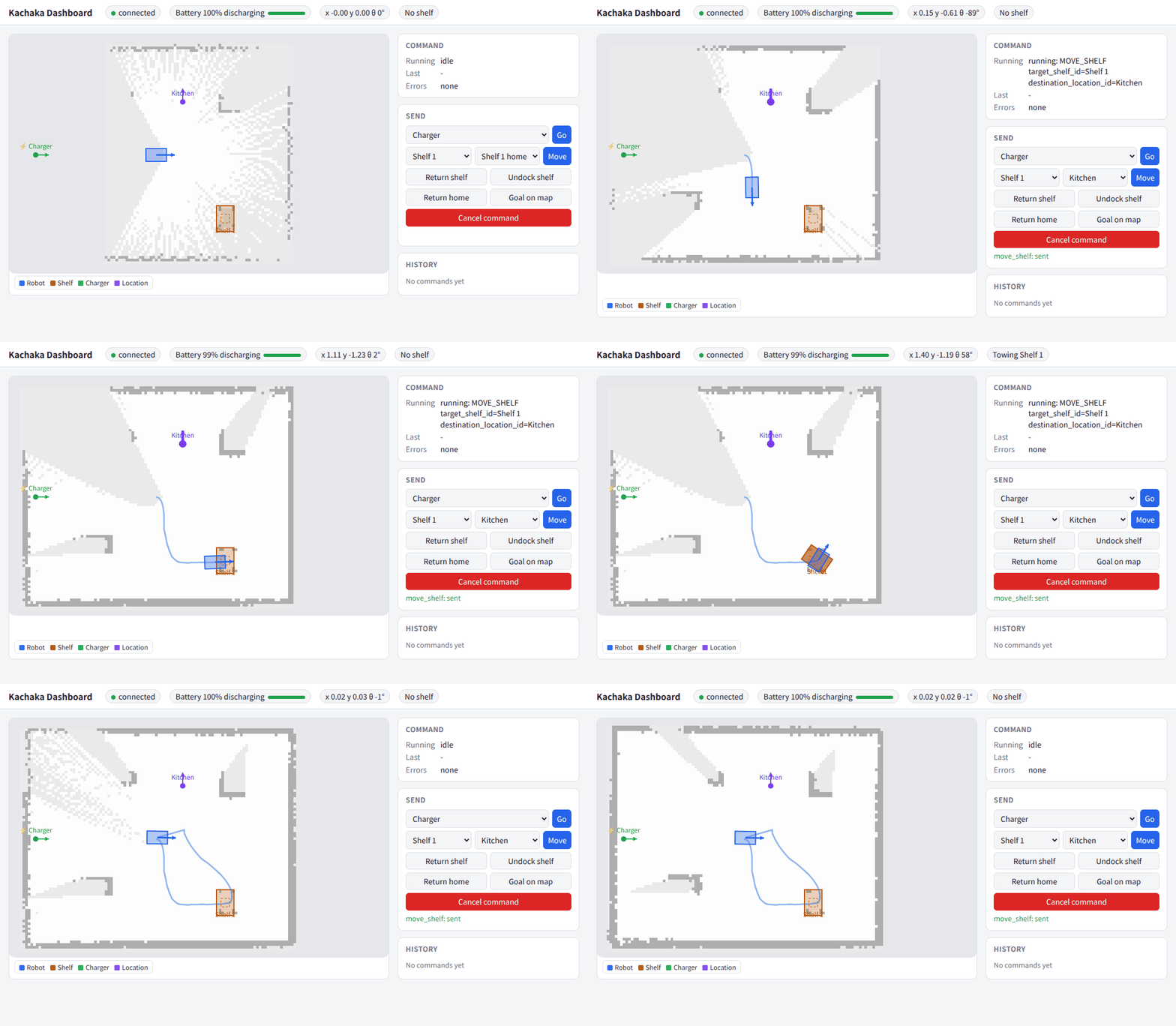
ros2 service call /kachaka/sim/reset std_srvs/srv/SetBool "{data: false}" # data: true also clears the SLAM map
- The robot goes back to its spawn pose at rest, a towed shelf is let go and every shelf goes back home.
- The SLAM map and the map frame stay valid: the odometry sees the jump back
as an exact move. With
data: trueslam_toolbox starts a new map and the odometry starts again at zero. - The battery goes back to its initial level, the torches go off, the
emergency stop is released and the front obstacle stop goes back to its
setting in
config/robot.yaml. command_serverdrops the running and queued commands without a result, clears the costmaps and goes back to its parameters (auto homing).- The gRPC server forgets the command history, the last result, the errors,
added sounds and the speaker volume. Under
navigation.launch.pyit also tells AMCL the robot is back at the start. - For 1 s after the reset the robot ignores
cmd_vel, so a controller that is still sending cannot drive it off again.
The ROS checks under tests/ reset first (--no-reset skips it,
--clear-map also clears the map); python3 /tests/sim_reset.py resets on its own.
Returning to the charger
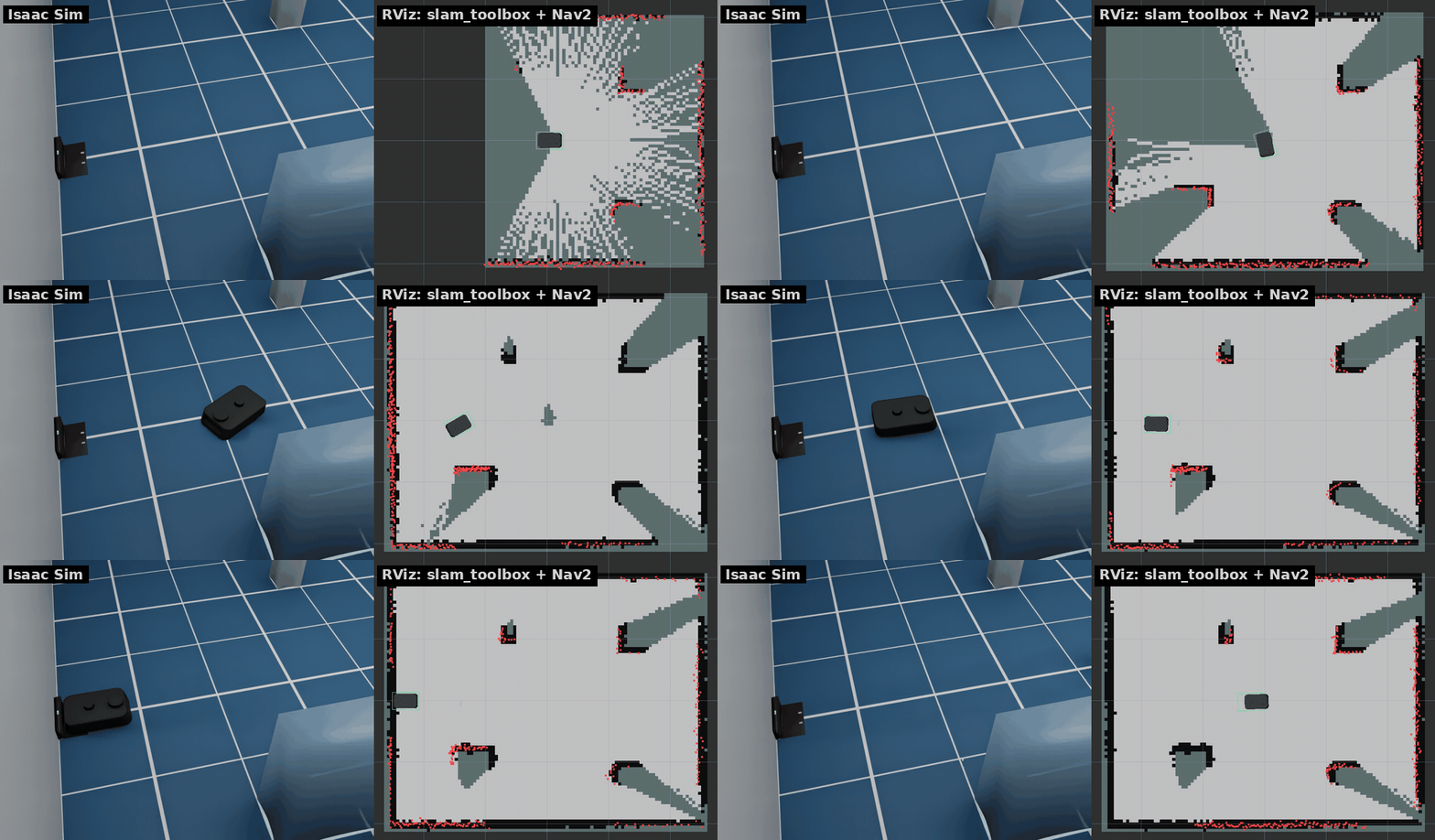
RETURN_HOME (2× speed). Nav2 drives to a point in front of the charger, then the robot backs onto it, as the real one does.
ros2 action send_goal /kachaka/kachaka_command/execute kachaka_interfaces/action/ExecKachakaCommand \
    "{kachaka_command: {command_type: 8}}"   # RETURN_HOME_COMMAND
This needs the ROS 2 stack with Nav2 (NAV=true ... up slam, or up navigation),
which runs command_server. The robot leaves the charger with any Nav2 goal.
The charger's size is an estimate (config/robot.yaml).
Battery
The battery level follows the power the robot draws (battery in config/robot.yaml):
- Off the charger: an idle part (electronics, sensors, computer) all the time, plus a motion part from the wheel speeds and the torques of the wheel drives, larger with a shelf. With the defaults about 20 %/h standing, 40 %/h at 0.3 m/s and 60 %/h at 0.3 m/s with a shelf (sim time).
- On the charger: constant current at 100 %/h up to 80 %, then constant voltage, the rate falling with what is left (about 50 minutes from 80 % to full).
robot_info/battery_statealso carries voltage (from a level-to-voltage curve), current (negative while discharging), charge, capacity and a constant temperature. The real bridge fills only the level and the charging state (voltage −1);battery.bridge_fields_only: truedoes the same.
All the numbers are estimates until measured on a real robot (#4).
Carrying a shelf
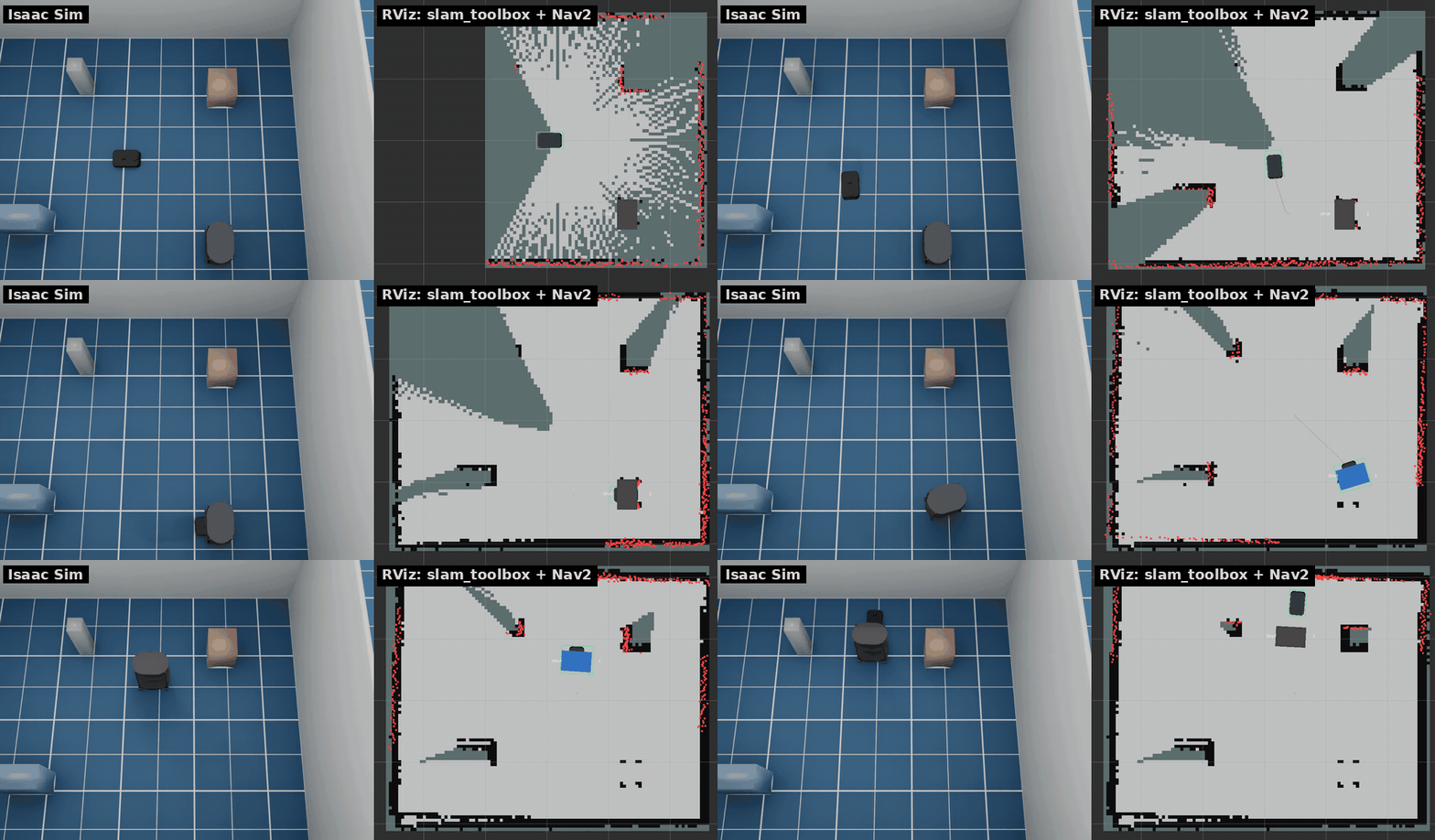
DOCK_SHELF, then MOVE_SHELF to another location and UNDOCK_SHELF (3× speed).
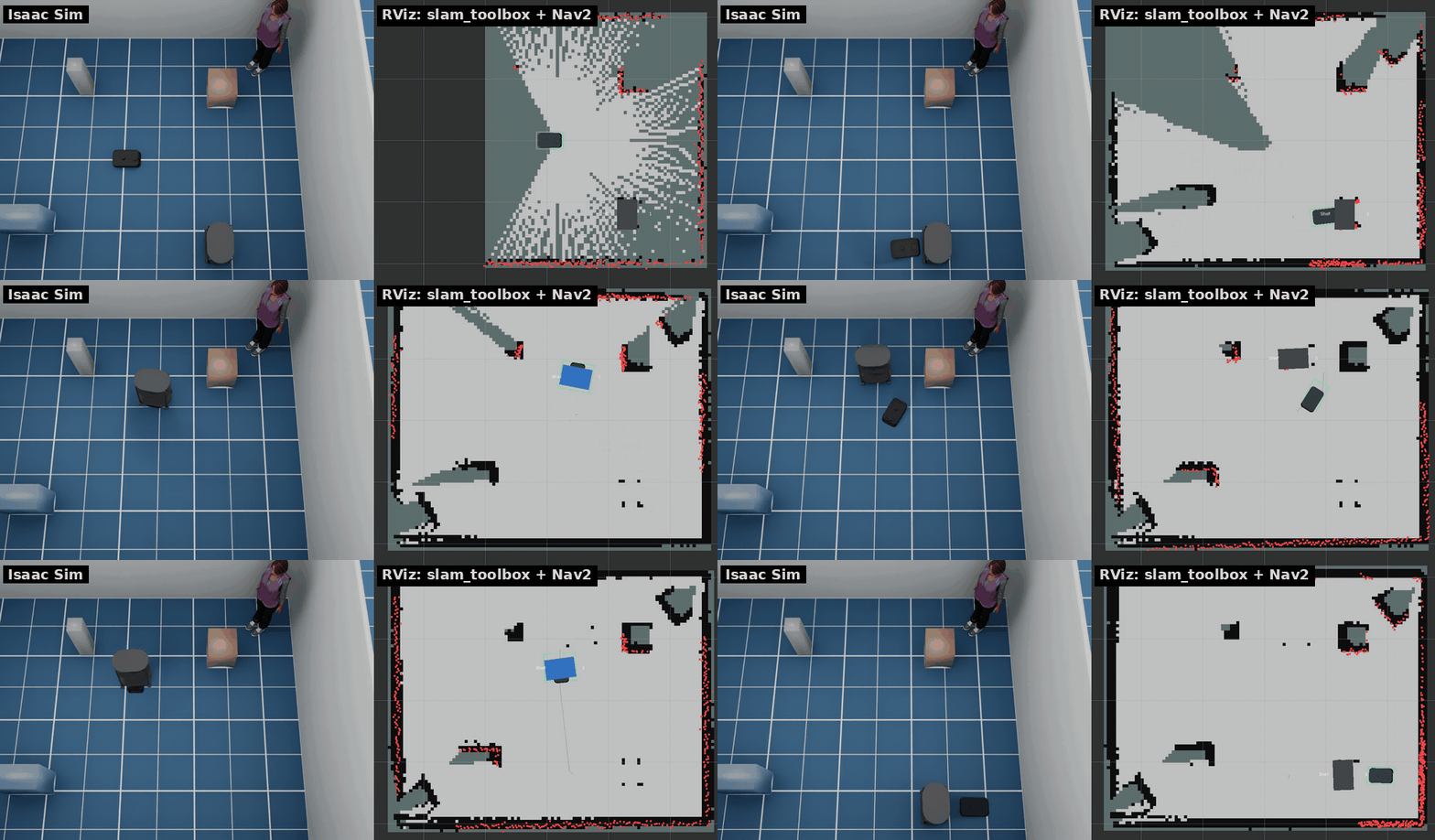
RETURN_SHELF from there: Nav2 plans around the parked shelf, which is in the costmaps as a whole (the LiDAR sees only its legs).
The room has one Kachaka Shelf (S01, home location S01_home) and one other
location (L01). The robot drives in under a shelf forward, raises its pin and
tows the shelf on its casters (≤ 0.5 m/s, see Speed limits).
Nav2's footprint grows to the shelf's while towing.
Undocking lowers the pin and drives forward out of the shelf; it fails if
something blocks the way.
ros2 action send_goal /kachaka/kachaka_command/execute kachaka_interfaces/action/ExecKachakaCommand \
    "{kachaka_command: {command_type: 1, move_shelf_command_target_shelf_id: S01,
      move_shelf_command_destination_location_id: L01, move_shelf_command_undock_on_destination: true}}"   # MOVE_SHELF_COMMAND
| Command | What it does |
|---|---|
| DOCK_SHELF | docks with the shelf in front of the robot (within 1.5 m) |
| UNDOCK_SHELF | puts the towed shelf down and drives out forward |
| MOVE_SHELF | docks with the shelf if needed, tows it to a location, optionally undocks |
| RETURN_SHELF | MOVE_SHELF to the shelf's home location, then undocks |
| RETURN_HOME | returns a towed shelf home first, then docks with the charger |
Shelves are listed on layout/shelves/list and their homes on
layout/locations/list. Place shelves with --shelf X Y YAW. The shelf lands
where SLAM puts the location, a few centimetres off the world.
robot_description is the robot alone, as on the real Kachaka; RViz draws the
shelves from /shelf_markers (MarkerArray, published by shelf_markers).
Speed limits
| Alone | Towing a shelf | |
|---|---|---|
Manual: manual_control/cmd_vel, set_robot_velocity |
0.3 m/s | 0.3 m/s (assumed) |
Autonomous: Nav2, kachaka-api commands (sim/autonomous/cmd_vel) |
0.8 m/s (est.) | 0.5 m/s (est.) |
| Turning (both) | 1.57 rad/s | 1.57 rad/s (Nav2: 0.98 rad/s) |
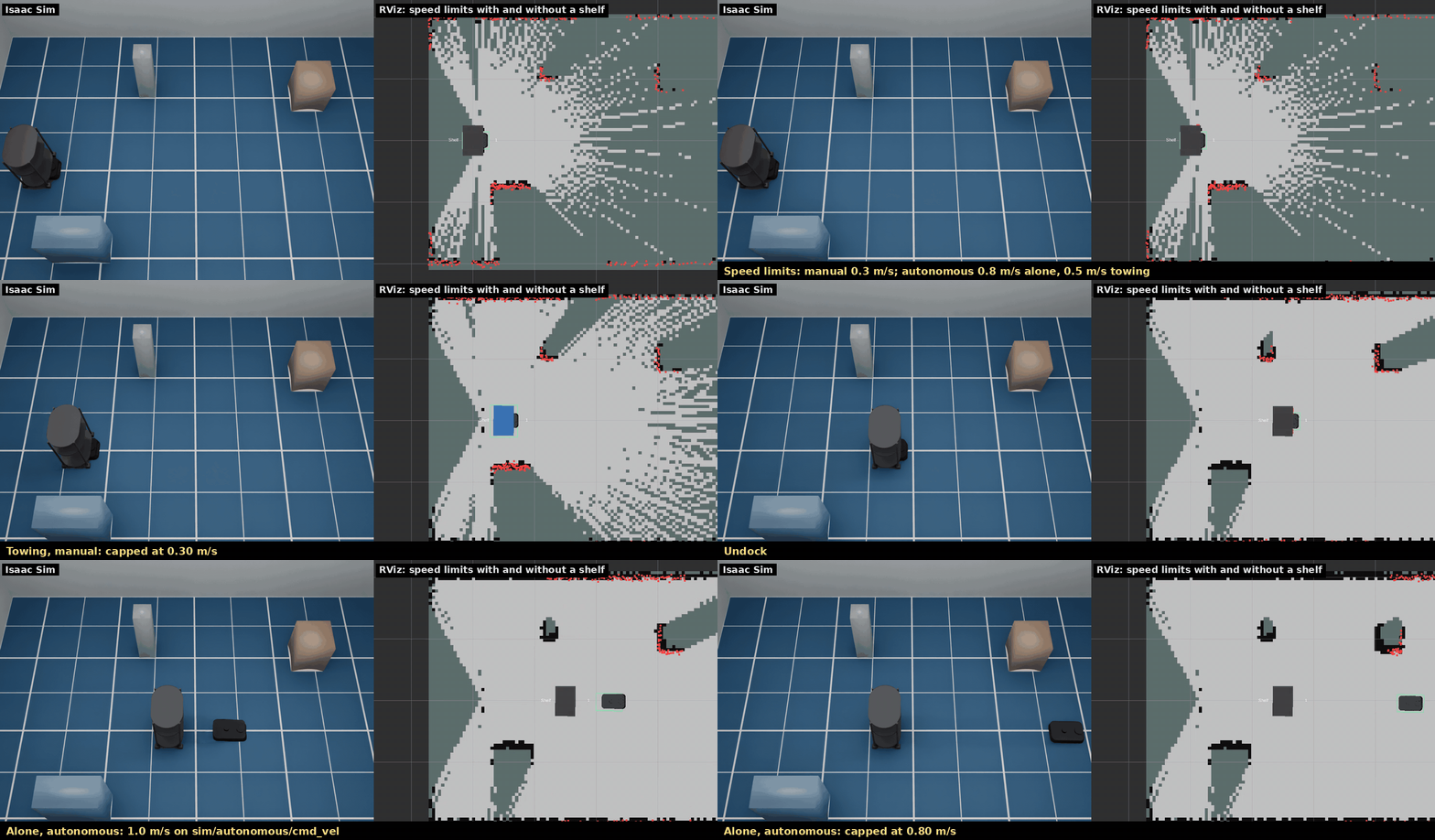
The real bridge scales manual cmd_vel to 0.3 m/s and 1.57 rad/s. The Kachaka spec gives a top speed of 0.8 m/s alone and 0.5 m/s with a shelf; the simulator uses these for autonomous motion until they are measured on a real robot (#4). Whether the real robot also lowers the manual cap while towing is not known, and the 0.5 m/s towing cap is above 0.3 m/s anyway.
Autonomous motion reaches the simulator on the simulator-only topic
sim/autonomous/cmd_vel: nav_bridge forwards Nav2's /cmd_vel there when
use_sim_time is true (to manual_control/cmd_vel for a real robot), and
command_server drives MOVE_FORWARD, ROTATE_IN_PLACE and the like on it.
Anything published on manual_control/cmd_vel stays at 0.3 m/s. While a shelf
is docked, command_server also sends Nav2's controller a 0.5 m/s
speed_limit (MPPI scales its turn rate with it, 1.57 → 0.98 rad/s) and
lifts it after undocking. The caps are drive.max_linear_vel,
drive.max_linear_vel_auto and drive.max_linear_vel_towing in
config/robot.yaml; tests/speed_limit_check.py measures them.
Object detection
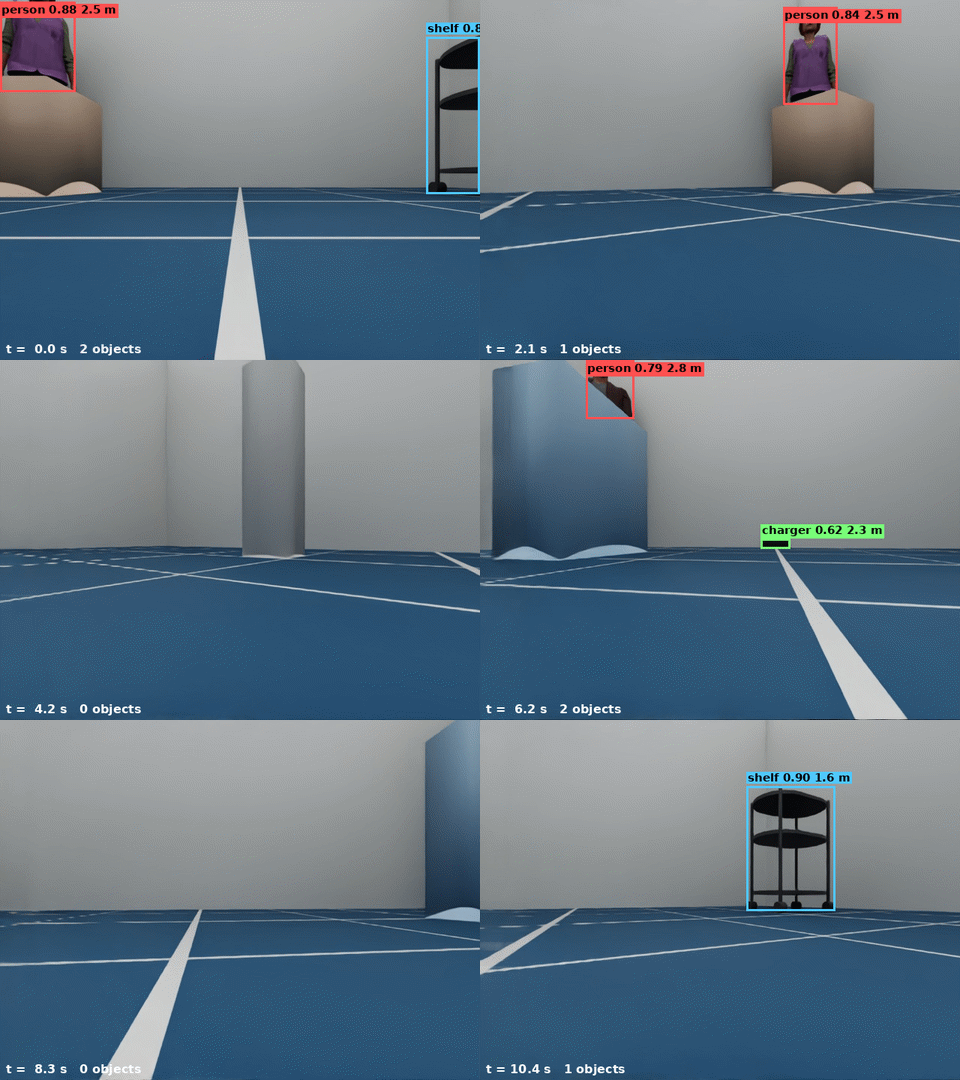
scripts/detection_demo.py: one turn in place, drawn from GetObjectDetection and the front camera image.
The real robot runs a detector network on the front camera. The simulator takes the objects from the renderer instead: every pixel's instance id and distance tell which person, shelf or charger it shows. An object is detected from its visible pixels only, so a box in front of a person cuts the person's bounding box, as it would for a real detector.
roi: box around the visible pixels, in front camera pixels (640×480), with ±2 px noise.distance_median: median distance of the visible pixels.score: grows with the visible area (0.5 at 150 px, 0.95 from 20000 px), with a little noise.- Nothing farther than 5 m or smaller than 150 px; 2 % of objects are missed in each frame.
- The results come with every front camera image (10 Hz) and carry its stamp.
The real detector's range, scores and miss rate are not published; these
numbers are guesses (object_detection in config/robot.yaml). Doors are
not detected.
GetObjectDetectionFeatures returns feature maps of each front camera image
in the shapes the robot's detector gives, which are the inputs of the
predictor.onnx that
kachaka-transfer-learning
trains: p4_out (1×96×14×25), p5_out (1×96×7×13) and p6_out (1×96×4×7).
The robot's network is not published, so they come from a different one:
torchvision's ImageNet MobileNetV3-Large on the image resized to 224×398, its
stride 16 and 32 blocks projected to 96 channels by a fixed random 1×1
convolution, and a stride-2 max pool for p6_out
(kachaka_isaac_sim/detection_features.py). The names are assumed from the
demo notebooks, which strip _out to get the ONNX inputs. A head trained on
the simulator's features works in the simulator, not on the robot, and the
other way round. The first call downloads the weights (22 MB) into the torch
hub cache; api.detection_features: false in config/robot.yaml turns the
features off (empty, as before).
The room has two people (people.room in config/robot.yaml): Isaac Sim's
bundled characters (people.characters, standing still with the arms down).
Without the asset server they are capsule mannequins. --person X Y YAW places
others and --no-people removes them. The Isaac Sim scenes have none by default.
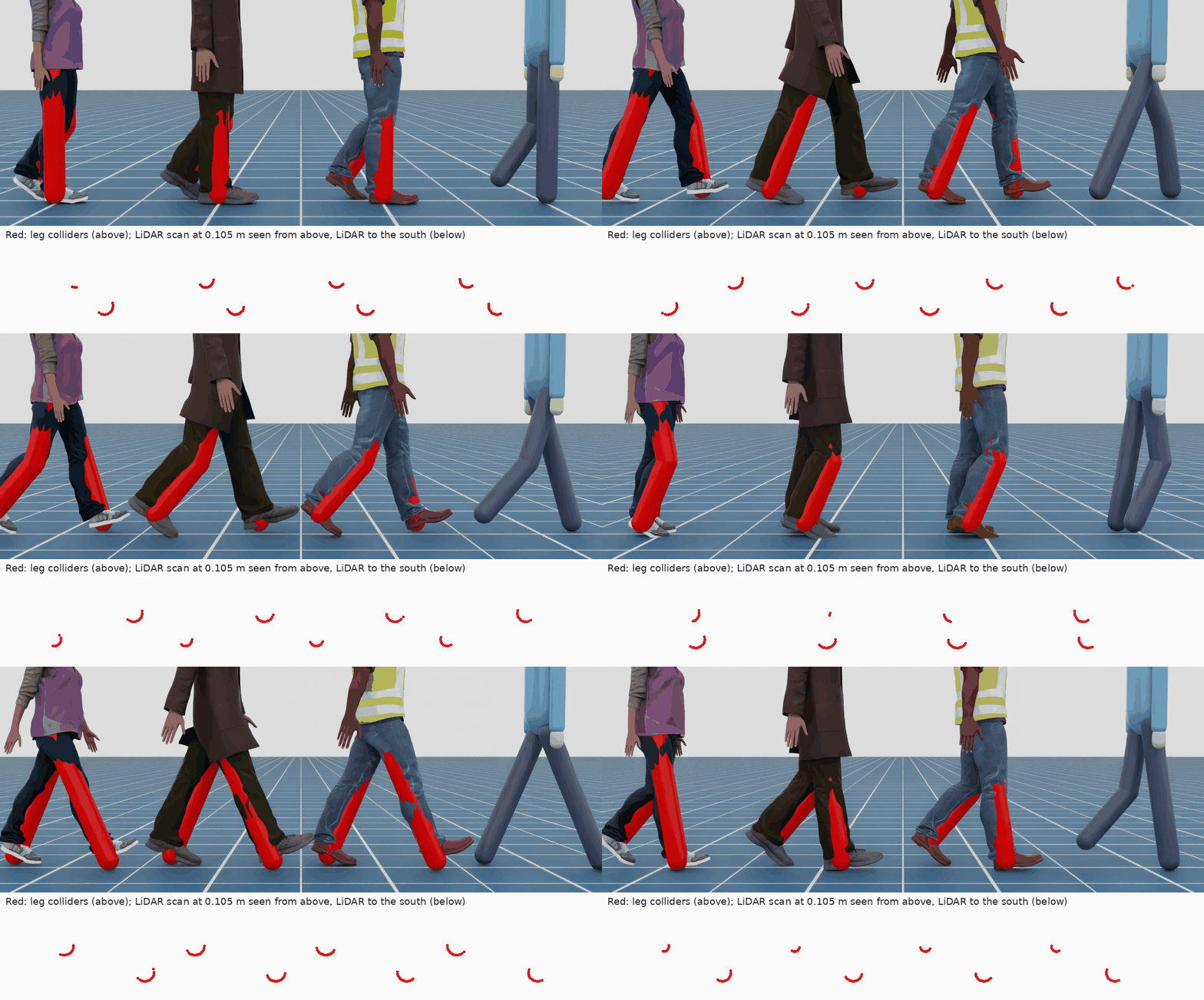
The LiDAR and Nav2 see a person by their colliders
(legs.py): a capsule for each thigh and shin,
0.13 m across (assumed), and an invisible box over the upper body from 0.75 m
up (0.28 × 0.5 m). The LiDAR scans 0.105 m above the floor, so a person shows as
two small arcs 0.2 m apart, the shins. A walking person's legs swing with the
gait: the arcs swap front and back, and a leg lifted in its swing drops out of
the scan for a moment. Sizes scale with people.height.
The results are on GetObjectDetection and on the real bridge's ROS 2 topic
/kachaka/object_detection/result (kachaka_interfaces/ObjectDetectionListStamped).
The simulator publishes JSON on sim/object_detection and
object_detection_relay in bridge.launch.py converts it.
Steps and collisions
The real Kachaka has two step sensors at the front. When one sees no floor, the robot stops, cancels its command and pauses with errors 21052 "Step detected" and 21051 "Kachaka is paused" until its power button is pressed. The simulator does the same:
- Two downward rays just ahead of the front casters (positions and range assumed,
cliffinconfig/robot.yaml) check the floor every physics step (120 Hz). - At a new drop the wheels stop at once, all commands are cancelled, velocity
commands are ignored and
GetErrorlists[21051, 21052]. New commands fail with 21051. - The power button is
sim/power_button(std_srvs/Trigger); kachaka-apiRestartRobotandsim/resetalso resume. While a sensor still looks over the edge, forward motion stays blocked; backing up and turning are allowed.
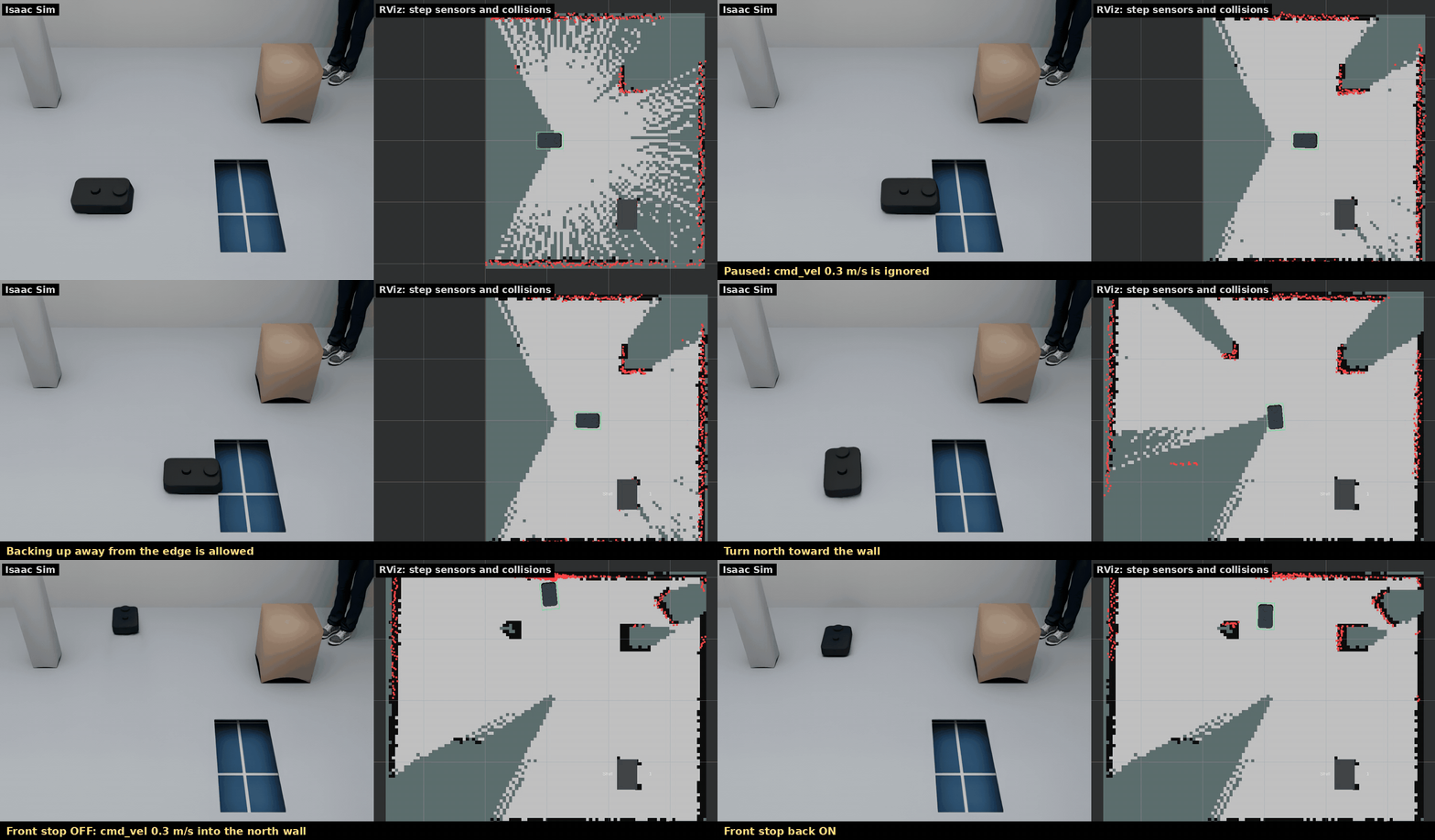
The built-in worlds are flat. --drop X Y SX SY cuts an SX × SY m hole centred
at (X, Y) into the floor, 0.15 m deep (drop.depth); repeat it for more:
scripts/run_sim.sh --drop 1.0 0.0 0.4 0.8   # a drop 0.8 m east of the spawn pose
ros2 topic echo /kachaka/sim/cliff          # {"enabled": true, "paused": true, "over": [true, true]}
ros2 topic echo /kachaka/sim/errors         # [21051, 21052]
ros2 service call /kachaka/sim/power_button std_srvs/srv/Trigger
No bumper is published for the real robot, so collisions do not stop it by
default: PhysX contact reports of the body (not the wheels or casters, nor the
floor) are counted, and each collision is published on sim/collision as
{"stamp", "count", "with", "pose"}, e.g. for scenario metrics. Contact with
the same object counts again after 0.5 s without contact. collision.stop: true
makes a collision stop the robot like a step, with the simulator error -18,
until the power button (assumed behaviour). sim/reset sets the count back to zero.