Over ssh (GPU machine: Ubuntu on the LAN; you: a Mac or similar)
Isaac Sim, Claude Code and agentic-sim-world-gen run on a GPU machine you reach over ssh (for example, Ubuntu + RTX on the LAN). On your own computer (a Mac or similar; no GPU needed) you only talk to Claude in an ssh terminal and view the preview in a browser. Nothing is installed on your computer (only ssh and a browser).
If you sit at the GPU machine, see Everything on one machine. The table in Getting Started "0. Where to run it" compares the two setups.
flowchart LR
subgraph local["Your computer (Mac or similar)"]
term["Terminal<br/>(ssh client)"]
browser["Browser"]
end
subgraph gpu["GPU machine over ssh (Ubuntu + RTX)"]
sshd["sshd :22"]
subgraph tmux["tmux"]
claude["claude (Claude Code)"]
end
subgraph mcp["agentic-sim-world-gen-mcp (child process of claude)"]
svc["Search, layout, USD output"]
preview["Preview HTTP server<br/>127.0.0.1:8765"]
end
isaac["Isaac Sim (headless)<br/>started and stopped for each check"]
files[("<workspace>/scenes/<name>")]
end
subgraph net["Internet"]
anthropic["Anthropic API"]
hf["SimReady Central / S3"]
end
term -- "ssh :22" --> sshd
sshd --> claude
browser -- "http://127.0.0.1:8765<br/>(through sshd with ssh -L)" --> preview
browser -- "thumbnails (HTTPS)" --> hf
claude -- "HTTPS" --> anthropic
claude -- "MCP (stdio)" --> svc
svc -- "child process" --> isaac
svc -- "search" --> hf
isaac -- "USD, textures" --> hf
svc --> files
preview --> files| Connection | Port | What goes over it |
|---|---|---|
| Your terminal → GPU machine | 22 (ssh) | Your instructions to claude inside tmux |
| Your browser → preview on the GPU machine | 8765, forwarded with ssh -L |
preview.html, the layout plan, check images. Listens only on the GPU machine's 127.0.0.1, not exposed to the LAN |
| Your browser → Hugging Face / S3 | 443 | Candidate thumbnails (the browser fetches URL thumbnails directly) |
The only inbound traffic the GPU machine needs is ssh.
1. Requirements
| Where | What you need |
|---|---|
| GPU machine | Ubuntu + RTX GPU and driver, Isaac Sim 6.1 (pip or standalone), Python 3.12 or later and uv, Claude Code (logged in), tmux. No display needed |
| Your computer | An ssh client and a browser |
2. Preparing the GPU machine
Below, replace <gpu-host> with the host you ssh to the GPU machine with (user@192.168.0.10 or a Host name in ~/.ssh/config).
- Install Isaac Sim 6.1 and agentic-sim-world-gen (same as steps 1 and 2 of Everything on one machine "2. Install").
- Set environment variables in
~/.profile, or at the top of~/.bashrc(before thecase $- inline that exits for non-interactive shells). If you put them at the end, they do not apply to non-interactive shells such asssh <gpu-host> 'command'.
export ISAACSIM_PYTHON=~/isaacsim_venv/bin/python   # python of the pip version's venv. Standalone version somewhere other than ~/isaacsim: ISAACSIM_PATH=<that folder>
export OMNI_KIT_ACCEPT_EULA=YES
- Create a workspace (outside the repository):
- Check it over ssh from your computer. If
out/study/check.pngis created, both headless rendering and the environment variables in non-interactive shells work.
ssh <gpu-host> 'cd agentic-sim-world-gen && .venv/bin/agentic-sim-world-gen resolve examples/p0_study_room.json -o out/study \
  && .venv/bin/agentic-sim-world-gen compose out/study/scene.resolved.json && .venv/bin/agentic-sim-world-gen check out/study'
3. Your first world
- From your computer, connect to the GPU machine with the preview port forwarded, and start Claude Code inside tmux:
ssh -L 8765:127.0.0.1:8765 <gpu-host>
tmux new -s agentic-sim-world-gen          # so Claude keeps working if the connection drops
cd ~/agentic-sim-world-gen-ws && claude
On the first run, approve the agentic-sim-world-gen MCP server from .mcp.json.
2. Ask:
Make a 10 m² study. A desk and a chair, and a bookshelf against the wall.
Japanese works too, e.g. 「6畳の書斎を作って。机と椅子、壁際に本棚」 (the same request).
- Preview: the GPU machine cannot open a browser, so Claude's reply shows the URL (
http://127.0.0.1:8765/<name>/preview.html) and thessh -Lsteps. Open that URL in your local browser. The page checks for updates once a second and changes every time a tool is called. If the port in the URL is not 8765 (see "5. Limitations and notes" below), redossh -Lwith that number (or addssh -N -L 8766:127.0.0.1:8766 <gpu-host>in another terminal). - check: Isaac Sim runs headless on the GPU machine (35–50 seconds per run). The results appear under "Isaac Sim check" in the preview. Once physics settles, 24 shots are taken from around the scene; drag or use the ← → keys to rotate them. This stands in for a 3D view.
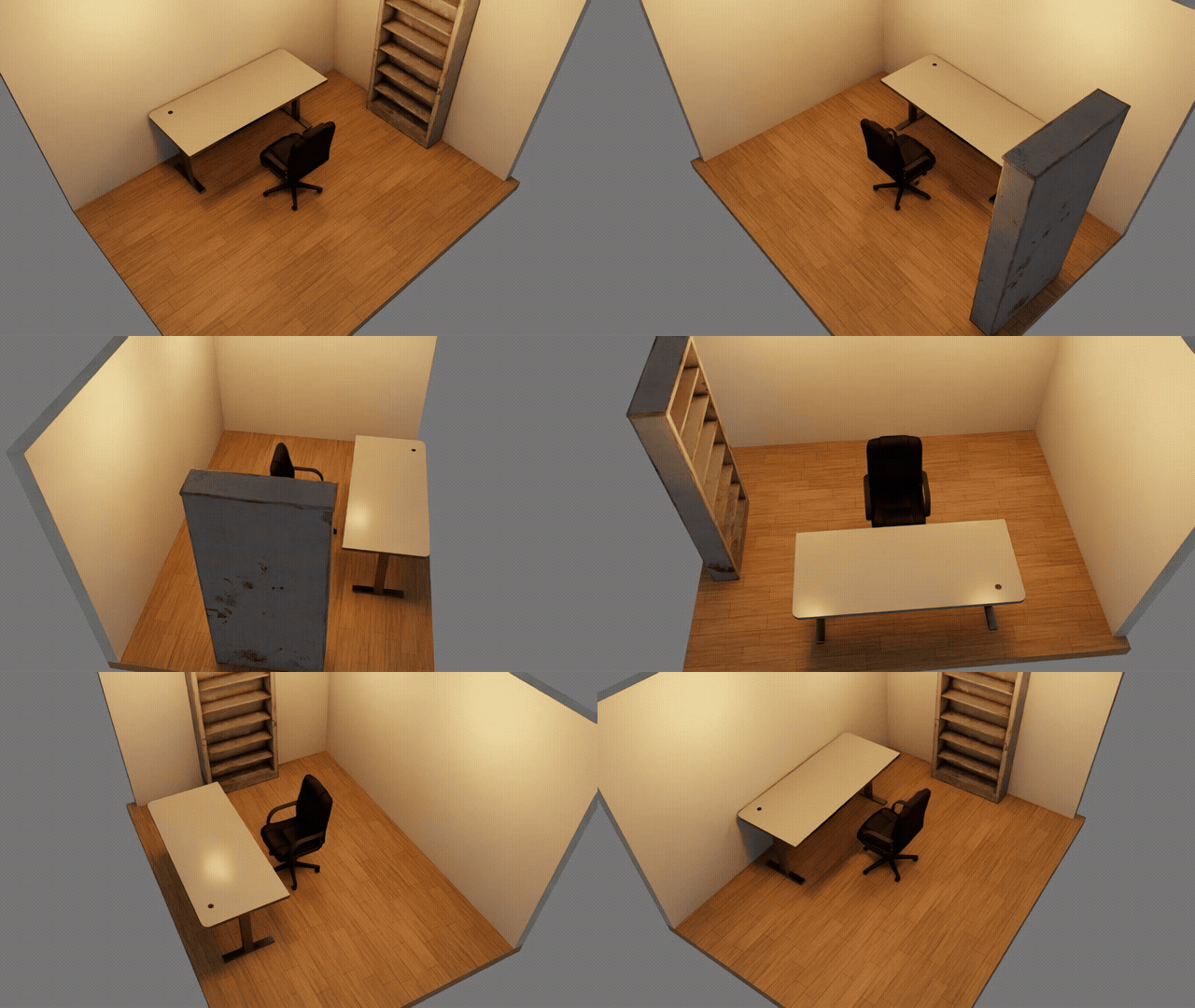
- Open the result: open Isaac Sim on the GPU machine's display, or bring the scene to your computer (next section).
4. Passing inputs and fetching results
When building a room from photos, Claude crops the photos and reads pixel positions. It cannot read paths on your computer, so put photos and drawings on the GPU machine first and give Claude that path.
# Photos and drawings to the GPU machine (give Claude that path)
scp -r ~/photos/living <gpu-host>:~/agentic_sim_world_gen_inputs/living
# The finished scene to your computer. To open it in a local Isaac Sim, first re-export it with the assets bundled
ssh <gpu-host> 'cd agentic-sim-world-gen && .venv/bin/agentic-sim-world-gen compose ~/agentic-sim-world-gen-ws/scenes/study/scene.resolved.json --localize'
rsync -av <gpu-host>:~/agentic-sim-world-gen-ws/scenes/study ./
For the re-export, you can also ask Claude to "re-export the USD with local references" (MCP compose_scene(localize=true)).
A scene.usda without --localize references assets by URL, so it opens anywhere with a network connection.
5. Limitations and notes
- Live mode (running the check in an open Isaac Sim window) is not used. You would have to be at the GPU machine's display to see it, so check with the headless check and the rotatable images in the preview.
If you ask for it, the check switches to headless and continues (
live_fallbackin the report). If you also work at the GPU machine, use the Everything on one machine setup. - If ssh drops, you lose the preview too, but Claude inside tmux keeps running. Reconnect with
ssh -L …and runtmux attach -t agentic-sim-world-gen. - The preview server runs inside the Claude Code session. It stops when you quit
claude, so after restarting, ask to "open the preview". - The preview port is 8765 by default. If it is in use (by Claude in another workspace, for example), the server uses the number that folder used last time (recorded in
~/.cache/agentic-sim-world-gen/preview_ports.json), and if that is also in use, the next free number. With a single workspace it is 8765 every time, so the samessh -Lalways works. If you use several workspaces at once, forward each number withssh -L. To fix a number per folder, write it into.mcp.json, likeagentic-sim-world-gen workspace … --env AGENTIC_SIM_WORLD_GEN_PREVIEW=127.0.0.1:8766.
6. Troubleshooting
| Symptom | Fix |
|---|---|
| The browser says it cannot connect | Does the ssh -L port match the URL in the reply? Is ssh still connected? Is claude running? |
| The preview does not update | If updates at the top of the page have stopped, ssh or claude has stopped. Reconnect and ask to "open the preview" |
Address already in use (on ssh -L) |
The port is in use on your computer (by another forward, for example). Change only the local number: ssh -L 9765:127.0.0.1:8765 <gpu-host>, then open http://127.0.0.1:9765/… |
Isaac Sim not found / stuck |
Are ISAACSIM_PYTHON (or ISAACSIM_PATH) and OMNI_KIT_ACCEPT_EULA=YES set in the shell that started claude? (echo $ISAACSIM_PYTHON) |
| A browser opened on the GPU machine's display | You started it from a shell that inherited DISPLAY (ssh -X, etc.). Run unset DISPLAY, then claude |
| Screenshots are all black | Does nvidia-smi see the GPU? Does the driver support RTX rendering? |
| Other symptoms | Getting Started "9. Troubleshooting" |