Getting Started
From git clone to opening your first world in Isaac Sim (about 15 minutes, not counting the Isaac Sim install).
0. Where to run it
In both setups, Isaac Sim, Claude Code and agentic-sim-world-gen are installed on the GPU machine (Ubuntu + RTX). The difference is whether you work on the GPU machine's own screen and keyboard or over ssh from another PC.
flowchart LR
  q1{"An Ubuntu + RTX<br/>GPU machine?"} -- "No" --> nogpu["Search, preview, USD only<br/>(no check)"]
  q1 -- "Yes" --> q2{"Where do you<br/>work from?"}
  q2 -- "its own screen<br/>and keyboard" --> local["1. All local<br/>live check too"]
q2 -- "another PC<br/>over ssh" --> ssh["2. Over ssh<br/>ssh and a browser locally"]| Setup | GPU machine | What you see locally | Live mode | Guide |
|---|---|---|---|---|
| 1. All local | Your own Ubuntu + RTX machine (with a display) | The Isaac Sim window, the preview, the terminal | Available | use-local.md |
| 2. Over ssh | An Ubuntu + RTX machine on the LAN, etc. (no display needed) | The ssh terminal and the preview in a browser (ssh -L) |
Not available (headless) | use-ssh.md |
The sections below apply to both setups (install, environment variables, workflow, output).
1. Requirements
| What you need | Used for |
|---|---|
Ubuntu + RTX GPU, Isaac Sim 6.1 (tested with the pip version; the standalone python.sh is untested) |
Physics checks, screenshots, photo comparison, synthetic data |
| Python 3.12 or later, uv | agentic-sim-world-gen itself (search, preview, USD output) |
| Claude Code | Building scenes from natural-language instructions (MCP server + skill) |
ffmpeg (optional; Ubuntu apt install ffmpeg, Mac brew install ffmpeg) |
Recording the physics check as a GIF (check --gif) |
On a Mac or PC without a GPU you can still search, preview and write USD. Only the operations that need Isaac Sim fail, with "Isaac Sim not found".
2. Install
git clone https://github.com/atinfinity/agentic-sim-world-gen.git
cd agentic-sim-world-gen
uv sync --extra usd --extra hf --extra mcp --extra dev   # for floor plans add --extra dxf --extra ifc
source .venv/bin/activate
uv sync creates .venv with the versions in uv.lock and installs this repository in editable mode (uv picks a Python that fits requires-python, 3.12 or later).
To add an extra later, run uv sync again with every --extra you use (extras you leave out are removed from .venv).
Install usd-core only into .venv. Do not pip install anything into Isaac Sim's Python (python.sh or the pip version's venv).
Isaac Sim ships its own pxr, and mixing the two breaks it.
3. Environment variables
| Variable | Default | Description |
|---|---|---|
ISAACSIM_PATH |
~/isaacsim |
Folder of the standalone Isaac Sim (untested), where python.sh lives |
ISAACSIM_PYTHON |
none | Python of the pip-version Isaac Sim venv (takes priority over ISAACSIM_PATH when set) |
OMNI_KIT_ACCEPT_EULA |
none | YES accepts the NVIDIA Omniverse EULA (required to run Isaac Sim non-interactively) |
AGENTIC_SIM_WORLD_GEN_OUT |
~/agentic_sim_world_gen_scenes |
Where scenes made through MCP (Claude Code) are saved |
AGENTIC_SIM_WORLD_GEN_EXAMPLES |
examples/ in the repository |
Folder of SceneSpecs shown in the example gallery (show_gallery) |
AGENTIC_SIM_WORLD_GEN_SOURCES |
simready-central,isaac,polyhaven |
Asset sources. +local:/data/usd adds your own folder to the defaults (a list without + replaces the defaults; default means the 3 defaults). polyhaven (Poly Haven CC0 models) is fetched only when used |
AGENTIC_SIM_WORLD_GEN_POLYHAVEN_INDEX |
bundled index | Replacement for the Poly Haven model index (rebuild with scripts/build_polyhaven_models_index.py) |
AGENTIC_SIM_WORLD_GEN_MDL |
1 |
0 stops using Isaac Sim's bundled MDL for floor, wall and ceiling materials (CC0 PBR or plain colors only). Use it together with removing isaac from AGENTIC_SIM_WORLD_GEN_SOURCES when rendering images that must not show bundled assets |
ISAAC_ASSETS_ROOT |
public S3 | Root of the Isaac Sim bundled assets if you keep them locally or on Nucleus (the parent of Isaac/) |
AGENTIC_SIM_WORLD_GEN_ISAAC_LIVE |
127.0.0.1:8226 |
Address for live check (use-local.md "Live mode") |
AGENTIC_SIM_WORLD_GEN_PREVIEW |
127.0.0.1:8765 |
HTTP server for the preview. If the port is in use, it takes the port the same output folder used last time, and if that is in use too, the next free one (remembered in ~/.cache/agentic-sim-world-gen/preview_ports.json, so an ssh tunnel does not have to be set up again) |
AGENTIC_SIM_WORLD_GEN_BROWSER |
xdg-open / open |
Command that opens the preview (e.g. chromium --app={url}). In a shell without a display it does not open anything and returns the URL |
Example (pip version):
4. Your first world with Claude Code
Create a workspace folder and start Claude Code in it:
workspace creates these in the folder: .mcp.json (the agentic-sim-world-gen MCP server), the world-gen skill (a link into the repository),
a short CLAUDE.md, a hook that keeps the reply language after the conversation is compacted, and hooks that check the notes and the final report were written in the user's language. Scenes go to ~/agentic-sim-world-gen-ws/scenes.
.mcp.json sets AGENTIC_SIM_WORLD_GEN_ISAAC_WORKER=1: Isaac Sim stays up, so check and compare_photo are faster from the second call on (compare_photo about 90 → 70 s). While waiting it holds several GB of GPU memory (it is stopped by itself before MoGe's monocular depth runs). To turn it off: --env AGENTIC_SIM_WORLD_GEN_ISAAC_WORKER=0 (the value in .mcp.json wins, so a shell variable does not turn it off).
Create the workspace outside the repository (creating it inside is an error). Starting claude inside the repository also works,
but then it reads the development CLAUDE.md on every turn: that costs more and the conversation gets compacted sooner.
Options of workspace:
| Option | |
|---|---|
--out <dir> |
where scenes are saved (or AGENTIC_SIM_WORLD_GEN_OUT) |
--env NAME=value |
environment variables for the MCP server, e.g. --env AGENTIC_SIM_WORLD_GEN_SOURCES=simready-central,isaac,local:/path. Claude Code's own environment is passed through too |
--allow-tools |
skip the permission prompts for agentic-sim-world-gen tools |
--model sonnet |
the Claude Code model for this folder (for building with a cheaper model; output quality has not been compared yet) |
--copy-skill |
copy the skill instead of linking it (a link is updated by git pull) |
--force |
replace files whose contents differ |
On first start, approve the agentic-sim-world-gen MCP server in .mcp.json (the world-gen skill loads automatically). Then just ask:
Make a 10 m² study. A desk and a chair, and a bookshelf against the wall.
Japanese works too, e.g. 「6畳の書斎を作って。机と椅子、壁際に本棚」 (the same request).
Claude goes through these steps (answer its questions if it asks; 2–3 minutes, about $1 in API cost per run).
In short: create_scene builds the draft (steps 1–5 below) in one call and shows it, and once you say it is fine, finish does the finishing (steps 5–7) in one call:
flowchart TD
  ask(["Ask"]) --> cs
  subgraph cs["create_scene (1-5)"]
    direction LR
    a1["Fill in defaults"] --> a2["Search assets"] --> a3["Lay out, check"] --> a4["Render a draft"]
  end
  cs --> look{"Anything<br/>to change?"}
  look -- "Yes: ask in words or move things in the preview" --> cs
  look -- "Looks good" --> fin
  subgraph fin["finish (5-7)"]
    direction LR
    f1["Write the USD"] --> f2["Physics check in Isaac Sim<br/>(fix what fell, check again)"] --> f3["Check against the request<br/>licenses"]
  end
fin --> done(["scene.usda, LICENSES.md"])- Anything not in the request (size, floor, lighting, etc.) gets a default; it does not ask up front (
plan_questions) - Turns the room and furniture into a SceneSpec and searches assets with English queries plus synonyms (
create_scene). The preview also opens in the browser here - Looks at candidate thumbnails and picks (
view_candidates). If nothing fits, it substitutes something close and says so - Places objects by relation (against the wall, in front of the desk, etc.). Checks overlaps and out-of-bounds
- Writes the USD (
compose_scene), shows a draft rendered without physics, and asks what is wrong (draftofcheck_in_isaac). Say "go all the way to the end" and it does not stop - Physics check and screenshots in Isaac Sim (
check_in_isaac). If anything fell over or sank, it fixes it and checks again - Verifies each item of the request (
check_request) and collects the licenses of the assets used (license_report→ LICENSES.md)
You can keep refining with requests like "move the bookshelf to the wall opposite the window" or "swap the chair for a black one".
The scene is created in $AGENTIC_SIM_WORLD_GEN_OUT/<name>/ (scenes/<name>/ if you started from a workspace).
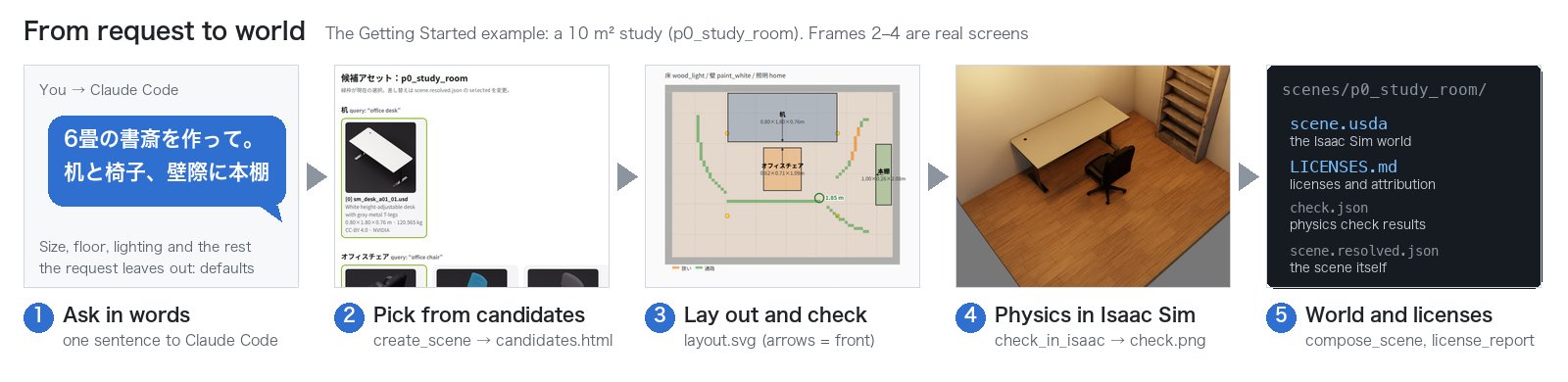
The flow of this example (②–④ are real screens; each is explained under "What the preview shows" below):
What the preview shows
Keep the preview (preview.html; MCP open_preview, CLI agentic-sim-world-gen preview <scene> --open) open in a browser while you work.
It updates in place on every change (no reload, so no flicker).
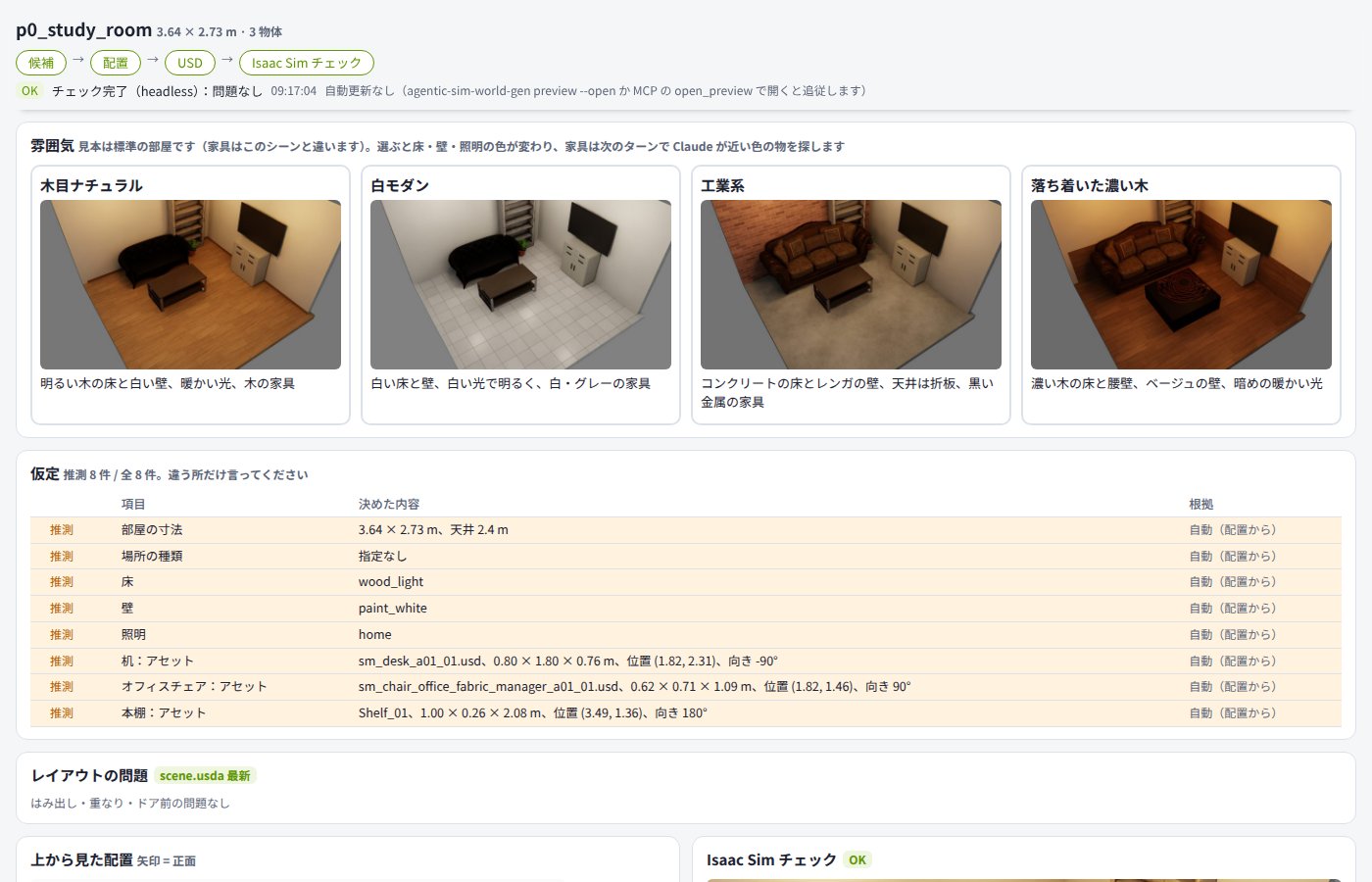
(After asking Claude Code「6畳の書斎を作って。机と椅子、壁際に本棚を置いて」 (make a 10 m² study; a desk and a chair, and put a bookshelf against the wall) and finishing the Isaac Sim check. The "Match against the request", "Mood" and "Assumptions" sections at the top of the page are omitted.)
The preview UI is in Japanese; the Japanese labels are given in parentheses.
| Part of the page | What it shows |
|---|---|
| Asset candidates | One row per object: selected thumbnail, asset name, license badge, badges for substitutions and placement problems. Only the object being worked on is expanded. "Needs review only" (要確認のみ) filters to objects with a substitution, unknown license, non-commercial license or placement problem |
| Change history (変更履歴) | The operations done on this scene (newest first, up to 200). "Undo" (取り消す) in the header goes back one version, and "Return here" (ここに戻す) on a row goes back to that version (up to the last 30 versions). Each operation notes what changed and how (asset, position and orientation, room size, floor/wall/lighting, number of placement problems) in Japanese. Objects that moved along because of a relation (such as the chair in front of the desk) are listed too. The changes from the latest operation also appear at the top of the page |
| Top-down layout and 3D draft | Drag objects to move them, pick candidates. Double-click to leave Claude a note about that spot (such as "put a trash can here") |
| check result | An "OK" (green) / "Needs fix" (要修正, red) badge |
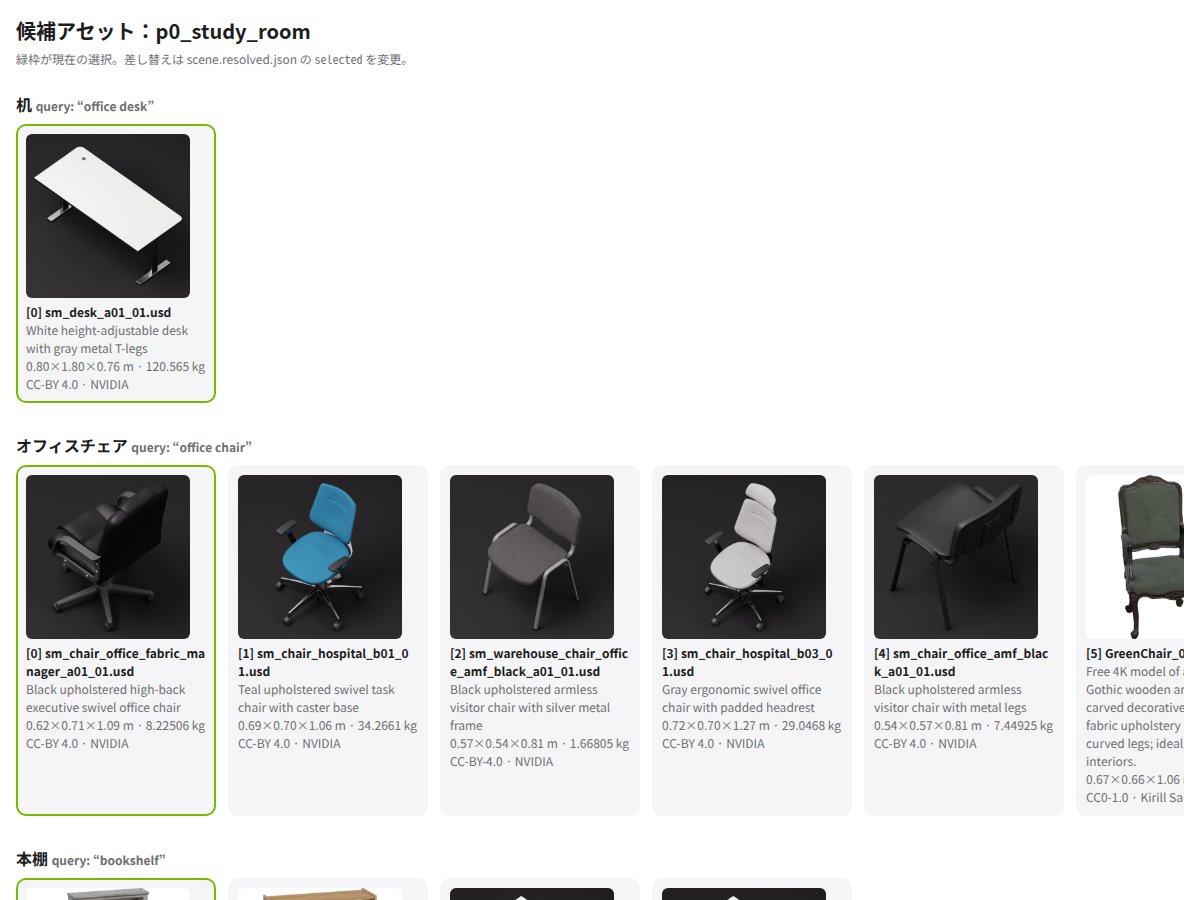
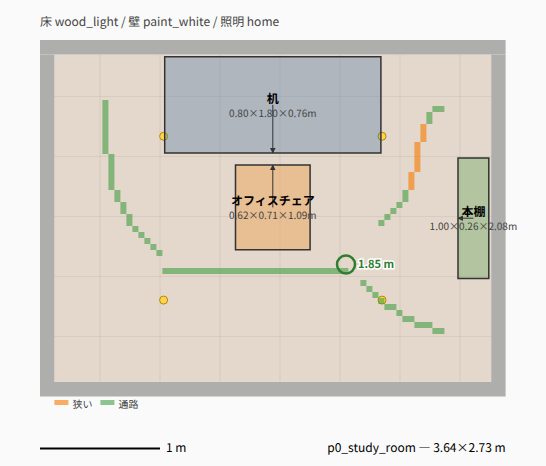
The same folder also gets the candidate list and the top-down layout as standalone files:
| candidates.html (candidate list; green frame = selected) | layout.svg (top-down layout; arrows show the front) |
|---|---|
 |
 |
The Isaac Sim check photographs the room after physics settles into check.png:
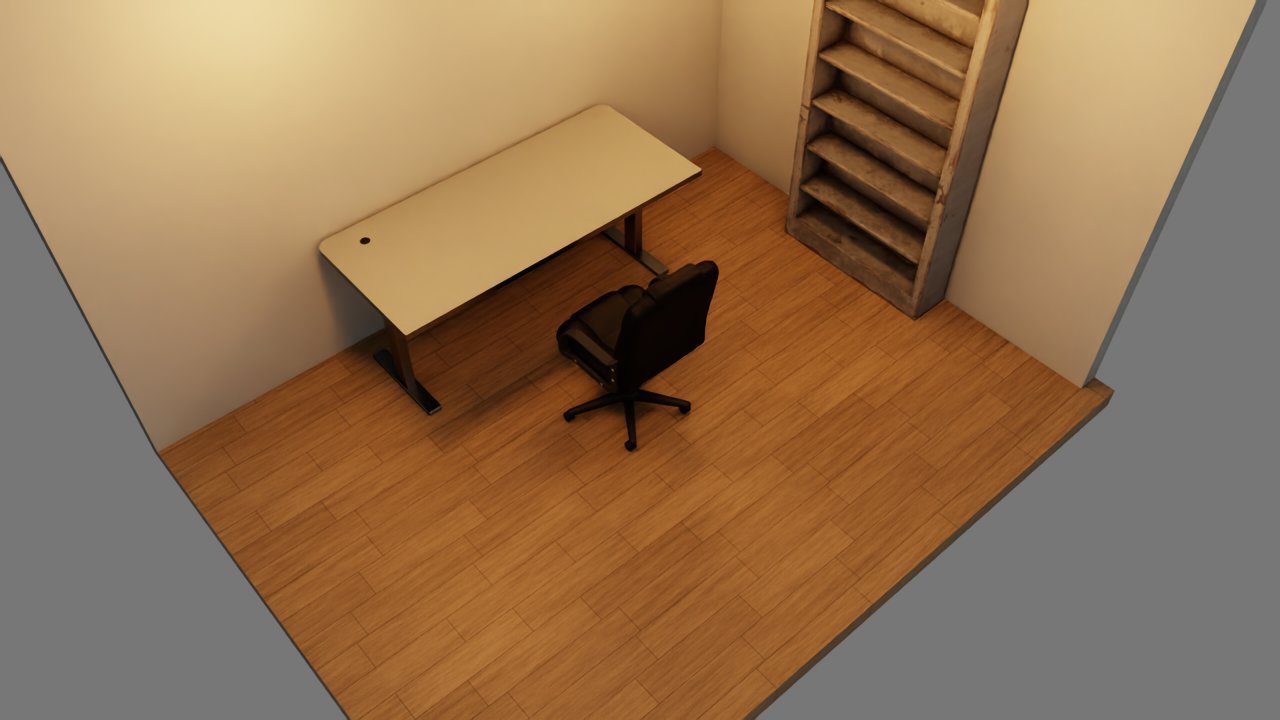
It also photographs the room from 24 directions around it (check_orbit/; adds about 6 seconds; orbit=0 / --orbit 0 skips it).
On the preview page you can rotate this view by dragging (or with the ← → keys):
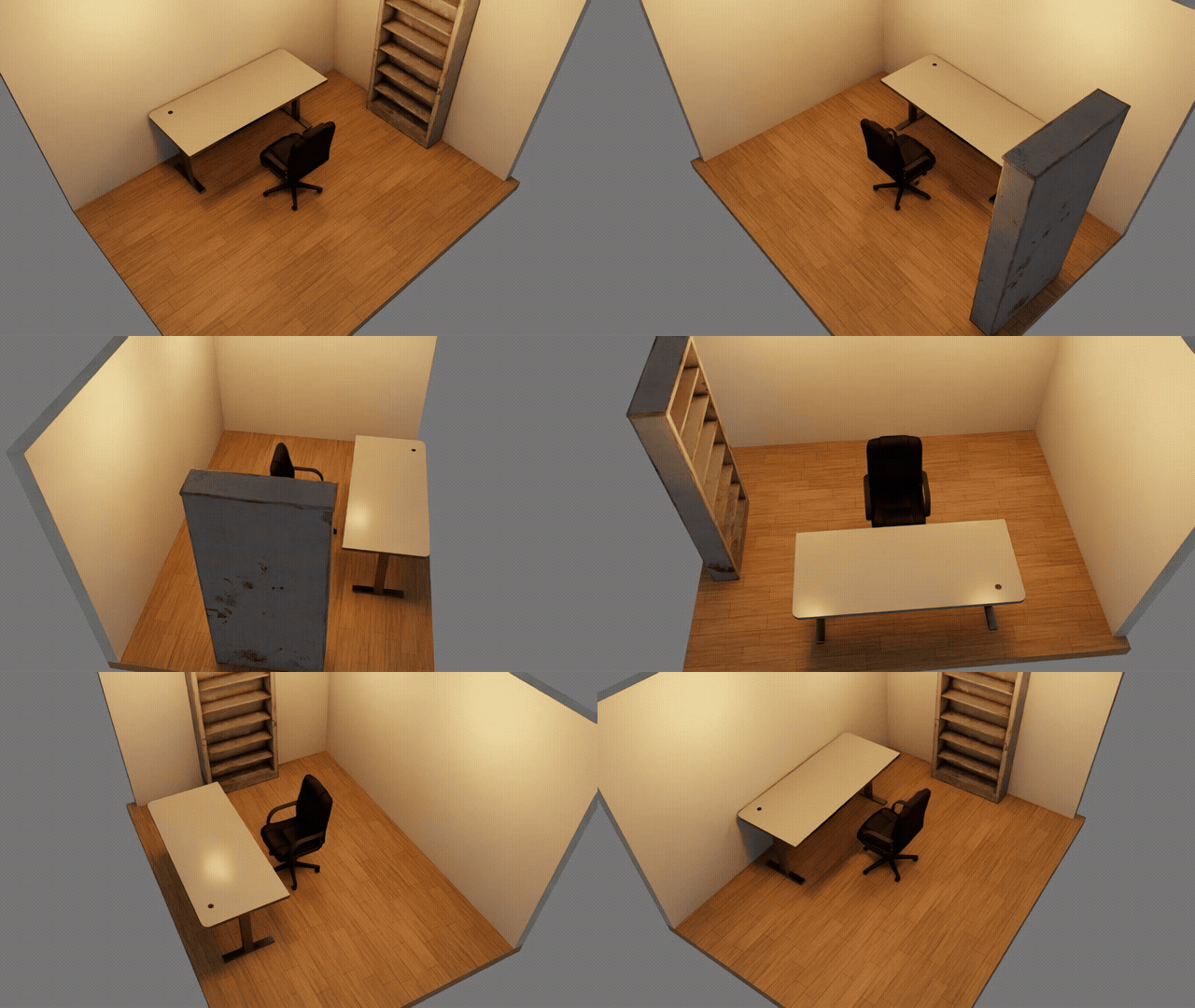
How to open the finished world in Isaac Sim, and "live mode", which runs check in the Isaac Sim window you already have open, are in use-local.md.
How to open the preview over ssh (ssh -L) is in use-ssh.md.
5. The same from the CLI
You can call the same processing without Claude Code by writing the SceneSpec (JSON) yourself. The commands and the files they write:
flowchart LR
  spec["SceneSpec<br/>examples/*.json"] -- "resolve" --> r["scene.resolved.json<br/>candidates.html<br/>layout.svg"]
  r -- "compose" --> u["scene.usda"]
  u -- "check" --> c["check.json, check.png<br/>check_orbit/"]
  r -- "licenses" --> l["LICENSES.md"]
  r -. "edit, then preview" .-> r
agentic-sim-world-gen search "office chair" --limit 5 # search only
agentic-sim-world-gen resolve examples/p0_study_room.json -o out/study
# out/study/scene.resolved.json scene with candidates (selected and position are editable)
# out/study/candidates.html candidate list
# out/study/layout.svg layout drawing
agentic-sim-world-gen preview out/study/scene.resolved.json # rebuild the preview after editing
agentic-sim-world-gen preview out/study --open # open preview.html in the browser; auto-updates on every change (--serve gives only the URL, no browser)
agentic-sim-world-gen compose out/study/scene.resolved.json # -> out/study/scene.usda
agentic-sim-world-gen check out/study # physics + screenshots in headless Isaac Sim (about 35 seconds)
agentic-sim-world-gen licenses out/study # -> out/study/LICENSES.md
agentic-sim-world-gen finish out/study # compose (if stale), check, match against the request and licenses in one go (same as MCP finish)
Examples of scene files are in examples/. Their format, and calling the Isaac Sim check script directly, are in
Contributing.
6. Other inputs
Besides text, you can build from floor plans and photos.
| Input | Example | Details |
|---|---|---|
| Floor plan (JSON / DXF / IFC) | agentic-sim-world-gen plan examples/plans/1ldk.json -o out/1ldk_plan into plan.json, then set it as room.plan_file. To Claude: "Use the floor plan in examples/plans/1ldk.json, with a sofa in the LDK and a low table in the Japanese-style room" (the Japanese-style room gets a tatami floor, the washroom a tile floor) |
Data, src/agentic_sim_world_gen/scene/plan.py |
| Floor plan (image / PDF) | Give Claude the image; it traces it into JSON (units in px, plus the image as an underlay) | plans.md in the skill |
| Photos | "Make the room in examples/photos/living_room.jpg". The source is in the neighboring <stem>.source.json. agentic-sim-world-gen photo <scene> shows it side by side with a render from the same viewpoint |
photos.md in the skill |
| Depth for photos | Create the venv from "Monocular depth" below, then run agentic-sim-world-gen fit-photos req.json --depth (photos in image). Room dimensions are easier to pin down |
Monocular depth below |
Other features
| Feature | Example | Details |
|---|---|---|
| Repeated placement | agentic-sim-world-gen resolve examples/warehouse_racks.json -o out/racks (rows of racks + aisles) |
Layout (set_array) |
| Outdoor | agentic-sim-world-gen resolve examples/outdoor_yard.json -o out/yard (road, sidewalk, buildings, sky) |
Data |
| See missing assets, most frequent first | agentic-sim-world-gen missing (substitutions, objects with no candidates, skipped small items, objects removed for want of an asset and assets only reported, across all scenes made on this machine) |
Asset search |
| Search the missing ones again after adding assets | agentic-sim-world-gen missing --recheck (searches every query with the sources of now and moves what it finds to a separate list) |
Asset search |
| Your own USD folder | AGENTIC_SIM_WORLD_GEN_SOURCES=+local:/data/usd; list its contents with agentic-sim-world-gen index /data/usd --list |
Asset search |
| Floor, walls, lighting | room.floor: "wood_light", room.lighting: "office", etc. (plain words such as "wood flooring, night lighting" work too) |
Composing the USD |
| Synthetic data | agentic-sim-world-gen sdg out/study --frames 24 --coco → RGB, bbox, segmentation, depth |
The Isaac Sim side |
Monocular depth (optional)
fit_photos(depth=true) estimates depth for each photo with MoGe-2 (MIT, 141 MB). MoGe has heavy dependencies, so install it in a venv separate from agentic-sim-world-gen:
python -m venv ~/.venvs/moge && ~/.venvs/moge/bin/pip install torch torchvision pillow numpy scipy \
    opencv-python-headless huggingface-hub click
~/.venvs/moge/bin/pip install --no-deps "git+https://github.com/microsoft/MoGe.git@74fbce054ebed49800de42d0ad0e83495065719a" \
    "git+https://github.com/EasternJournalist/utils3d-moge.git@62f09d58509485564e24d5d9f6aac9ee9ebc0c37" \
    "git+https://github.com/EasternJournalist/pipeline.git@1c511390d90226c00c101f34b84df26a0f8789b4"
export AGENTIC_SIM_WORLD_GEN_DEPTH_PYTHON=~/.venvs/moge/bin/python
AGENTIC_SIM_WORLD_GEN_DEPTH_DOWNLOAD=1 agentic-sim-world-gen fit-photos req.json --depth   # downloads the model the first time only
The same steps are at the top of scripts/depth/moge_depth.py. Depth is saved next to each photo as <stem>.depth.npz, so the model does not run again on later runs.
AGENTIC_SIM_WORLD_GEN_DEPTH_MODEL selects a different MoGe-2 model.
7. Output
<scene>/
  scene.resolved.json   the scene itself (SceneSpec + candidates + selections + computed positions). Edit and reuse this
  candidates.html       candidate asset list
  layout.svg            top-down layout drawing
  scene.usda            world for Isaac Sim (assets referenced by URL; --localize copies them locally)
  check.json / .png     physics check report and screenshot (.gif when gif=true)
  check_orbit/NN.jpg    images taken around the room (drag to rotate in the preview)
  LICENSES.md           licenses and attributions for the assets, input photos and sky (HDRI) used, and for photos and fonts used in asset textures
  plan.json / plan.svg  when a floor plan was loaded
  sdg/                  synthetic data
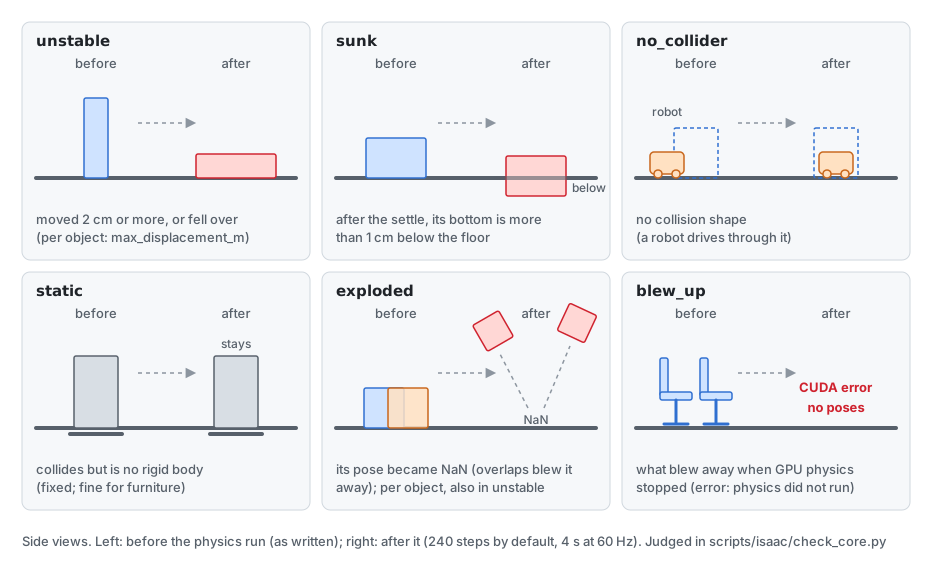
Main fields of check.json: unstable (moved or fell over), sunk (sank into the floor), no_collider (no collision shape),
static (fixed objects that do not move; fine for furniture), and per object max_displacement_m and moved_body.
For objects with no_collider, set_collider (box) adds an invisible box collider the same size as the asset (the object becomes a fixed, static object).
SimReady assets known to have no physics (such as Vertiv racks) get one from the start.
What is returned to Claude (MCP) or by agentic-sim-world-gen check is a summary: counts and maximum displacement per object ID, plus details only for problem objects (a few thousand characters even with many objects).
What each item means (exploded is per object; blew_up appears only when "physics did not run"):
8. Licenses
The source, author and license are recorded in each asset's customData agentic_sim_world_gen:license in the USD and in LICENSES.md.
SimReady Central / SimReady (bundled with Isaac Sim) are mostly CC BY 4.0 (attribution required). Props, Environments and skies bundled with Isaac Sim are
NVIDIA-Isaac-Sim (they follow the Isaac Sim license; take care with redistribution).
If an asset folder's asset.json has image_credits (photos or fonts used in textures), each one is listed in the
"Material used in the assets" section of LICENSES.md, next to the name of the object that uses it (e.g. Noto Sans JP, SIL Open Font License 1.1).
Where each asset came from, and which version, is also recorded in a form that lets you identify the same asset later (the "Sources" section of LICENSES.md, "License and source" in the preview,
and the USD customData agentic_sim_world_gen:origin). What is recorded depends on the source:
- SimReady Central: the Hugging Face commit (included in the URL) and the path inside the dataset
- Bundled with Isaac Sim: the release (e.g. 6.1) and the path. Files may be replaced within a release, so it is shown as "per release"
- Your own folder (
local:): the asset's own version (versioninasset.json, or elseassetInfo.versionin the USD; e.g. v1.3.0), the git remote, the last commit that changed the asset's folder, and the file's SHA-256. If the folder has uncommitted changes, it warns "uncommitted changes" (the same files cannot be fetched again). Outside git, only the version and SHA-256
Before sharing, check the "Warnings" in LICENSES.md (non-commercial, share-alike, unknown) and include the attributions. For unknown licenses, check the license of the original folder or switch to a different asset.
9. Troubleshooting
| Symptom | Fix |
|---|---|
Isaac Sim not found |
Set ISAACSIM_PATH (the folder with python.sh) or ISAACSIM_PYTHON (the pip version's python) |
Isaac Sim EULA not accepted / hangs |
export OMNI_KIT_ACCEPT_EULA=YES |
| The first check is very slow | Asset downloads and shader compilation. A few minutes the first time, about 35 seconds after that |
| Search fails or is slow (SimReady Central) | Rate limits or temporary trouble on the Hugging Face side. Wait a bit and retry. Offline, AGENTIC_SIM_WORLD_GEN_SOURCES=isaac still searches the bundled index |
| Screenshot is black or dark | Change the lighting preset (room.lighting) or raise lighting_scale. Outdoor skies are HDRIs. Check that your GPU / driver supports RTX rendering |
| Materials are red | MDL failed to load (loading from HF sometimes fails). Work around it with compose --localize |
| An object faces backwards | The asset uses a different front convention. Check with view_fronts (CLI agentic-sim-world-gen fronts <scene>) and fix with front_offset_deg. For your own folder, use front in agentic-sim-world-gen.json |
| Objects fly off or fall over (unstable) | Overlaps (check issues), long thin or top-heavy shapes, placed on top of something small, etc. Move it, add gap, or use a different asset |
| Live check ran headless | The reason is in live_fallback in the report. Check that Isaac Sim was started with --enable isaacsim.code_editor.python_server and that objects do not overlap |
| check says "physics did not run" | Objects touching or interpenetrating blew apart and GPU physics stopped (CUDA error). The same scene fails the same way every time. Move the blew_up objects a few cm apart (e.g. chairs with casters lined up with no gap). In live mode, restart Isaac Sim too |
What to read next
To use it:
- use-local.md / use-ssh.md: steps for the all-local and over-ssh setups
- tools.md: every MCP tool and its arguments
- .claude/skills/world-gen/SKILL.md: Claude's conversation steps, standard furniture sizes, Japanese-to-English query examples
To change the code:
- architecture.md: how it works, with diagrams
- contributing.md: setup, tests, where things are, pull requests
- CLAUDE.md: conventions (coordinate system, USD structure)