How agentic-sim-world-gen works
This document gives you the overall flow of agentic-sim-world-gen before you open the code. For how to use it, see getting-started.md.
Each section goes "diagram → short explanation → related files". Names in the diagrams (functions, files, MCP tools, prim paths) are the names used in the code.
Contents
- Overall flow
- Data
- Asset search
- Layout
- Checks
- Composing the USD
- The Isaac Sim side
- The conversation
- Rooms from photos
1. Overall flow
flowchart TD
    subgraph inputs["Inputs"]
        nl["Text instruction"]
        photo["Photos"]
        plan["Floor plan JSON / DXF / IFC"]
        ref["Reference image"]
    end

    nl -->|"plan_questions defaults + Claude writes it in English"| spec["SceneSpec"]
    photo -->|"fit_photos"| spec
    plan -->|"import_floor_plan → room.plan_file"| spec
    ref -->|"taste of InputRef kind=reference"| spec

    spec -->|"create_scene"| search["Candidate search _find_candidates"]
    search --> resolved["ResolvedScene<br/>scene.resolved.json"]
    resolved -->|"density"| decor["Small items / store displays<br/>_apply_density"]
    decor --> resolved
    resolved -->|"on every save"| solve["Layout solve"]
    solve --> autofix["Fix problems with a known fix<br/>_auto_fix"]
    autofix --> checks["Static checks / usability"]
    checks --> preview["Preview<br/>candidates.html / layout.svg / preview.html"]
    preview -->|"once agreed, finish (compose_scene)"| usd["scene.usda"]
    usd -->|"finish (check_in_isaac)"| isaac["Physics settle + capture in Isaac Sim<br/>check.json / check.png"]
    isaac --> fix{"Problems?"}
    fix -->|"Yes: set_layout / select_asset / set_collider etc."| resolved
    fix -->|"No"| report["finish result (request match, licenses) → report"]
From inputs to SceneSpec
Every input first goes into a SceneSpec (a JSON that describes the room and the objects). The calling Claude writes the SceneSpec from the text instruction. The server has no LLM. Search queries are in English (translating to English helps search the most).
Items the instruction leaves out (size, entrance, checkout position, etc.) are filled with the per-place defaults that plan_questions returns. This gives a first draft, and the filled values are recorded as guesses (see 8. The conversation).
Instead of filling in defaults, there are three other ways to proceed.
| When | What happens | Name | How it is recorded |
|---|---|---|---|
| The instruction gives no size | Instead of one draft, show three top views that differ only in size and let the user pick | create_scene(drafts="size"), propose_drafts |
"chosen", not a guess |
| Homes, offices, schools, labs | Ask "who uses the place, how many people, and for what" instead of size or headcount, and derive the size, main furniture and counts from a table | derive_activity in scene/activity.py |
A guess with the reason "from activity" |
| The user says a draft is "wrong" without a reason | Show the current draft next to one that changes a single axis (size, amount of objects, mood, layout pattern) and ask "which is closer?". In 2–3 rounds this narrows down the axis that was off | propose_contrast, choose_contrast |
ResolvedScene and what each save does
create_scene searches assets for each object and attaches candidates. The result is the ResolvedScene, saved as scene.resolved.json in the scene directory.
Later tools (set_layout, select_asset, set_room …) all read this file, change it and save it. Every save (service._save) does the following.
- In an office, classroom, shop and the like under a ceiling, reviews the place's light fixtures (
_default_fixtures;Room.fixtures_from="place", set when a new scene has no fixtures chosen). The fixtures sit on the same grid as the preset's bare lights. They are swapped when the place or lighting changes, and taken out when the ceiling goes or a ceiling light fixture is placed as an object. Chosen fixtures andfixtures: falseare left alone. - Re-solves the layout (
solve). - Fixes problems that have exactly one fix (
_auto_fix). These are a narrow aisle (narrow_aisle), articulated chairs too close together (too_close) and a TV with no stand (tips_over). The server applies the fix the check attached toIssue.fixesto a copy of the scene and re-solves, and keeps the result only if the problem is gone and no new problem appears. It does not move objects the user placed or objects the current call moved. The fixes show up in the result'sauto_fixed, in the "auto-fixed" assumptions and in the preview's change history. - Runs the static checks and the usability checks (see 5. Checks).
- Rewrites the preview.
create_scene and finish
Steps that are usually called one after another are bundled into one call (the individual tools still exist).
create_scene(MCP tool;service.start_sceneinside): after creating the scene, it goes on to record the purpose (purpose), build the windows (windows), open the preview (preview) and capture the draft 3D (draft).skipleaves some of these out.finish: the final step once the user agrees. It writes the USD (compose_scene), runs Isaac Sim physics to check it (check_in_isaac), and returns the request match and the license list. If there is a problem it stops withstopped. You fix it and callfinishagain; that is the fix loop.
flowchart TD
    f["finish"] --> iss{"Layout issues or<br/>an unchosen layout option?"}
    iss -->|"Yes"| s1["stopped=issues / layout_options"]
    iss -->|"No"| gate{"windows onto gray (no site, no window_view assumption)?<br/>not compared with the photo (rounds left and Isaac Sim at hand)?"}
    gate -->|"Yes"| s0["stopped=window_view / compare"]
    gate -->|"No"| comp["compose_scene<br/>(only when scene.usda is stale)"]
    comp -->|"Fails"| s2["stopped=compose"]
    comp --> isaac{"Isaac Sim available?"}
    isaac -->|"No"| lic
    isaac -->|"Yes"| chk["check_in_isaac<br/>(reused if unchanged since the last passed)"]
    chk -->|"verdict failed / needs_fix"| s3["stopped=check"]
    chk -->|"draft=true"| dr["Ends after capturing the draft"]
    chk -->|"passed"| req["check_request<br/>re-measure the request items"]
    req --> lic["license_report<br/>license list"]
    lic --> done["done (true if no unmet items)<br/>without Isaac Sim, physics is listed in unverified<br/>report_must_include: what the report must name"]
An editing tool's result (service.reply) has only what changed since the previous result.
The status hints (*_hint, *_next, substitute) work the same way: one with the same text as before is not sent again; its key and first sentence go in open_hints near the top.
The tool's own hint / next is always sent. If the previous result came from another server process (a new session), everything is sent in full.
The order is the language, issues, open_hints, new hints, then the rest (usability lists its first 5 and usability_more).
Of the hints that get read past, windows onto nothing and the photo comparison stop finish (stopped), and what the report needs (the usability count and kinds, substitutes, skipped small items, windows / curtains with no asset, furniture the photos could not locate) is listed in finish's report_must_include.
Related files
- src/agentic_sim_world_gen/service.py: operations shared by the CLI and MCP (create_scene, start_scene, _save, compose_scene, check_in_isaac, finish, etc.)
- src/agentic_sim_world_gen/mcp_server.py: MCP server (the tools only call service functions)
- src/agentic_sim_world_gen/cli.py: CLI (agentic-sim-world-gen ...)
- .claude/skills/world-gen/SKILL.md: the procedure Claude follows
2. Data
The diagram shows only the main fields (all fields are in scene/spec.py and assets/record.py).
classDiagram
    class SceneSpec {
        name
        room
        objects
        inputs
        sdg
        purpose
        mood
        photo_aisle
        assumptions
        requirements
        layout_options
        notes
    }
    class Room {
        place
        width / depth / height
        floor / walls / ceiling
        lighting / fixtures
        openings
        columns / levels / stairs
        plan
        density
        goods / goods_words
        outdoor / site
    }
    class ObjectSpec {
        id
        query / alt_queries
        min_size / max_size
        layout
        array
        fill
        position / facing_deg
        variants / tint / screen
        collider
        decor
    }
    class Layout {
        against_wall / along
        in_front_of
        next_to / side
        on
        facing
        center / ceiling
        gap
    }
    class InputRef {
        kind
        camera
        taste
    }
    class ResolvedScene {
        spec
        placements
    }
    class Placement {
        object_id
        selected
        candidates
        size_misses
    }
    class AssetRecord {
        source / uri
        bbox_min / bbox_max
        up_axis / meters_per_unit
        license
        thumbnail_url
        variant_selections
        shelves / hooks / screens
    }
    SceneSpec *-- Room
    SceneSpec *-- "0..*" ObjectSpec
    SceneSpec *-- "0..*" InputRef
    ObjectSpec o-- Layout
    ResolvedScene *-- SceneSpec
    ResolvedScene *-- "0..*" Placement
Placement --> "0..*" AssetRecord : candidates| Class | Contents |
|---|---|
| SceneSpec | The user's instruction itself: room, objects, inputs, purpose purpose, mood mood, assumptions, request items, preview notes notes. It does not include the asset choices |
| Room | A rectangular room (width, depth), a floor plan (plan) or outdoors (outdoor). The kind of place place (home, office, store kinds STORE_PLACES, etc.), floor, walls, lighting, openings, columns, level changes and density also live here. Goods for store types not in the table go in goods; the surroundings of an indoor room (sidewalk, parking lot, neighboring buildings) go in site |
| ObjectSpec | One object to place. An English query, and a layout that describes placement as relations (the solver decides the coordinates). A row of the same object is array; stocking shelves is fill. Objects added automatically by density have decor=true (id decor_*) |
| ResolvedScene | The SceneSpec plus a Placement per object (the list of candidate assets and the chosen index selected) |
| AssetRecord | One asset found by search. It holds what placement and composition need: bbox, axis, units, license, thumbnail, etc. |
A scene is "the directory that contains scene.resolved.json". The main files created there:
<scene>/
  scene.resolved.json   the scene itself (SceneSpec + candidates + choices + computed positions)
  candidates.html       list of candidate assets
  layout.svg            top-view layout
  preview.html / preview.json   live preview page and its update marker
  .history/NNNNNN.json.gz       scene.resolved.json per save (last 30; read by undo, "go back here" and restore)
  scene.usda            the world for Isaac Sim
  check.json / check.png / check.gif   Isaac Sim physics check report and screenshots
  check_orbit/NN.jpg    images taken around the room (orbit them in the preview)
  LICENSES.md           licenses and attributions for assets, materials and input photos
  surfaces.json         search results for floor, wall and ceiling materials
  layout_options/       top views of layout options and the 3 drafts, plus summary.json
  taste_pool.json       candidates compared by the taste check
  plan.json / plan.svg  when a floor plan was imported
  inputs/               input photos (source in <stem>.source.json)
  photo_fit.json / compare.png   results of estimating from photos, and the side-by-side
  nav/                  navigation map for robots (map.pgm, map.yaml, nav_map)
  variants/             scene variations (make_variants)
  sdg/                  synthetic data
Related files - src/agentic_sim_world_gen/scene/spec.py: SceneSpec, Room, ObjectSpec, Layout, ResolvedScene, Placement - src/agentic_sim_world_gen/scene/plan.py: openings (Opening), floor plans (FloorPlan) - src/agentic_sim_world_gen/assets/record.py: AssetRecord - Description of the output: getting-started.md "7. Output"
3. Asset search
flowchart TD
    obj["ObjectSpec query + alt_queries"] --> prov["get_provider<br/>CompositeProvider"]
    prov --> src1["SimReadyCentralProvider<br/>HF search API"]
    prov --> src2["IsaacIndexProvider<br/>isaac_6.1.jsonl.gz"]
    prov --> src3["LocalFolderProvider<br/>index of local:dir"]
    prov --> src4["PolyHavenProvider<br/>polyhaven_models.jsonl.gz"]
    src1 --> merge["Merge results per query<br/>same file name: earlier source wins"]
    src2 --> merge
    src3 --> merge
    src4 --> merge
    merge --> size["Size filter fits<br/>min_size / max_size"]
    size --> qmerge["Merge results per query<br/>same asset: better rank wins"]
    qmerge --> rr["rerank: score by noun match<br/>weak = probably something else"]
    rr --> drop{"Strong match?"}
    drop -->|"Yes"| keep["Drop weak ones"]
    drop -->|"No"| sub["Keep all as weak<br/>substitute"]
    keep --> order["Move poor fits to the back<br/>(table below)"]
    sub --> order
    order --> cands["Placement.candidates"]
    cands -->|"view_candidates"| img["Claude judges from thumbnails"]
img -->|"select_asset / research_object"| cands- Search: for each object, it searches every configured source with
queryandalt_queries(English synonyms). The environment variableAGENTIC_SIM_WORLD_GEN_SOURCESpicks the sources (default: SimReady Central, Isaac bundled assets, Poly Haven;+local:<dir>adds to the default). All searches in one call (create_scene,add_objects) are sent up front in parallel (service._searching). SimReady Central answers are kept for one day inAGENTIC_SIM_WORLD_GEN_CACHE/search. - Size: objects outside
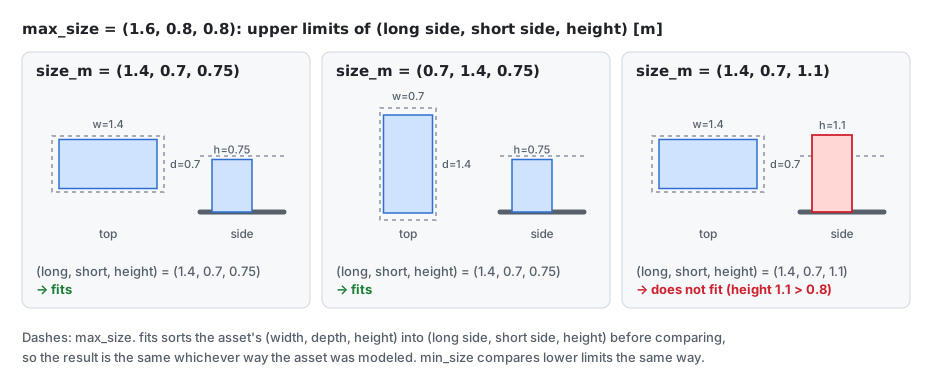
min_size/max_size(footprint long side, short side, height) are dropped (fits). This does not depend on the asset's direction.
 3. Rerank (
rerank): an asset scores by whether the last noun of the query (the object itself) appears as a noun in its class, tags, caption or name.
For example, a "desk lamp" is not a desk, and a "coffee table" does not stand in for a dining table (both weak). If the asset's card (assets/cards.py) has a kind kind checked by eye, that is used instead of the labels.
If there is even one strong match, weak ones are removed from the list. If all are weak, they stay as "no match = substitute".
Shape and build words (round, oval, rectangular, upholstered, glass) are matched by group: a match adds points, and the opposite shape (rectangular for an oval one asked for) takes points away.
4. Move to the back: poor fits are not removed. The higher their row in this table, the further back they go.
| Marker | What it is | Example |
|---|---|---|
too_tall |
Taller than the ceiling | |
off_size |
When no size is given, far from the typical size of its kind (TYPICAL in assets/sizes.py) |
A pasta box for "cardboard box" |
off_place |
An asset from a field that does not fit the place (Room.place) (assets/domain.py) |
A hospital bed in a home |
The card's physics_issue |
An asset that failed its own drop test | |
heavy |
Too many faces for its size | |
_wrong_picture |
Artwork that belongs to another store. Not a tier; it only lowers the score a little (PICTURE_PENALTY) |
A bookstore checkout sign in a drugstore |
- When nothing is found: when everything is a substitute, the kind table (
assets/kinds.py, MCPkind_availability) tells whether that kind exists in no source (not_in_catalog), so the search is not retried. When all are weak and a size was given, the strong matches dropped by size are listed inPlacement.size_misses(a hint for widening the size). Missing objects are recorded per scene inAGENTIC_SIM_WORLD_GEN_CACHE/missing/on every save (missing.py).agentic-sim-world-gen missinglists them, most frequent first. Objects removed for want of an asset (remove_object(no_asset=true)) and assets only reported (note_missing) stay too. After adding assets,agentic-sim-world-gen missing --rechecksearches again and moves what it finds to a separate list (missing-found.json). - Final call: Claude decides with
view_candidates(returns thumbnail images). Metadata alone does not tell color, material or shape.
Related files
- src/agentic_sim_world_gen/assets/providers/base.py: AssetProvider protocol, fits
- src/agentic_sim_world_gen/assets/providers/composite.py, simready_central.py, isaac_index.py, local_folder.py, polyhaven.py
- src/agentic_sim_world_gen/assets/sizes.py: TYPICAL (typical size per kind), kinds.py: the kind table
- src/agentic_sim_world_gen/assets/rerank.py: rerank, score, noun_last
- src/agentic_sim_world_gen/assets/cards.py: per-asset cards (of, physics_issue, brief). Data is in src/agentic_sim_world_gen/data/asset_cards.jsonl.gz; rebuild with scripts/build_asset_cards.py
- src/agentic_sim_world_gen/assets/domain.py: off_place
- src/agentic_sim_world_gen/service.py: get_provider, _find_candidates, _wrong_picture, research_object
4. Layout
flowchart TD
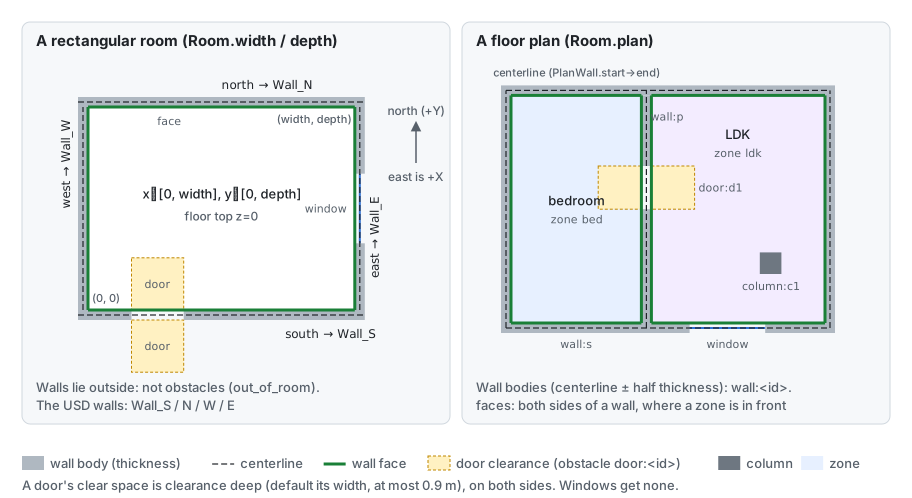
    room["Room"] --> geom["RoomGeometry<br/>walls, faces, obstacles, zones"]
    objs["ObjectSpec.layout"] --> order["_order<br/>solve targets first"]
    order --> rel{"Relation type"}
    geom --> rel
    rel -->|"against_wall"| wall["Back against a faces_for face<br/>position by along"]
    rel -->|"in_front_of"| front["Stand in front of target, face it"]
    rel -->|"next_to + side"| side["Beside target, same direction"]
    rel -->|"on"| on["Put on target's top<br/>sets z"]
    rel -->|"facing, center"| face["Direction / room center"]
    frame["frame.py<br/>front is +X, exceptions in KNOWN_FRONTS"] --> front
    frame --> face
    wall --> pose["position / yaw_deg / z"]
    front --> pose
    side --> pose
    on --> pose
    face --> pose
    pose --> arr["array.instances<br/>rack rows, desk islands"]
    pose --> fill["fill.slots<br/>goods on shelf boards"]
    pose --> dec["decor.plan<br/>small items by density, store shelf stock"]
    win["fill_windows<br/>windows, curtains in openings"] --> pose
RoomGeometry gives rectangular rooms, floor plans and outdoor scenes the same shape.
| Element | Contents |
|---|---|
Walls walls |
Centerline and thickness |
Faces faces |
Inner surfaces an object can put its back against. The space in front of a door is an obstacle (kept free) |
Obstacles obstacles |
Wall bodies, space in front of doors, columns columns, level changes levels, stairs, ceiling beams and light fixtures |
Zones zones |
Rooms of a floor plan |
Surroundings (with site) |
Faces of the room's exterior walls, area edges and buildings, and obstacles for areas and buildings. Outside objects have zone outside or an area ID |
An object whose center is on a raised level is placed at that height by the solver.
- solve: decides position, direction and height from the
layoutrelations (against_wall,in_front_of,next_to,on,facing,center,gap)._orderdecides the solving order, e.g. desk first, then chair. Because it re-solves on every save, the layout follows size changes when an asset is swapped. An object moved by hand withmove_objectloses itslayoutand keeps its coordinates. - Front convention: an asset's front is +X (checked in Isaac Sim 6.1 by rendering about 40 assets from 4 directions).
Exceptions go in
KNOWN_FRONTSandKNOWN_FRONT_PATTERNS; for your own folders, infrontin agentic-sim-world-gen.json; per object, infront_offset_deg. To set a direction by hand, usefacing_deg(0 = east = +X, 90 = north = +Y). - Repetition:
arrayplaces the whole block as one object, and expands it into units (<id>.r<row>c<col>) for checks, preview and USD. - Displays:
fillputs goods on the shelf boards found in the fixture's geometry (assets/shelves.py). - Small items: depending on
Room.density(sparse / normal / lived_in),create_sceneadds small itemsdecor_*, like books on a desk or a rug in front of a sofa. Placements that add problems are discarded (service._apply_density). - Store displays: in stores (
shopand the 25 kinds inSTORE_PLACES: convenience store, supermarket, drugstore, bookstore, bakery, bike shop, furniture store, etc.), the same mechanism stocks empty fixtures with goods viafill. Goods come from per-store tables (decor.PRODUCTS,COLD_PRODUCTSfor refrigerated cases,HANGfor hooks), and each fixture starts with different goods from its neighbor. For store types not in the table,Room.goods(English search terms for goods) andgoods_words(words for the trade) place only goods that carry those words (decor.fits_goods). Defaults for store size, entrance, checkout, etc. are in theplan_questionstable (questions.STORE_SIZES). - Windows: a window opening is only a hole in the wall, so
fill_windowsadds a window assetwin_<id>. The window is stretched to the opening (fit_scale), and in stores, windows 1.8 m or wider become shop windows. It also adds a curtaincurtain_<id>in homes and a blindblind_<id>in offices, schools, labs and hospitals (covers="auto";coverscan choose another).
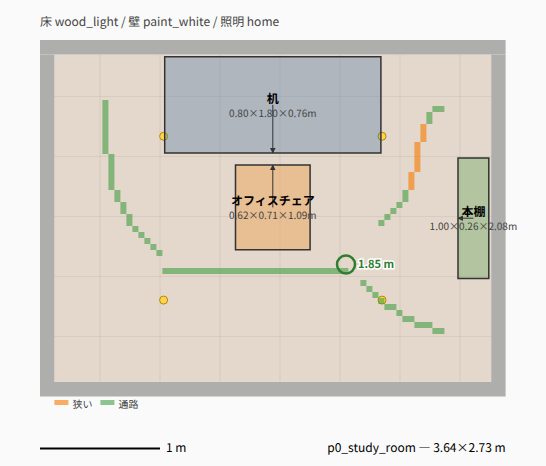
layout.svg (top view; arrows show the front):
Related files
- src/agentic_sim_world_gen/layout/room.py: RoomGeometry, Wall, Face, Obstacle
- src/agentic_sim_world_gen/layout/solver.py: solve
- src/agentic_sim_world_gen/layout/knee.py: how deep a chair goes under a desk (height grids of the parts)
- src/agentic_sim_world_gen/layout/frame.py: front direction (asset_front_deg, yaw_for_facing; a thin thing hung on a wall with no recorded front faces along its thin side)
- src/agentic_sim_world_gen/layout/array.py, fill.py, assets/shelves.py
- src/agentic_sim_world_gen/scene/decor.py: plan, PRODUCTS, fits_goods
- src/agentic_sim_world_gen/scene/columns.py, levels.py, fixtures.py: columns and partial floor finishes, level changes and stairs, ceiling light fixtures and beams
- src/agentic_sim_world_gen/preview/layout2d.py: layout.svg
5. Checks
flowchart LR
    scene["ResolvedScene"] --> v1["validate.check<br/>issues"]
    scene --> v2["usability.usability<br/>usability warnings"]
    scene --> v3["request.evaluate<br/>request match"]
    scene --> v4["taste.report<br/>taste outliers"]
    v1 --> i1["out_of_room, overlap 3D, hits_wall<br/>blocks_door, too_tall, tips_over, etc."]
    v2 --> i2["From the walkable grid<br/>narrow_aisle, unreachable, no_front_space<br/>chair_facing, tv_distance<br/>empty_shelves, register_hidden, etc."]
    v3 --> i3["met / unmet / unknown"]
    v4 --> i4["outliers and alternatives"]
    i1 --> st["status and preview.html"]
    i2 --> st
    i3 --> st
    i4 --> st
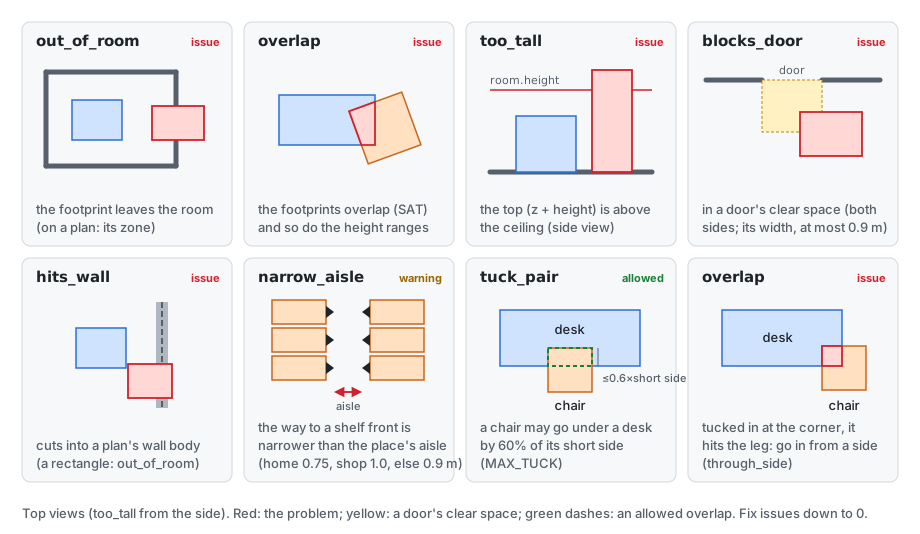
There are four kinds of checks, with different weight.
| Check | What it looks at | Handling |
|---|---|---|
Static check validate.check |
Sticking out of the room, overlap between objects (SAT on footprint polygons + height range = 3D), inside a wall or in front of a door, taller than the ceiling | issues. Fix until there are 0 |
Usability usability |
Walkable area, aisle widths, whether you can stand in front of objects, directions and distances (list below) | Warning. May stay if there is a reason |
Request match request.evaluate |
Splits the instruction into items and measures against the wall, next to, count, direction, zone and on top of from the layout | check_request. Always run before reporting |
Taste taste.report |
Embeds thumbnails of the chosen assets with SigLIP2 and looks for a single object that looks out of place | Warning. Never swapped automatically |
What the usability check looks at:
- It puts the floor on a grid and finds the area walkable from the door. From that it checks whether you can stand in front of shelves, checkouts, etc.
- It checks whether aisles are wide enough for the place (the robot's width if the purpose purpose is amr). Aisle width comes from one distance-transform map (AisleMap); the narrowest width and its location go into narrow_aisle. layout.svg draws the aisle centerline colored by width (red = impassable, orange = narrow, green = aisle, blue = wide).
- It also checks the direction and distance of chairs to desks and TVs, tall objects blocking windows, empty store shelves, and a checkout not visible from the entrance.
A chair may go under a desk by up to 60% of the short side of the chair's footprint (tuck_pair, MAX_TUCK). But the solver does not tuck chairs in by itself (only when gap is negative). A bbox does not tell whether there is legroom under the desk, and running physics with overlaps makes PhysX explode.
Related files
- src/agentic_sim_world_gen/layout/validate.py: check, Issue, overlap_depth
- src/agentic_sim_world_gen/layout/usability.py: usability, AisleMap, aisle_map
- src/agentic_sim_world_gen/layout/widths.py: edt (distance transform), widest (widest path from the entrance), narrowest, ridge (centerline). Shared by usability, nav (routes) and layout2d
- src/agentic_sim_world_gen/layout/request.py: evaluate, summary
- src/agentic_sim_world_gen/taste.py: report, analyze
6. Composing the USD
flowchart TD
    world["/World<br/>defaultPrim, Z-up, metersPerUnit=1"] --> phys["PhysicsScene"]
    world --> lights["Lights"]
    world --> room["Room"]
    world --> objects["Objects"]
    world --> cams["Cameras/id<br/>same viewpoint as photos"]
    room --> floor["Floor, ZoneFloors/id"]
    room --> walls["Wall_S / Wall_N / Wall_W / Wall_E<br/>Part_NN if there are openings"]
    room --> ceil["Ceiling"]
    room --> doors["Doors/id<br/>automatic doors"]
    room --> parts["Columns, Levels, Stairs, Railings<br/>FloorAreas, CeilingFeatures"]
    room --> looks["Looks<br/>Floor, Wall, Ceiling, SDG"]
    objects --> obj["Objects/id<br/>Xform: placement xformOps + customData"]
    obj --> asset["Asset<br/>asset reference + variant PhysX=Enabled"]
    obj --> col["Collider<br/>only for assets without physics"]
    objects --> grp["Objects/id<br/>array / fill group"]
    grp --> unit["id_r0c0 etc.<br/>each with an Asset"]
Coordinate convention
The stage is Z-up, meters (metersPerUnit=1), and the defaultPrim is /World. The inside of a rectangular room is x∈[0, width], y∈[0, depth], with the floor's top surface at z=0.
  y (north)
  ↑
depth ┌──────────── Wall_N ────────────┐
  │   │                                │
  │ Wall_W     inside of the room    Wall_E
  │   │      floor top surface z=0     │
  │   │                                │
  0   └──────────── Wall_S ────────────┘
      0 ─────────────────────────── width → x (east)

  facing_deg: 0 = east (+X), 90 = north (+Y). z points up
The object prim and its xformOps
Each object references its asset from a child Asset of /World/Objects/<id> (Xform). The reference sits on the child so the asset's own root transform (e.g. scale 0.01 for a cm asset) is kept. Writing an xformOpOrder on the outer Xform would override the root transform of a reference on the same prim.
In xformOpOrder, the outer Xform's xformOps are listed in the order shown under "prim layout" in the figure. They act on points in the reverse order (from the right): an asset point is first moved so the pivot is at the origin, and last moved to its position in the room (steps 1→6 in the figure).
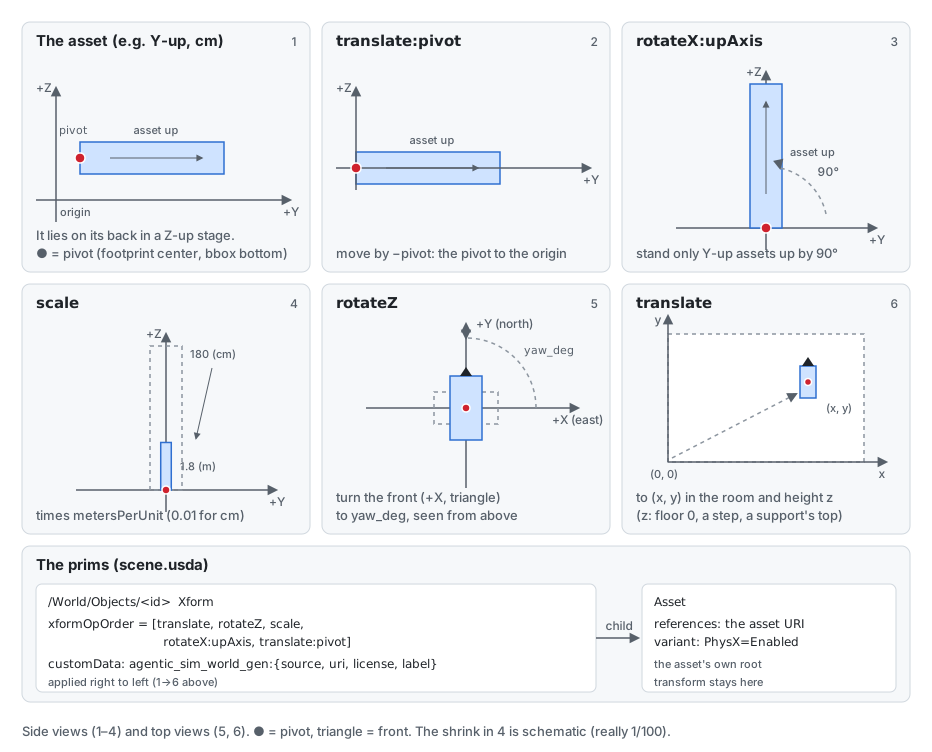
As a formula: p' = translate · rotateZ(yaw) · scale(mpu) · rotateX(90°, for Y-up) · (p − pivot).
In addition, windows and curtains stretched to an opening get a scale:fit right after rotateZ, and goods laid flat on a shelf (fill.lay_flat) get a series of layFlat ops.
For array and fill objects, /World/Objects/<id> is a group, and each unit under it (<id>_r<row>c<col> for array, <id>_<unit>_l<level>_<col>_<row> for fill) has its own Asset in the same layout as above.
Provenance, physics and looks
- Provenance: the customData
agentic_sim_world_gen:source,agentic_sim_world_gen:uri,agentic_sim_world_gen:license,agentic_sim_world_gen:label,agentic_sim_world_gen:origin(where it came from and version) andagentic_sim_world_gen:facing_degare written on the object prim.license_reportcollects the license list intoLICENSES.md. - Physics: setting the asset's
PhysXvariant toEnabledgives SimReady assets a rigid body and colliders. Assets without physics get an invisible fixed boxColliderthe size of the bbox (whencolliderisbox, orautoand the asset is known to have no physics). Floor and walls have static colliders and a friction material. - Floor, wall and ceiling looks: materials under
Looks(UsdPreviewSurface, textures, MDL). Materials come from named presets (scene/looks.py) or, viaselect_surface, from the indexes of Isaac Sim's bundled MDL (materials.py) and CC0 PBR (ambientCG, Poly Haven,pbr.py).moods/apply_mood(scene/moods.py) pick floor, walls and lighting together from a sample image. - Object colors:
tint(usd/tint.py) overrides material colors from the scene side without changing the asset files (the base color of UsdPreviewSurface, OmniPBR, OpenPBR and MaterialX standard_surface; a texture is multiplied by the color).
Related files
- src/agentic_sim_world_gen/usd/compose.py: compose, build_room, build_site, _add_asset, add_box_collider, build_inputs
- src/agentic_sim_world_gen/usd/look.py: materials and lighting (build_lights)
- src/agentic_sim_world_gen/materials.py, pbr.py, scene/moods.py: searching floor and wall materials, mood samples
- src/agentic_sim_world_gen/usd/door.py, screen.py: automatic doors, images on screens (a TV that declares no screen: its material lighting up a texture is the screen; a panel with no texture, like an lcd, gets the image on a quad laid over its front; monitors and TVs in an office, school or lab are switched off with a black image)
- src/agentic_sim_world_gen/license.py, origin.py: licenses and sources
7. The Isaac Sim side
Isaac Sim exists only on the Ubuntu (RTX) machine and runs in a separate process from agentic-sim-world-gen itself (Python using usd-core). agentic-sim-world-gen reaches Isaac Sim in one of two ways: it runs a script with Isaac Sim's Python, or it sends code to a running Isaac Sim.
flowchart TD
    call["check_in_isaac"] --> live{"live=true?"}
    live -->|"Yes"| risk{"Overlaps?<br/>_live_risk"}
    risk -->|"None, and python_server responds"| lx["live_exec<br/>send code to the open Isaac Sim on :8226"]
    risk -->|"Overlaps / no response"| hl
    live -->|"No"| hl["_run_isaac<br/>scripts/isaac/check_scene.py headless<br/>(to the Isaac worker if there is one; diagram below)"]
    lx --> core["check_core.run"]
    hl --> core
    core --> s1["open_stage: open USD, wait for references to load"]
    s1 --> s2["survey: count rigid bodies and colliders"]
    s2 --> s3["Run physics for steps frames"]
    s3 --> s4["judge: unstable, sunk, no_collider, static"]
    s4 --> s5["check.png, check.gif<br/>draft=true: capture only, no physics"]
    s5 --> s6["orbit: check_orbit/NN.jpg"]
s6 --> rep["check.json → summarize_report"]- Headless:
check_scene.pystarts its ownSimulationAppand callscheck_core.run. Isaac Sim's Python isISAACSIM_PYTHON(pip install) or python.sh underISAACSIM_PATH. - Live mode: sends the same
check_corecode to an Isaac Sim started with--enable isaacsim.code_editor.python_server. It opens the scene on the user's screen, runs physics and selects the problem objects. Scenes with overlapping objects go to headless instead. If overlapping objects explode in PhysX, the GPU physics of the GUI Isaac Sim stays stopped for the rest of that session. - What check does: compares rigid body positions before and after physics, and reports objects that moved or fell (
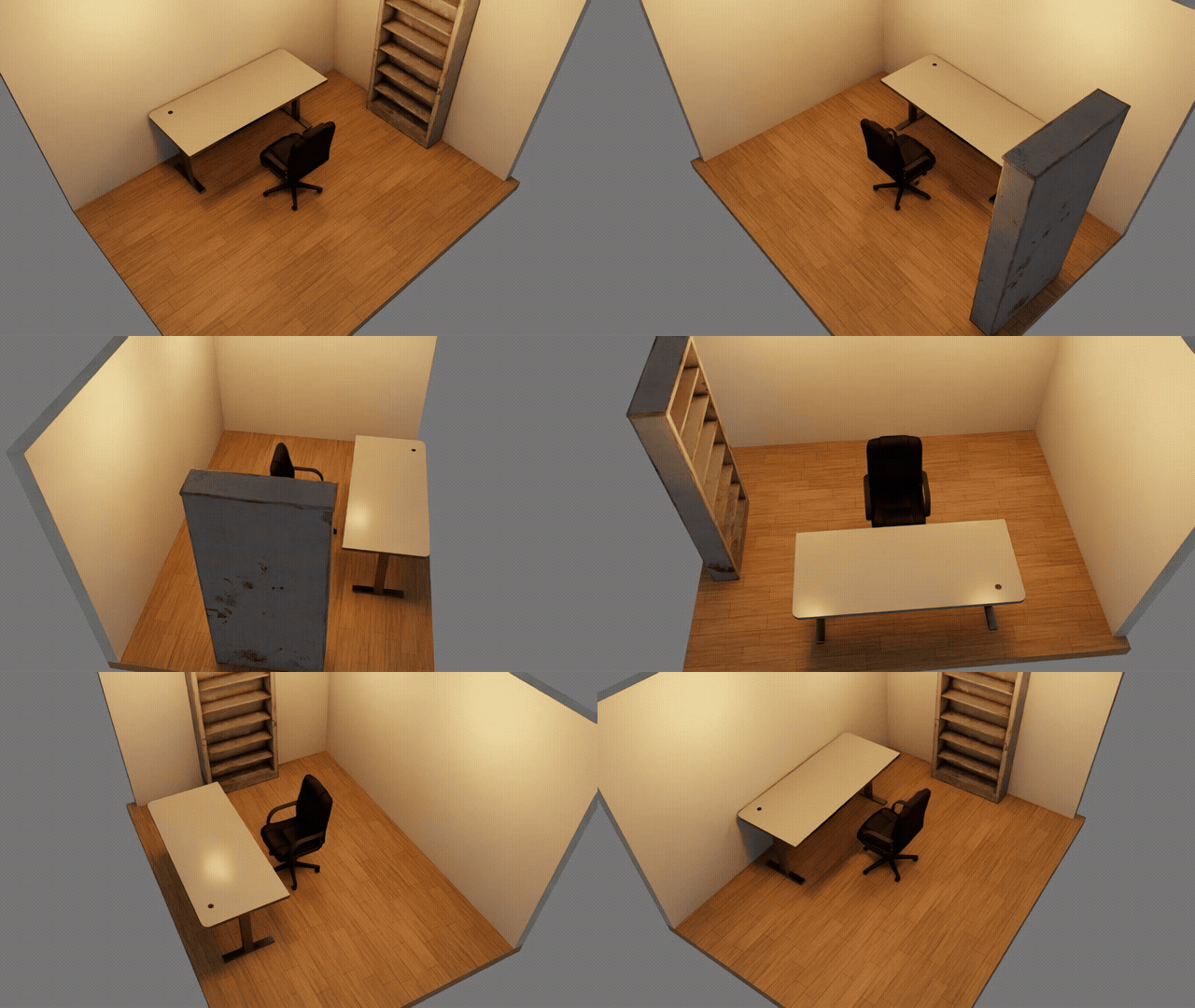
unstable), sank into the floor (sunk), have no collision (no_collider) or are fixed and do not move (static). Then it photographs the room from 24 directions so you can orbit it in the preview. - Result:
summarize_reportsummarizes per object ID, andcheck_in_isaacadds averdict(passed/needs_fix/draft/failed).draft=trueskips physics and only captures the draft 3D.
Isaac worker
Starting Kit takes most of the roughly 40 s of a draft check. With AGENTIC_SIM_WORLD_GEN_ISAAC_WORKER=1, the headless Isaac Sim started by the first call (scripts/isaac/worker.py) keeps running, and later check_scene.py, front_views.py and render_view.py runs go to it one after another.
The server's default is off, but a work folder made with agentic-sim-world-gen workspace turns it on. While waiting, one Kit holds several GB of GPU memory (3.8–7.9 GB), so isaac_worker.free_gpu() stops it before MoGe (monocular depth) runs (a running job is let finish; the next Isaac Sim call starts it again, about 11 s).
flowchart TD
    req["_run_isaac → isaac_worker.run"] --> on{"AGENTIC_SIM_WORLD_GEN_ISAAC_WORKER=1 and<br/>a script the worker can run?"}
    on -->|"No"| one["Start and run once (one-shot)"]
    on -->|"Yes"| up{"Worker running?"}
    up -->|"No"| start["Start worker.py<br/>wait in the spool folder (AGENTIC_SIM_WORLD_GEN_CACHE)"]
    start --> job
    up -->|"Yes"| job["Put job_NNNNNN.json<br/>wait for reply_N.json"]
    job --> ok{"Succeeded?"}
    ok -->|"Failed / timed out / crashed"| fail["Stop the worker<br/>(after a PhysX explosion, GPU physics stays broken)"]
    fail --> one
    ok -->|"Succeeded"| cnt{"Reached AGENTIC_SIM_WORLD_GEN_ISAAC_WORKER_JOBS<br/>(default 40) jobs?"}
    cnt -->|"Yes"| stop["Stop the worker<br/>restart on the next call"]
    cnt -->|"No"| idle["Wait for the next job<br/>stops by itself after AGENTIC_SIM_WORLD_GEN_ISAAC_WORKER_IDLE<br/>(default 600 s) with no job, or when the server exits"]
The worker closes the stage after each job and reloads the layers of that job's folder, so nothing from the previous job is left. Which way it ran shows in the result's isaac (mode is worker or one-shot).
Other Isaac Sim jobs
view_fronts(front_views.py): photographs each object from its assumed front. It opens a layerfront_views_stage.usdawith the other objects deactivated, so only the assets being photographed are loaded.compare_photo(render_view.py): renders from the same viewpoint as a photo.nav_map(isaac=true)(nav_map.py): makes a navigation map with Isaac Sim's Occupancy Map.front_views.pyandrender_view.pydo not shoot after a fixed number of frames. They shoot again every 20 frames and stop when two shots in a row look the same (view.capture_settled, at most 900 frames), so a model whose shaders are still compiling is not missing from the picture.
Like check, all of these run with Isaac Sim's Python.
Synthetic data (SDG)
flowchart LR
    gen["generate_data"] --> sp["sdg.plan<br/>cameras, lights, materials from seed"]
    sp --> pj["sdg/plan.json"]
    pj --> rs["scripts/isaac/sdg.py<br/>Replicator writer"]
    rs --> out["sdg/basic, coco, kitti<br/>summary.json, sheet.jpg"]
The Python side (sdg.plan) decides camera positions, lighting and material assignments from a seed and writes them to sdg/plan.json. On the Isaac side, scripts/isaac/sdg.py only applies them and runs the Replicator writer. Labels use the UsdSemantics that compose put on the prims.
check_orbit orbit images:
Related files
- scripts/isaac/check_scene.py, check_core.py, view.py, front_views.py, nav_map.py, worker.py
- src/agentic_sim_world_gen/service.py: check_in_isaac, live_exec, summarize_report, generate_data
- src/agentic_sim_world_gen/isaac_worker.py: run (hands jobs to an Isaac Sim that keeps running)
- src/agentic_sim_world_gen/sdg.py, scripts/isaac/sdg.py
8. The conversation
sequenceDiagram
    actor U as User
    participant C as Claude (skill)
    participant W as agentic-sim-world-gen MCP
    participant P as Preview
    participant I as Isaac Sim

    U->>C: 6畳の書斎を作って (make a 10 m² study)
    C->>W: plan_questions
    W-->>C: High-impact items and defaults (ask_now only if the place is unknown)
    C->>W: get_preferences
    C->>W: create_scene (purpose, windows, preview, draft 3D)
    W->>P: Write and open preview.html (updated on every save)
    W->>I: Capture without physics (draft 3D)
    C->>W: view_candidates (dubious candidates in one sheet) / select_asset
    C->>W: propose_layouts (when the arrangement is a choice)
    C->>W: set_assumptions (only guesses not visible in the layout, server records the rest)
    C->>W: After fixes, finish(draft=true) (recapture the draft)
    C->>U: Show the draft and guesses, "tell me what is wrong"
    U->>P: Drag to move, swap candidates, "wrong" on assumptions, notes, mood
    P->>W: POST api/edit (move / select / feedback / note / mood / choose_layout)
    U->>C: Looks good
    C->>W: get_scene (read preview_edits, assumption_feedback, notes)
    C->>W: finish
    W->>I: Write USD, physics settle + capture
    I-->>W: check.json, check.png, check_orbit
    W-->>C: check, request match, licenses (stopped if problems)
    C->>W: If problems, fix and finish again
    C->>U: Report the request match table, USD and licenses
The skill (SKILL.md) sets this procedure for Claude.
- Draft from defaults:
plan_questionsreturns, from a per-place question table, the items the instruction does not cover yet, with defaults. It does not ask first. It builds with the defaults and records them as guesses. It asks first only in these cases: - The place is unknown (
ask_now) - The user said "ask me first" (
ask_first) - Two items that are costly to change later: the purpose is a robot (amr / manipulation) and the robot size is not given; the request is for a real place ("our store") with no drawing or photo attached
For places with no question table (hospital, school, station, etc.; plan_questions returns gallery), show_gallery shows a page (gallery.html) with examples (examples/) and top views of past scenes, and start_from_example makes the chosen one's SceneSpec the draft. Inherited dimensions, place, finishes and fixtures are recorded as guesses "from example '…'" (gallery.py).
2. Create: get_preferences reads earlier preferences, then create_scene. create_scene goes on to the purpose defaults (set_purpose; sets density, aisle width, etc. from the purpose, scene/purpose.py) and the windows (fill_windows).
If assumptions conflict (an 8-seat table in a 10 m² room, an aisle narrower than the robot, etc., scene/conflicts.py), it returns conflicts without capturing the draft. Claude asks one question about which to prioritize (if the user leaves it to Claude, it goes with the larger one and reports).
3. Check candidates: create_scene opens the preview. For dubious candidates (substitutes, weak matches, objects with wrong size or place), view_candidates returns one sheet image; Claude looks and swaps.
4. Layout: fix until there are 0 issues, then review the usability warnings. If the arrangement itself is a choice, propose_layouts gives 2–3 options.
5. Show the draft: the server records the room's 5 items and per-object assumptions from the layout (_auto_assumptions), so set_assumptions gets only guesses the layout does not show.
create_scene has already captured the 3D (after fixes, finish(draft=true)). Claude shows the guessed parts first and stops (it does not stop if the user said "leave it to you").
6. check: once agreed, finish (USD → check → request match → licenses).
7. Request match: check_request measures each item of the instruction.
8. Report: the match table, USD path, chosen assets (substitutes marked) and licenses.
The preview page
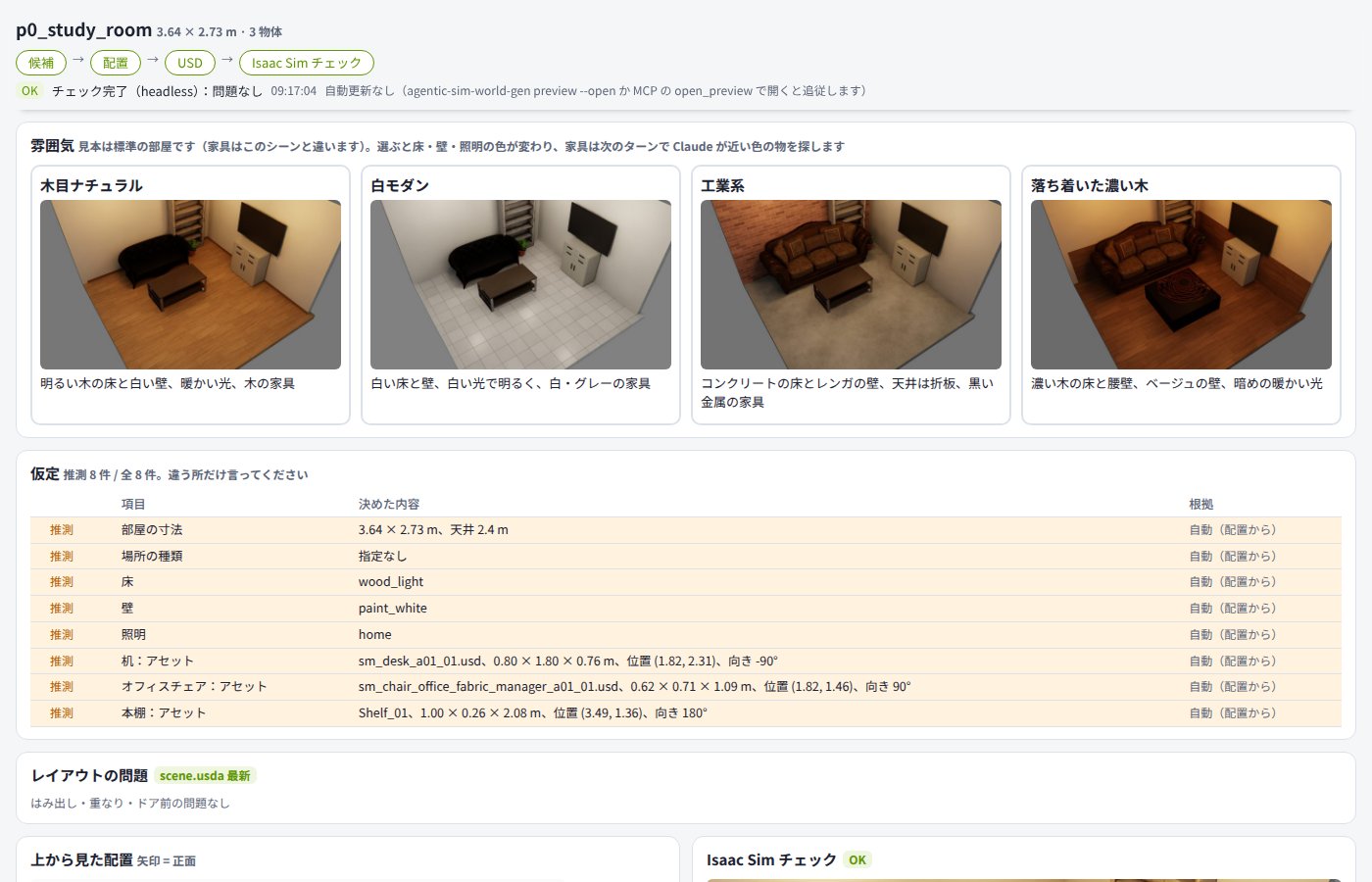
Users can work in the preview page as well as in chat. Actions on the page call service functions through the preview server's api/edit and update the scene.
| Action on the page | api/edit op |
|---|---|
| Dragging and rotating an object in layout.svg | try (checks while dragging), move |
| Clicking a candidate card to swap | select |
| "Wrong" in the assumptions table | feedback |
| "Use this option" on a layout option | choose_layout |
| Picking or undoing a mood sample | mood, mood_undo |
| Writing or deleting a note | note, note_delete |
| Undo, delete, duplicate, density, room, light | restore, remove, duplicate, density, room, light |
Notes written by double-clicking the top view or the check 3D ("a light here") are kept without changing the scene (notes.py). Claude answers them with resolve_notes, which clears them.
On the next turn, Claude learns about actions on the page from preview_edits, assumption_feedback and notes in the status of the tool results.
The preview server is a thread inside the MCP server process.
- Listens on: 127.0.0.1:8765 (AGENTIC_SIM_WORLD_GEN_PREVIEW). If in use, the port used before for that folder or the next free one.
- Serves: the parent folder of the scenes (usually AGENTIC_SIM_WORLD_GEN_OUT).
- Updates: the page checks preview.json every second and rewrites only the parts that changed.
- Writes need: the token embedded in the page and a loopback connection.
Values the user corrected (set_room, set_layout, set_array, select_asset with correction=true, and swaps in the preview) are recorded as preferences. An item with the same value (for numbers, a change in the same direction) in 2 or more scenes becomes the default from then on.
Related files
- .claude/skills/world-gen/SKILL.md: the full procedure
- src/agentic_sim_world_gen/scene/questions.py: plan_questions
- src/agentic_sim_world_gen/scene/purpose.py: defaults from the purpose (demo / amr / manipulation / sdg)
- src/agentic_sim_world_gen/scene/conflicts.py: detects conflicting assumptions (floor occupancy, ceiling height, robot aisle width, people vs. seats). conflicts in the status; if present, create_scene does not capture the draft
- src/agentic_sim_world_gen/gallery.py: list of examples and past scenes (entries, rank), the page (write_page), inherited values (inherited). Top views of the examples are built into data/gallery/ by scripts/make_gallery.py
- src/agentic_sim_world_gen/preferences.py: observe, apply
- src/agentic_sim_world_gen/preview/server.py: serve, edit (the ops in the table above), api/gallery/pick (example chosen in the gallery)
- src/agentic_sim_world_gen/notes.py: describes the location of preview notes in words
- src/agentic_sim_world_gen/preview/page.py, changes.py: the page and change history
9. Rooms from photos
There are two stages. First, the room dimensions and cameras are estimated from photos (fit_photos). Then the result goes into the scene, where it places furniture and is compared with the photos.
Estimating the room and cameras
flowchart TD
    photos["Photos"] --> lm["Claude picks landmarks<br/>room corners, wall seams, opening corners"]
    photos -->|"depth.run"| dep["MoGe-2 depth<br/>stem.depth.npz"]
    lm --> fit["fit_photos<br/>photo_fit.fit least squares"]
    dep -->|"depth=true"| fit
    fit --> res["Room size, openings, each camera"]
The room is treated as a box. For each photo, Claude picks the pixels of visible landmarks (room corners, wall-floor lines, door and window corners, points shared across photos).
fit_photos takes the room width and depth, opening positions, and each camera's position, direction and field of view as unknowns, and minimizes the reprojection error of the landmarks (pure-Python Levenberg–Marquardt).
The wall height sets the scale. If there are no ceiling landmarks, the camera height (eye_height) sets it.
Without a ceiling each photo carries its own scale, so something of known height (a door's top) sets the scale only of the photos it is in. When the photos that measure the width or depth (those that see both of its walls) see nothing of known height, the result's scale and a warning say that dimension rests on the camera height (_scale_reach).
The wall height is fitted too; when it falls outside the range for the kind of room (place) or is suspect (height_suspect), the same call fits again with the height held, and takes the held fit when the landmarks fit it about as well and nothing measured in meters (the depth, a door top) fits it worse (height_refit; a room with no place, or one not listed, is not refitted).
Adding monocular depth (MoGe-2) helps fix the dimensions even for photos that show only 1–2 walls.
Putting it into the scene and checking
flowchart TD
    res["fit_photos result<br/>room size, openings, each camera"] -->|"set_room / set_input"| scene["Scene"]
    res -->|"place_from_photos"| pp["photo_place.py<br/>furniture position and direction from foot points"]
    pp -->|"with outlines"| ref["photo_refine.py<br/>fit the projected box to foot points and rectangle"]
    pp --> scene
    ref --> scene
    scene -->|"compare_photo"| cmp["Render same view, place next to photo"]
scene -->|"measure_photo"| ms["photo_measure.py<br/>room and aisle widths seen from the photo camera<br/>floor plane and free width from depth map (depth_floor)"]- The result goes into the scene with
set_roomandset_input(cameras). - If foot points of furniture were picked in the photos,
place_from_photosfits the chosen asset's footprint to those points to set position and direction. If you also pass rectangles around objects in the photo (outlines), it projects the asset's box into the photo with the fitted camera and refines the position to match the foot pixels and the rectangle (photo_refine.py). compare_photorenders from the same viewpoint to compare with the photo, andmeasure_photocompares room and aisle widths with the photo in numbers.- Pointing at a pixel pair across an aisle with
aisle_pairmakes that width a layout target (SceneSpec.photo_aisle). It is used for array aisles, the walking-width and too-wide checks throughusability.photo_aisle, and the ratiophoto_aislein the status. - If an object of known size (one shelf unit, a door, floor tiles, etc.) is in the photo, pass its pixels with
known. Widths and the camera height are then also given using that object as a ruler.
Related files
- src/agentic_sim_world_gen/photo_fit.py: fit (the result's scale = the list of scale evidence, from _scale_evidence; the height refit is _height_refit), FitRequest, PointObs, LineObs, SurfaceObs
- src/agentic_sim_world_gen/photo_refine.py: refine (minimizes the pixel difference between the projected box and the foot points and outline)
- src/agentic_sim_world_gen/photo_place.py, photo_measure.py: furniture positions from photos, width comparison with photos (widths come with an error range). photo_vanish.py: camera pitch and roll from the vanishing point of vertical lines in the photo
- src/agentic_sim_world_gen/depth.py, scripts/depth/moge_depth.py: monocular depth
- src/agentic_sim_world_gen/inputs.py: input sources (<stem>.source.json)
- scripts/isaac/render_view.py: renders from the same viewpoint as a photo