agentic-sim-world-gen
An agent (Claude Code) builds an Isaac Sim world (USD) from a description in Japanese or English, a floor plan or photos: it searches for assets, picks them, lays them out, checks the result with physics in Isaac Sim and records the license of every asset. Assets come from SimReady Central, the Isaac Sim bundled assets, Poly Haven CC0 models and your own USD folders.
flowchart TB
  IN["<b>Input</b><br/>text (Japanese or English)<br/>floor plan: JSON / DXF / IFC / image<br/>photos"]
  CC["<b>Claude Code</b><br/>reads the request, decides which tools to call"]
  subgraph WG["agentic-sim-world-gen (this repository): MCP server + skill, the same operations from the CLI"]
    direction LR
    S["Search and pick assets"] --> L["Lay out<br/>relations, arrays, shelves"] --> V["Review in the browser<br/>thumbnails, top view"] --> U["Write the USD world<br/>and LICENSES.md"]
  end
  SRC["<b>Asset sources</b><br/>SimReady Central<br/>Isaac Sim bundled assets<br/>Poly Haven CC0<br/>your USD folders"]
  ISAAC["<b>Isaac Sim 6.1</b><br/>runs the check script:<br/>physics, screenshots"]
  IN --> CC
  CC -- "calls the tools" --> WG
  SRC -- "searched" --> WG
  WG -- "USD" --> ISAAC
  ISAAC -- "report: fix and check again" --> CC
  style WG fill:#536dfe14,stroke:#536dfe,stroke-width:3px
  classDef repo fill:#536dfe2e,stroke:#536dfe
  classDef input fill:#9e9e9e26,stroke:#9e9e9e,stroke-dasharray:5 5
  classDef claude fill:#d977572e,stroke:#d97757,stroke-dasharray:5 5
  classDef assets fill:#e3a0082e,stroke:#e3a008,stroke-dasharray:5 5
  classDef isaac fill:#76b9002e,stroke:#76b900,stroke-dasharray:5 5
  class S,L,V,U repo
  class IN input
  class CC claude
  class SRC assets
  class ISAAC isaac
Blue with a thick frame: this repository. Dashed: outside it (orange: Claude Code, yellow: asset sources, green: Isaac Sim, gray: your input).
Important
This is a personal project. It is not an official NVIDIA product and is not sponsored or endorsed by NVIDIA. Isaac Sim, Omniverse, SimReady and Replicator are trademarks of NVIDIA Corporation.
Warning
SimReady Central is searched through the unpublished API its web page uses. It is unofficial and may change
or stop working without notice. The official endpoint (search.simready.omniverse.nvidia.com, used by the
simready-search package) indexes a different catalog, mostly the Isaac Sim bundled assets, and does not
return the SimReady Central datasets on Hugging Face, so it cannot replace this API.
Caution
Asset licenses differ per asset, and non-commercial ones (e.g. CC-BY-NC) can be picked. Check the
LICENSES.md written for each scene before you use or share it. The Isaac Sim bundled assets are licensed
by NVIDIA and are not covered by this repository's license; handing out a USD with assets packed in is
redistribution.
Caution
Do not use photos that show people as input.
Demo: a warehouse
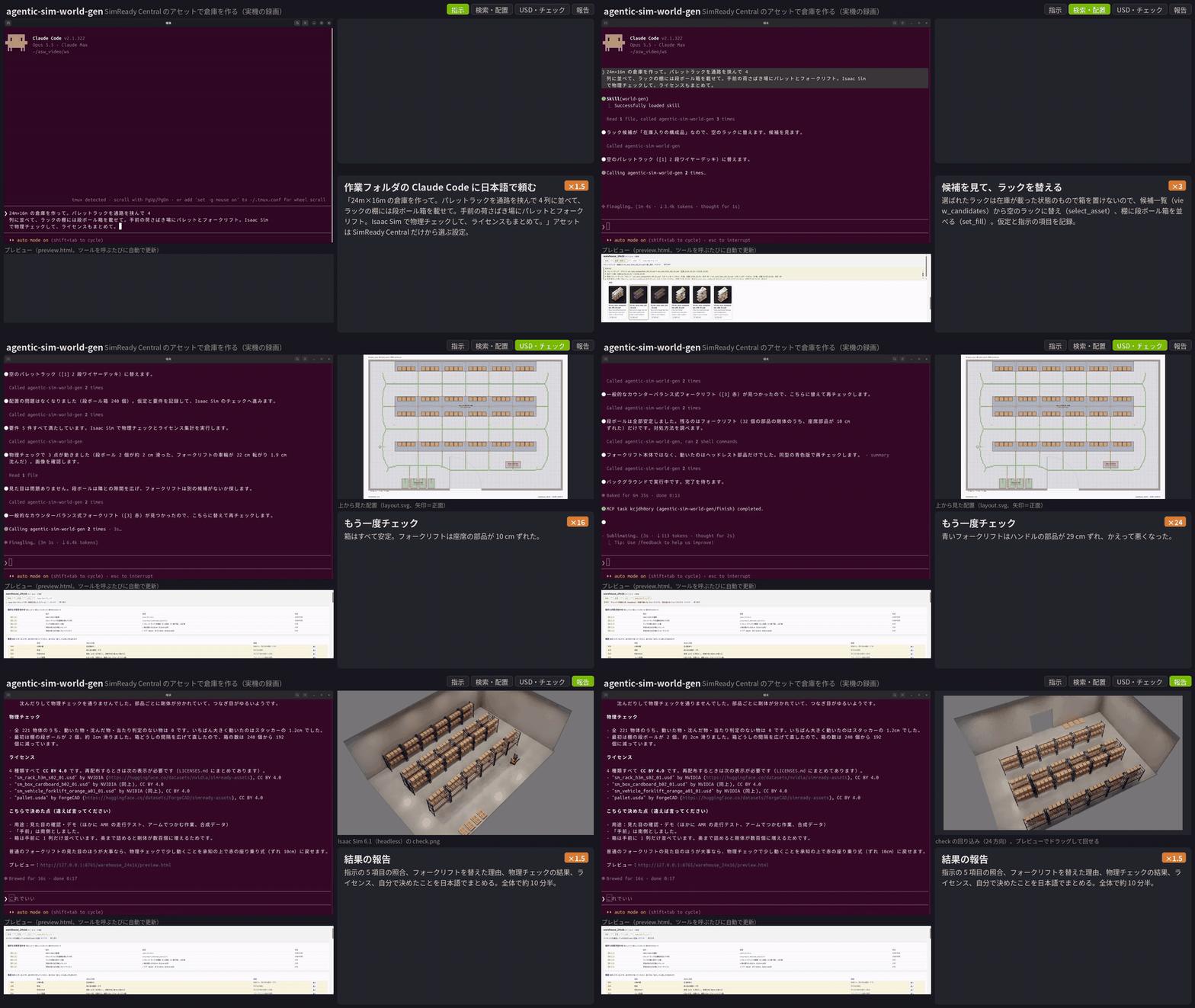
One turn, asked in Japanese, waits fast-forwarded: "Make a 24 m × 16 m warehouse. Put pallet racks in 4 rows with
aisles between them and cardboard boxes on the shelves; pallets and a forklift in the loading area at the front.
Check it with physics in Isaac Sim and sum up the licenses." Claude fills in the defaults, searches and lays out
everything at once, swaps the stocked racks for empty ones from the candidates (select_asset) and puts boxes on
the shelves (set_fill). The physics check in Isaac Sim 6.1 finds 2 boxes that slid and a forklift that moved:
Claude spaces the boxes out, tries three forklifts (their seat or handle parts come loose) and settles on a walk-behind
electric stacker, and the check passes (221 objects). It ends with the request checklist, the licenses (all
CC BY 4.0) and a view from 24 directions. Assets from SimReady Central only
(AGENTIC_SIM_WORLD_GEN_SOURCES=simready-central, AGENTIC_SIM_WORLD_GEN_MDL=0). A screen recording on Ubuntu
(Isaac Sim not opened, the check runs headless); full quality: docs/videos/warehouse_demo.mp4.
Assets (all CC BY 4.0, details in LICENSES.md): "sm_rack_h3m_s02_01", "sm_box_cardboard_b02_01" and "sm_vehicle_forklift_orange_a01_01" by NVIDIA (nvidia/simready-assets), "pallet" by ForgeCAD (ForgeCAD/simready-assets), CC BY 4.0.
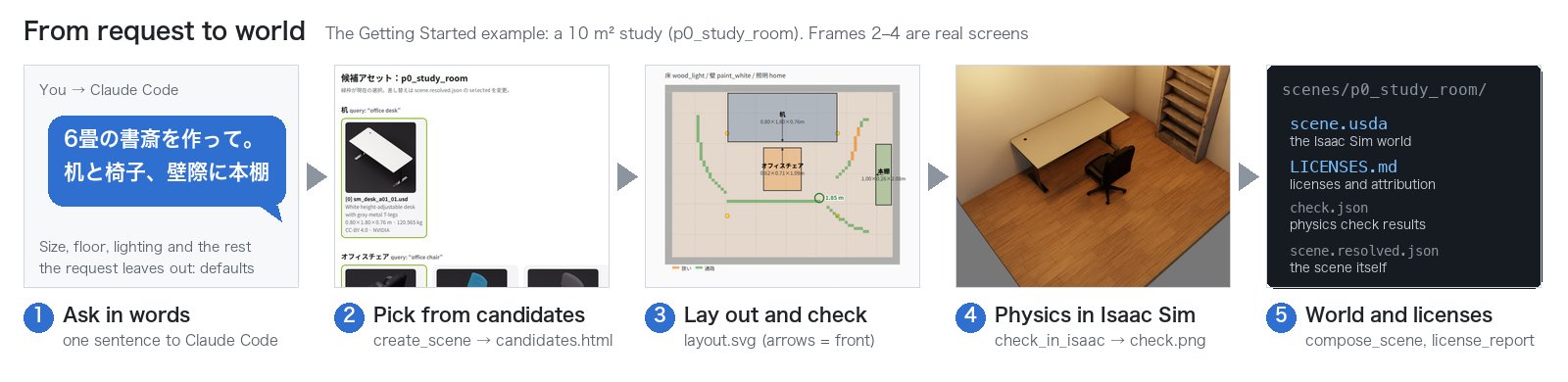
One run end to end (the example in Getting Started; ②–④ are real screens):
Features
- MCP server + skill for Claude Code (62 tools); the same operations from the CLI
agentic-sim-world-gen - Input: text (rooms, warehouses, outdoor sites), floor plans (JSON / DXF / IFC, or traced from an image) and photos
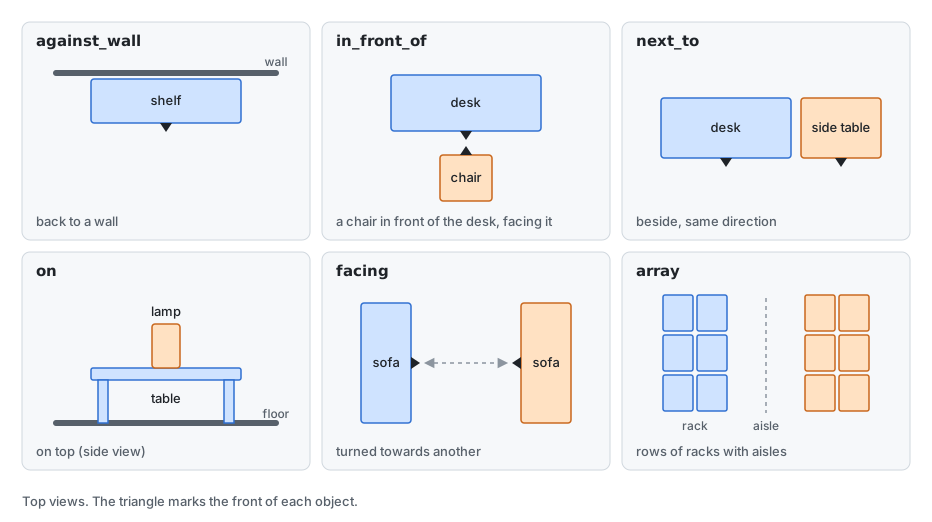
- Layout: relations (against a wall, in front of, next to, on, facing), arrays (rack rows with aisles), stocking shelves, overlap / out-of-room / door clearance checks
- Look: floor and wall materials (Isaac Sim MDL or CC0 PBR), lighting presets, moods, outdoor ground / roads / buildings / sky
- Review: candidate thumbnails and a top-down layout in a browser preview; physics check and screenshots in Isaac Sim 6.1 (headless or live)
- Synthetic data with Replicator: RGB, 2D boxes, segmentation, depth (COCO / KITTI)
- Licenses: source and license of every asset recorded in the USD and in
LICENSES.md
Objects are placed by relation, not by coordinates; the solver works out the position and the direction, and keeps them when an asset is swapped for one of another size:
When no asset fits, a close one is used instead and reported (no 3D generation). Your own asset folders can be
added with local:.
Requirements
| Tested | Not tested | |
|---|---|---|
| Isaac Sim | 6.1 pip install, Ubuntu 24.04, RTX 2080 Ti | the standalone (binary) build, other versions, Windows |
| The rest (search, preview, USD) | Ubuntu 24.04 (Python 3.14), macOS on Apple Silicon (Python 3.12) | Windows |
Python 3.12+ and uv; Claude Code to use it as an agent; Isaac Sim 6.1 only for the physics check, screenshots and synthetic data. Without a GPU you can still search, preview and write USD.
Install
git clone https://github.com/atinfinity/agentic-sim-world-gen.git
cd agentic-sim-world-gen
uv sync --extra usd --extra hf --extra mcp --extra dev
source .venv/bin/activate

agentic-sim-world-gen resolve examples/p0_study_room.json -o out/study   # search -> candidates.html, layout.svg
agentic-sim-world-gen compose out/study/scene.resolved.json              # -> out/study/scene.usda
agentic-sim-world-gen check out/study                                    # physics check in Isaac Sim (Linux)
Install usd-core only in this venv, never in Isaac Sim's Python. Point to Isaac Sim with ISAACSIM_PYTHON
(pip install) or ISAACSIM_PATH (default ~/isaacsim), and set OMNI_KIT_ACCEPT_EULA=YES to run it non-interactively.
The other environment variables are in Getting Started "3. Environment variables".
With Claude Code: .mcp.json registers the agentic-sim-world-gen MCP server and .claude/skills/world-gen
is the skill. To only make worlds, create a workspace outside the repository with
agentic-sim-world-gen workspace <dir>, start claude there and ask, e.g. "Make a 10 m² study with a desk,
a chair and a bookshelf".
Guides
To use it:
| Guide | |
|---|---|
| Getting Started | from the install to your first world |
| Everything on one machine | Ubuntu with an RTX GPU and a screen (live mode too) |
| Over ssh | the GPU machine is an Ubuntu box on the LAN; you use ssh and a browser from a Mac or similar |
To change the code:
| Guide | |
|---|---|
| How it works | the flow, data, search, layout, checks, USD, Isaac Sim, the conversation and rooms from photos, with diagrams |
| Contributing | setup, tests, where things are, pull requests, the project page, GitHub Actions |
The Japanese versions are in docs/.
License
The code is under the Apache License 2.0 (see NOTICE). Not covered by it:
- Assets are not included. A generated world refers to assets that keep their own licenses (the scene's
LICENSES.md). - Images (
docs/images,src/agentic_sim_world_gen/data/moods) show assets under their own licenses (the demo's attribution is above). - Bundled indexes (
src/agentic_sim_world_gen/data/*.gz) are lists of names, sizes and URLs; their origin is in NOTICE. - Example photos (
examples/photos) are CC0 from Wikimedia Commons (SOURCES.md). - Optional dependency: IFC import (extra
ifc) uses IfcOpenShell, LGPL-3.0-or-later (imported, not bundled). - Optional models (not bundled; downloaded only when you allow it): SigLIP 2 for the taste check (Apache-2.0), MoGe-2 for photo depth (MIT).
Contributions: Contributing. Security: SECURITY.md.