toio_ros2
Introduction
toio_ros2 is ROS 2 package for using toio.
If you are interested in this work, please read https://qiita.com/dandelion1124/items/150ec284d8d85769f745.
Feature
- Control using the
cmd_veltopic - Precise final positioning with the
dock_to_poseaction(cube built-in target motion) - Optional
goal_posetopic for the built-in target motion(off by default so an external planner owns the motion; seeenable_goal_pose_motion) - Publish
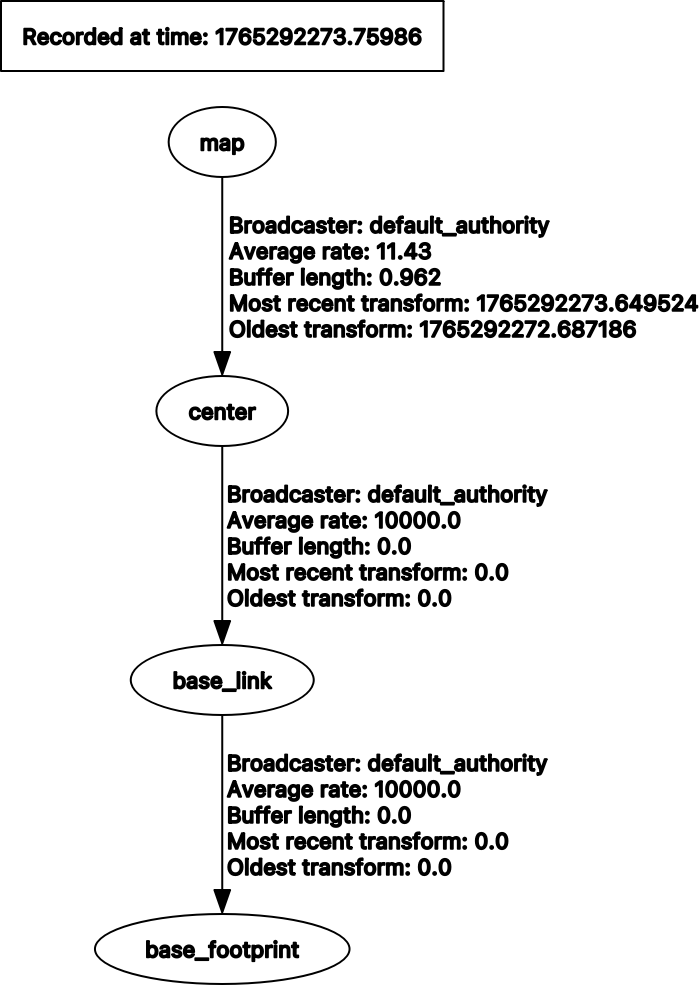
/toio/poseandtf(map -> odom -> centerwith wheel odometry, ormap -> center) - Publish
/odomwheel odometry - Indicator LED and sound:
/toio/led,/toio/sound, and the/toio/led_timed,/toio/led_pattern,/toio/melodytopics using toio_msgs - Cube state topics:
/toio/battery_state,/toio/button,/toio/position_id_missed,/toio/motion,/toio/imu,/diagnostics - Safety on top of
cmd_vel(stop_on_position_id_missed,stop_on_button) - Connect to a specific cube using the
cube_idorcube_addressparameter - Multiple cubes using ROS namespace and TF frame prefix
The full list of topics, the
dock_to_poseaction and every parameter is in docs/interfaces.md. This page summarizes the main ones.
Requirements
Hardware
- toio Core Cube
- toio play mat
Software
I checked this package on the following environment.
- Ubuntu 24.04
- ROS 2 Jazzy
- toio.py 1.10.0
Subscribed topics
| topic name | Type | Description |
|---|---|---|
| /cmd_vel | geometry_msgs/msg/Twist | desired robot velocity |
| /goal_pose | geometry_msgs/msg/PoseStamped | desired robot pose (cube built-in target motion). Only subscribed when enable_goal_pose_motion is true (off by default) |
| /toio/led | std_msgs/msg/ColorRGBA | indicator color (r/g/b 0.0-1.0; all zero turns it off) |
| /toio/sound | std_msgs/msg/UInt8 | sound effect id (0-10) |
| /toio/led_timed | toio_msgs/msg/Led | indicator color with a per-command lighting time |
| /toio/led_pattern | toio_msgs/msg/LedPattern | blink sequence the cube plays on its own |
| /toio/melody | toio_msgs/msg/Melody | MIDI melody the cube plays on its own |
Published topics
| topic name | Type | Description |
|---|---|---|
| /toio/pose | geometry_msgs/msg/PoseStamped | toio pose in map frame (from the Position ID) |
| /toio/battery_state | sensor_msgs/msg/BatteryState | battery level (percentage 0.0-1.0, 10% steps). See https://toio.github.io/toio-spec/docs/ble_battery |
| /toio/button | std_msgs/msg/Bool | true while the cube button is pressed |
| /toio/position_id_missed | std_msgs/msg/Bool | true while the cube cannot read the mat (lifted, off the edge) |
| /toio/motion | toio_msgs/msg/MotionDetection | motion detection (horizontal, collision, double_tap, posture, shake) |
| /toio/imu | sensor_msgs/msg/Imu | orientation of the cube (orientation only; yaw drifts, use /toio/pose for heading) |
| /odom | nav_msgs/msg/Odometry | wheel odometry at 20Hz (odom -> center), when publish_odom is true |
| /diagnostics | diagnostic_msgs/msg/DiagnosticArray | node health (connection / battery / position) |
| /tf | - | map -> center. With publish_odom (default) via odom (map -> odom corrected from the Position ID, odom -> center wheel odometry); with publish_odom:=false, map -> center directly |
Action servers
| action name | Type | Description |
|---|---|---|
| /dock_to_pose | nav2_msgs/action/NavigateToPose | precise final positioning with the cube built-in target motion. Unlike /goal_pose it reports the result, can be cancelled, and stays available even when enable_goal_pose_motion is false |
Odometry
With publish_odom (the default) the node dead-reckons the cube's wheel speeds:
odom -> center and /odom are the integrated wheel odometry, and map -> odom
is recomputed on every Position ID so map -> center matches the mat while
staying continuous over a gap in the mat reading. Set publish_odom:=false for
the plain map -> center transform with no odom frame and no /odom. See
docs/interfaces.md.
Parameters
Default is a param for A4 mat. Please see https://toio.github.io/toio-spec/docs/hardware_position_id in detail.
| name | Type | Default | Description |
|---|---|---|---|
| field_min_x | double | 98.0 | minimum of x in field |
| field_max_x | double | 402.0 | maximum of x in field |
| field_min_y | double | 142.0 | minimum of y in field |
| field_max_y | double | 358.0 | maximum of y in field |
| field_width_meter | double | 0.297 | width of field(meter) |
| field_height_meter | double | 0.210 | height of field(meter) |
| goal_max_speed | int | 30 | maximum motor speed for the built-in target motion(goal_pose and dock_to_pose) |
| goal_timeout | int | 60 | timeout(second) for a goal_pose motion |
| dock_timeout | int | 10 | timeout(second) for a dock_to_pose motion |
| goal_boundary_margin | int | 10 | margin(Position ID units) kept between a clamped goal and the mat boundary |
| cube_id | string | '' | connect only to the cube whose BLE local name contains cube_id |
| cube_address | string | '' | connect only to the cube with this BLE address |
| frame_prefix | string | '' | prefix of the TF child frame(<frame_prefix>center) for multi-cube setups |
| publish_odom | bool | true | publish /odom and the map -> odom -> center TF tree. false restores the plain map -> center transform |
| imu_interval_ms | int | 100 | notification interval of /toio/imu in 10ms steps. 0 disables the topic |
| enable_goal_pose_motion | bool | false | subscribe goal_pose and use the cube built-in target motion. Off by default so an external traffic authority(e.g. Open-RMF) owns the motion plan and all movement goes through Nav2 cmd_vel. Does not affect the dock_to_pose action |
The safety and feedback parameters(stop_on_position_id_missed, stop_on_button,
collision_threshold, horizontal_threshold, led_duration_ms, sound_volume,
diagnostic_updater.period, and the field_* set above) are documented in full in
docs/interfaces.md.
Parameter files is stored in params. And, launch/toio_ros2_bringup.launch.py load params/toio_a4_play_mat_params.yaml as default.
declare_params_file_cmd = DeclareLaunchArgument(
    'params_file',
    default_value=os.path.join(toio_ros2_dir, 'params', 'toio_a4_play_mat_params.yaml'),
    description='Full path to the ROS2 parameters file to use toio_ros2 node')
Parameter files use the /**/toio_ros2_node: wildcard key so that they apply to the node in any namespace(both the plain single-cube launch and the per-robot namespaces of the multi-cube launch).
A bare toio_ros2_node: key would only match the root namespace and be silently ignored by the namespaced nodes.
Connecting to a specific cube
By default(cube_id and cube_address are empty), the node connects to the nearest cube found by the BLE scan.
This is convenient when you have a single cube, but with other cubes around you may connect to somebody else's cube.
To connect only to your own cube, set the cube_id parameter to the identifier contained in the cube's BLE local name.
The name format depends on the cube, so take the <cube_id> part of whichever form your cube advertises.
toio Core Cube-<cube_id>(e.g.toio Core Cube-C7f->C7f)toio-<cube_id> (toio Core Cube)(e.g.toio-a7D (toio Core Cube)->a7D)
The name of every cube found by the scan is printed in the node log at startup, so you can find your cube_id there.
ros2 run toio_ros2 toio_ros2_node --ros-args -p cube_id:=a7D
cube_id is matched as a substring of the BLE local name, so use enough characters to identify one cube.
A short cube_id may match several cubes, and the nearest match is used.
cube_address can be used instead to specify the BLE address directly, but note that it is platform dependent: a MAC address on Linux/Windows and a CoreBluetooth UUID on macOS.
cube_id takes precedence when both are set.
Using multiple cubes
Each cube is handled by its own node instance separated by a ROS namespace.
launch/toio_multi_bringup.launch.py brings up one cube per namespace listed in the robots argument(default toio1,toio2).
Specifying cube_id of every cube is mandatory here, because without it the nodes would race for the same cube.
ros2 launch toio_ros2 toio_multi_bringup.launch.py cube1_id:=a7D cube2_id:=A8e
For three or more cubes, pass the robots and cube_ids arguments.
ros2 launch toio_ros2 toio_multi_bringup.launch.py robots:=toio1,toio2,toio3 cube_ids:=a7D,A8e,B9f
Topics are namespaced(/toio1/cmd_vel, /toio1/toio/pose, ...) and TF uses one tree with the shared map frame and per-cube prefixed frames(toio1/center, toio2/center, ...).
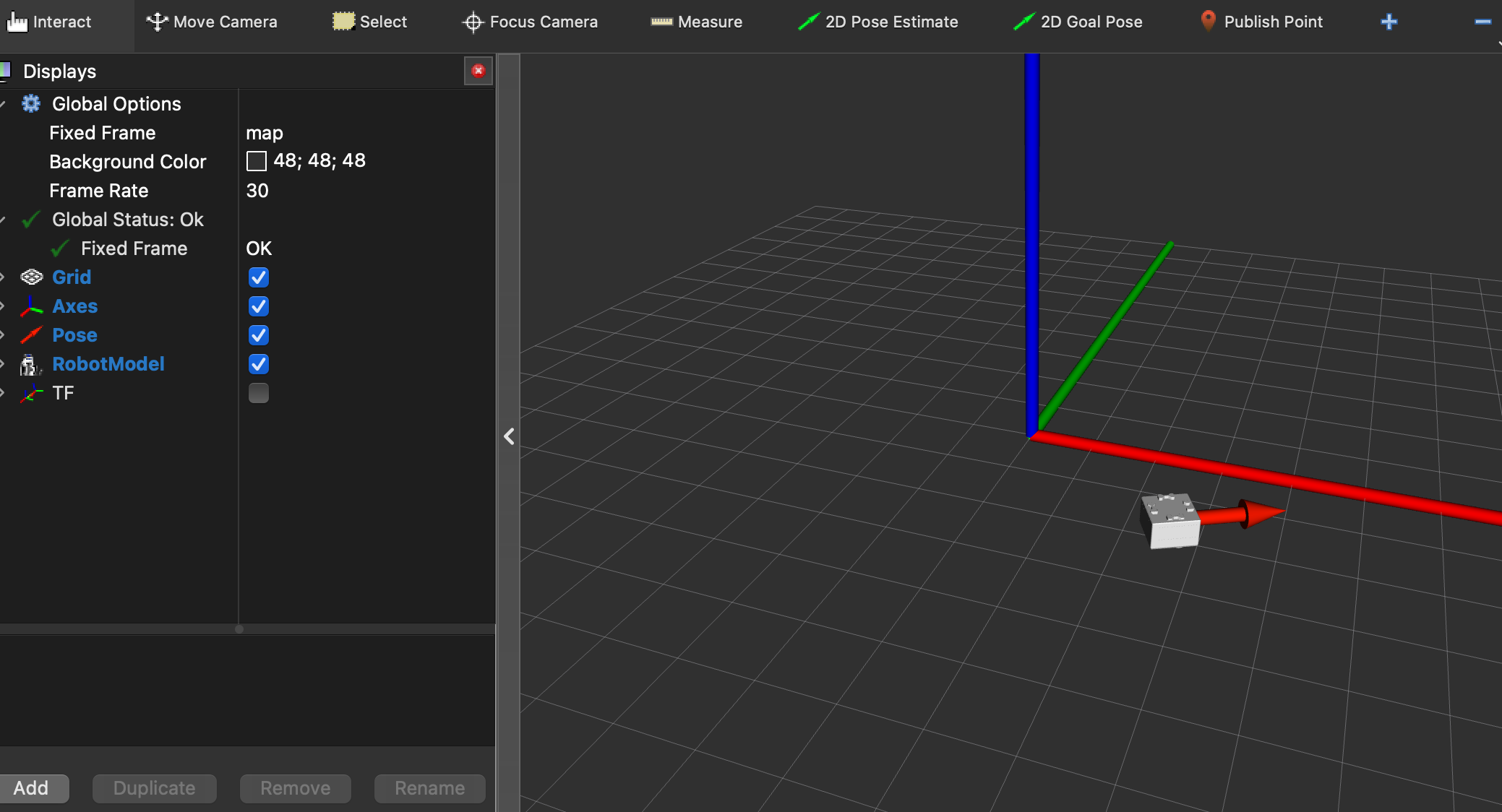
RViz2 starts with rviz/toio_multi.rviz, which shows the pose and robot model of every cube.
Frame