Web viewer
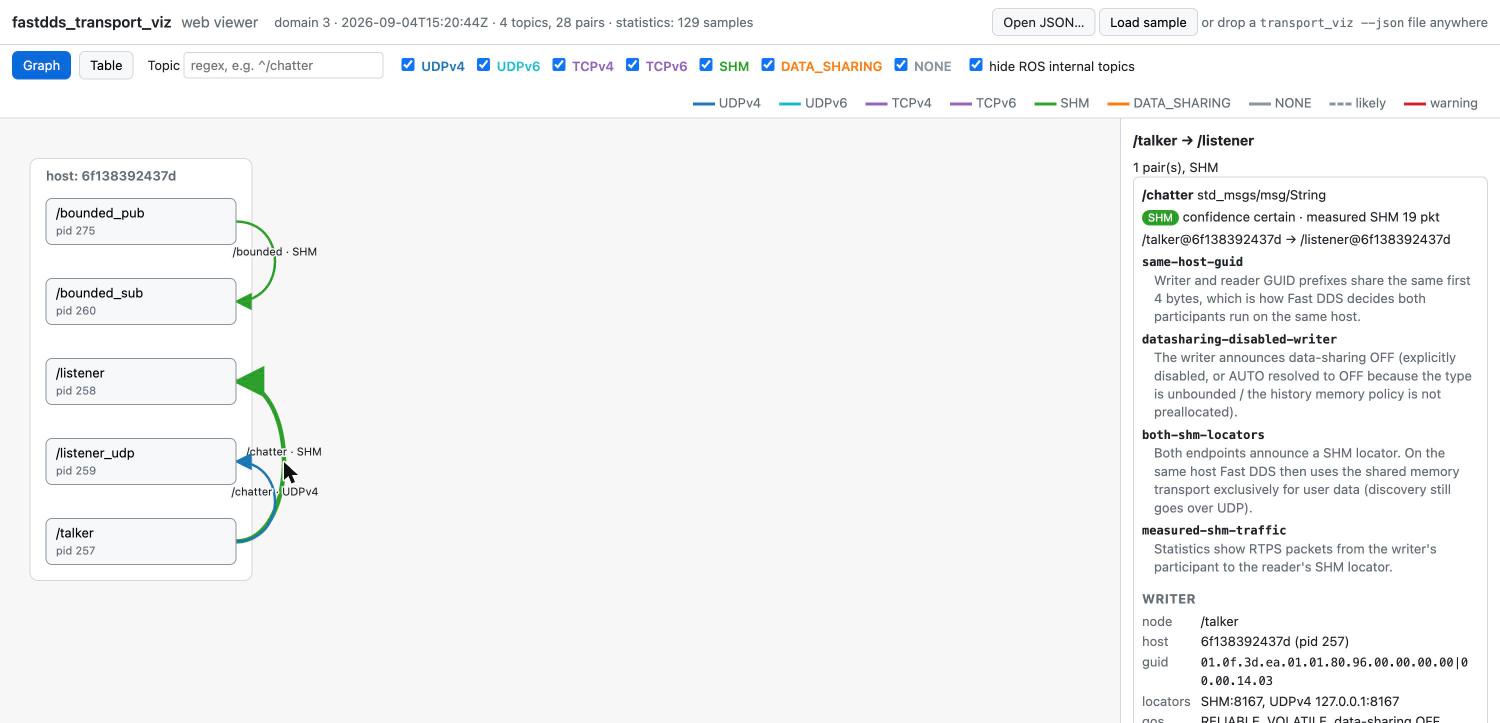
web/index.html renders a transport_viz --json document as a graph: hosts are columns,
ROS nodes are boxes, and every writer → reader pair is an arrow colored by transport.
It is a static page (plain HTML/JS plus a vendored copy of d3) — no build step, no
server, and it works offline from file://. (model.js holds the document model and
formatting, scene.js the layout and edge geometry, replay.js the reading of recordings
and their timeline, app.js the rendering.)
Open it
transport_viz --json --stats > snapshot.json
open web/index.html            # macOS; or double-click the file
Then load the document in one of three ways:
- Open JSON… button (file picker)
- drag & drop the file anywhere on the page
index.html?src=<URL>fetches the document (only when the page is served over HTTP, e.g.python3 -m http.serverinweb/; browsers blockfetchfromfile://)
The same three ways open a recording, a JSON Lines file of several documents (.jsonl,
see Recording and replaying).
The page starts with web/sample/sample.json, a real capture of talker/listener nodes
plus the bounded verification nodes with statistics enabled. Load sample in
the header brings it back after another document.
Reading the graph
| Element | Meaning |
|---|---|
| Column | a host (local, host:<id>, or the host name from statistics) |
| Box | a ROS node (pid <n> below the name when statistics are available); a red +N unmatched marks topics without a peer |
| Arrow | writer → reader pairs between two nodes with the same transport and confidence, bundled; the label is <topic> · <TRANSPORT> for a single pair (? after the transport when the confidence is likely) and <N> topics · <TRANSPORT> for a bundle of N pairs |
| Pill | a Discovery Server (SERVER / BACKUP participant; the announced name, Discovery Server when it has none, its first locator below), in its host's column (#86) |
CLIENT tag |
a node whose participant announced itself CLIENT / SUPER_CLIENT; a dotted grey line without a label leads to its server when the document could tell which one (see how-it-works.md); it is outside the transport legend and never bundled |
| Color | UDPv4 blue · UDPv6 cyan · TCP purple · SHM green · DATA_SHARING orange · NONE grey (legend in the toolbar) |
| Dashed | confidence likely |
| Red halo | at least one warning, e.g. measured-transport-mismatch |
Click an arrow to list its pairs in the side panel: transport, confidence, measured
traffic, reason codes with their descriptions and remedies (taken from
reason_code_descriptions / reason_code_remedies in the document), locators, QoS (reliability, durability, data-sharing, and the deadline,
liveliness, ownership and partitions when set), a data-sharing row with the size of the
writer's history and whether the endpoint's data-sharing segment is in the tool's /dev/shm
(#163) and, when the document carries a participants section, an shm row per
endpoint: its participant's SHM visibility from the tool's IPC namespace and the announced
SHM ports with their lock state (#125), and a type hash row with the first eight
characters of the endpoint's ROS 2 type hash when it announces one - hover it for the full
value (#85).
Click a node for its publishers, subscriptions and unmatched topics, and, for a client, the
discovery protocol it announced, its participant prefix and metatraffic locators, and its
server; a server's card lists the clients attributed to it.
The first header line names the domain, the observation time and the counts, and ends with
the statistics summary: how many samples the document holds and, when the tool lost some of
them, N lost. When the loss also cost a measurement, a !stats-samples-lost marker follows
whose tooltip carries the description and the remedy: a pair can then read (unmeasured, delivered)
although it carries traffic. The marker follows the document's stats.warnings, so N lost without it
is a loss that did no harm
(statistics.md).
The second header line summarizes the shared memory of the environment transport_viz
ran in (the document's shm object, see how-it-works.md):
capacity of /dev/shm, what Fast DDS keeps there, stale files and the shm-* warnings.
It ends with how the tool itself took part when that was not plain discovery (observed as
SUPER_CLIENT of UDPv4 …, or the Easy Mode address).
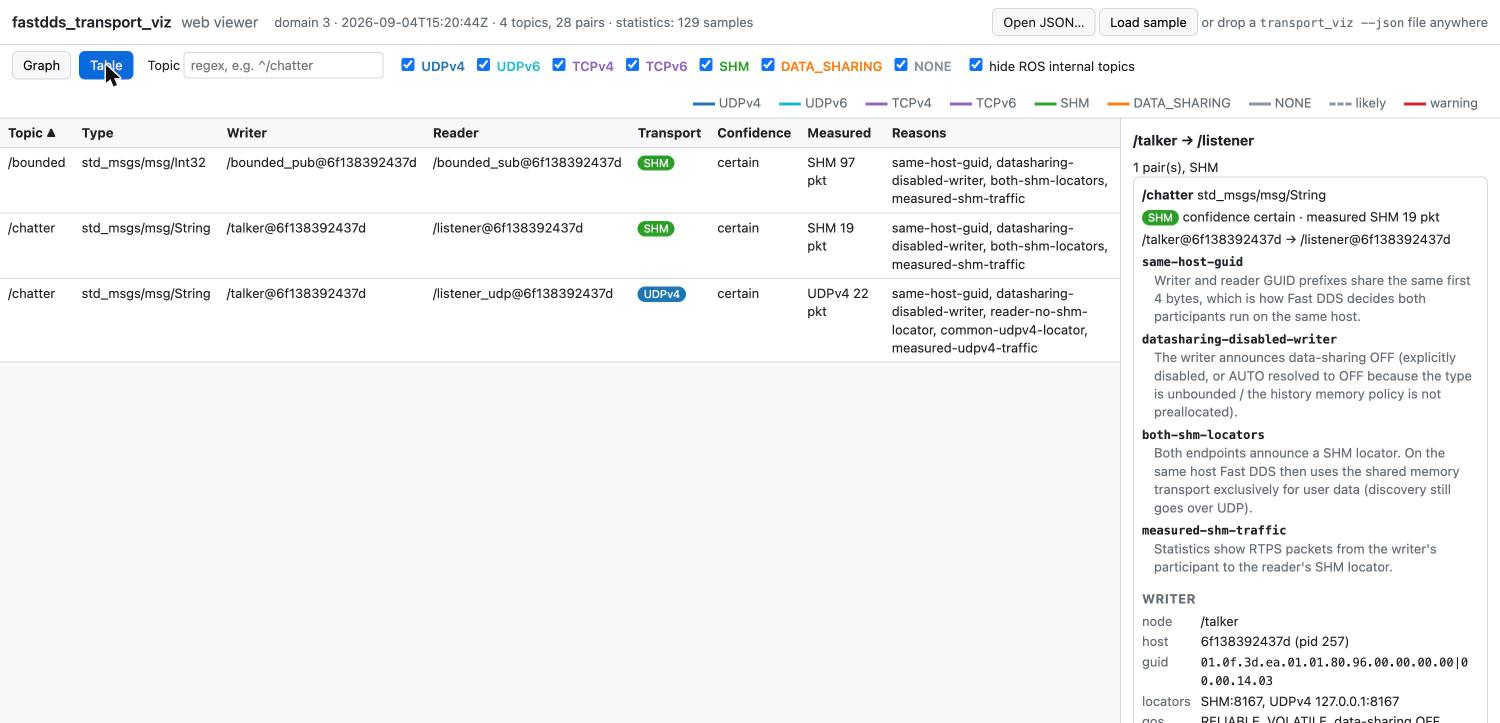
The Table tab has the CLI's --verbose shape: a header row per topic with the pair rows
beneath it. The header carries the document's topic aggregates (topics[]): the writer and
reader counts, the transports its pairs use, the latency of the slowest pair, the loss
(RTPS_LOST counted once per topic, resends summed) and the unmatched reasons; it never
sums the pair rows, so a filter that hides pairs leaves the header's numbers alone, and
the Hz cell stays empty because the rate exists only per pair. Click a header to fold or
unfold its pairs; the toolbar button, shown on the Table tab only, reads Collapse all
while any visible topic is unfolded and Expand all once all are folded. Clicking a column
header sorts topics by their aggregate and pairs within a topic by their own value
(numbers numerically, missing values last). With statistics the pair rows include the
packets and bytes carried during the observation, the latency, the delivered samples per
second (Hz, hover for the window) and the loss.
A service or an action taken with --all gets one header for the whole group, badged
SERVICE or ACTION and named after the service or action rather than its rq/ / rr/
topics, with every member pair beneath it
(#84). Its writer and
reader cells count the member pairs each way -- 1/1 for a complete service, 3/5 for
a complete action -- and its type is the members' with the tail taken off: _Request /
_Response for a service, which leaves the service type, and _SendGoal_Request,
_GetResult_Response, _FeedbackMessage and the like for an action, which leaves the
action type (example_interfaces/action/Fibonacci). sample/services.json is a capture to try it on
(index.html?src=sample/services.json). The graph is unchanged: an edge is an arrow and an
arrow has a direction, so each member keeps its own.
The filters
(topic regex, node regex, transport checkboxes, "hide ROS internal topics" for
/parameter_events, /rosout and the native-buffer companion topics whose every endpoint
is folded into the parent topic, buffer_parent_guid) apply to the graph, the table and the edge panel (the
node panel always lists every topic of the node). The node
filter has the semantics of --node: pairs whose writer or reader belongs to a matching
node stay, the graph keeps the matching nodes (highlighted, even without visible pairs)
and the partner nodes of the remaining pairs, and hides the rest. An invalid regex is
shown with a red border and filters nothing. Typing in a regex field applies it after a
100 ms pause, or at once on Enter or when the field loses focus.
Comparing two documents
The viewer runs the comparison of transport_viz diff (see
how-it-works.md) in the browser, in three ways:
- Compare with… loads a second document and compares the one on screen (before) with it (after); the after document is then shown. Open JSON… keeps replacing the document, which also ends a comparison.
index.html?src=before.json&diff=after.jsonfetches both (served over HTTP, like?src=);&key=guidselects the GUID key.- A document that already carries a
changesobject, that is the output oftransport_viz diff --jsonor a frame of--watch --json, is highlighted as it is.
The header names the before document (vs 2026-09-13T09:00:00Z by node key), the toolbar
shows the changes: summary of the CLI, a changes only switch that keeps the marked
pairs and their nodes, and, when the comparison was made here, the key (node, the
default, or guid, see how-it-works.md for what
each survives). The comparison itself is diffDocuments() in web/model.js, a port of
the C++ function that is tested against the binary's output on the same fixture pair
(web/sample/diff_before.json, diff_after.json, diff.json), so both agree.
| Element | Meaning |
|---|---|
+ green |
pair appeared (table row, edge halo and label) |
~ orange |
transport, confidence, measured transport, selected locator, measured locators or warnings changed; the table shows before → after transports and the pair card lists what changed |
- grey, dotted, italic |
pair disappeared: a ghost row at the end of the table with the transport it had (when the before document is at hand), and a dotted ghost edge when both of its nodes still exist |
In live mode every mark and ghost stays for three frames after its change and then
clears, like the CLI's --watch.
Live mode
transport_viz_web (installed from web/serve.py, Python standard library only) runs
transport_viz --watch --json as a subprocess and serves the viewer together with a
Server-Sent Events stream of every new document:
ros2 run fastdds_transport_viz transport_viz_web --stats --interval 1
# transport_viz_web: listening on http://127.0.0.1:8765/  (serving .../share/fastdds_transport_viz/web)
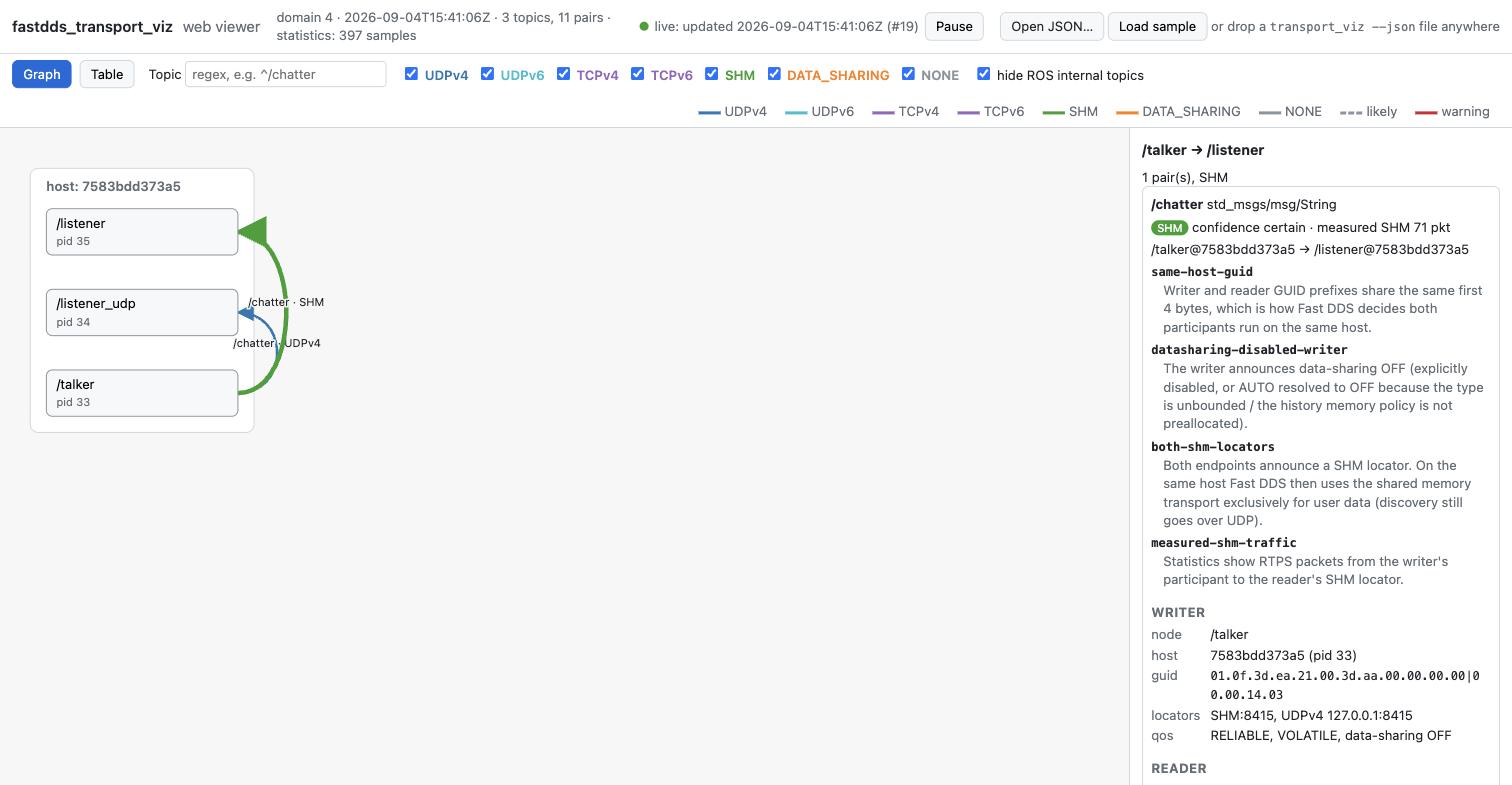
Open the printed URL: / redirects to index.html?live=1, which connects to /events
and re-renders on every document while keeping the selection, filters and zoom (the
layout is deterministic, so nothing jumps). The header shows the live state and the
time of the last update; the frames received so far stay in the page
(Live history). /latest.json
always returns the most recent document (usable with ?src=/latest.json; ?live=1 takes
precedence when both are given).
If the connection drops - the server stopped, the network went away, the laptop slept -
the header reads "live: connection lost, reconnecting…" while the last document stays on
screen, and the browser retries once a second (the stream asks for it with retry: 1000;
the browser's own default would be three). The server sends the latest document to every
new connection, so the banner clears as soon as one is listening again, without waiting
for the next --interval.
Live history
The viewer keeps every frame it receives (#218), so the pair that flipped to UDPv4 a minute ago can still be looked at. From the second frame on, the timeline of a replay sits under the toolbar and follows the newest frame, and the charts of a selected pair's card cover the kept frames, growing with each one.
- A move on the timeline -
◀/▶, the slider,◀ change/change ▶, a click on a chart - stops on that frame. The frames keep coming and join the timeline, the screen stays, and the header readslive: viewing #k of N (newest …). Pause stops on the frame shown the same way. live ▶|, the End key or Resume go back to the newest frame and follow it again.- The newest frame's changes stay marked for three frames, as on the CLI; a past frame
shows its own
changesonly, as in a replay. - Save recording downloads the kept frames as
transport_viz-<first observed_at>.jsonl, the JSON Lines of--record, to open later or send to someone. - match by reads the kept frames again with the other key; frames arriving meanwhile are added after them.
The history lives in the page: each frame's text is kept as a Blob and parsed again when
it is shown. It starts when the page is opened and ends when the page is closed or
reloaded; for the time before, or without a browser open, run the server with
--record. ?history=<MB> bounds it (default 512; 0 keeps
no history, and Pause then holds the newest frame back until Resume). / redirects
to index.html?live=1 and drops any query, so give the parameter on that address:
http://127.0.0.1:8765/index.html?live=1&history=1024. Over the
bound the oldest tenth of the frames is dropped at once and the timeline reads
history: 512 MB, oldest dropped; a past frame on screen that is dropped gives way to the
oldest kept frame, still paused, with the frame on screen was dropped.
With the 2400-pair medium document at --interval 1 (about 5.7 MB per frame as the
stream sends it) the default keeps 90 frames, a minute and a half; a frame costs the page
17 ms while it follows and 12 ms while it is paused, the drop of the oldest nine took
14 ms together with the frame that caused it, the JavaScript heap stayed at 38-49 MB (the
frames' text is in the browser's Blob store, not the heap), and match by read the 90
kept frames again in 0.8 s (verification-log.md). Raise the
bound for a longer look back, lower it on a small machine.
Every document event carries id:, its number in the server's stream. The server sends a
client only the newest document, so a browser that falls behind (a busy tab, a slow link)
misses some; the timeline counts them (3 frames skipped by the stream). The document
sent again on a reconnect has an id the page already has and is not added twice. An id
that goes down means the server was restarted: the history carries on and the timeline
adds stream restarted. When transport_viz exits, the kept frames stay and can still be
scrubbed.
The server takes its own options; every other argument is forwarded to transport_viz
(a literal -- is forwarded too, and rejected by the binary):
| Option | Meaning |
|---|---|
--bind ADDR |
listen address, default 127.0.0.1; use 0.0.0.0 to view from another machine (e.g. a laptop looking at a robot) |
--port N |
default 8765, 0 picks a free port |
--transport-viz PATH |
executable to run (default: next to the script, then $PATH) |
--verbose |
log requests and received documents |
--record FILE |
also write every line transport_viz prints - one document each - to FILE, for replay (overwrites FILE; the server exits before starting transport_viz if it cannot write it) |
| anything else | forwarded: --stats, --interval S, --domain N, --all, --topic REGEX, --timeout S |
If transport_viz exits, the server sends a status event (shown as "live: transport_viz
exited …") and stops; its exit code is 1 if transport_viz failed, 0 otherwise. Stopping
transport_viz_web - Ctrl-C, or SIGTERM or SIGHUP to the process itself - also stops the
transport_viz it started, and the server then exits with 0. In the Docker environment, docker compose run
--rm --service-ports dev publishes port 8765, so transport_viz_web --bind 0.0.0.0 inside
the container is reachable from the host browser.
transport_viz --watch --json itself prints one compact document per line (JSON Lines),
so any other consumer can read the same stream. The changes object of those documents is
also what transport_viz diff --json before.json after.json emits (see
how-it-works.md); the viewer highlights it in
both cases (Comparing two documents).
Prometheus metrics
transport_viz_web also serves /metrics: the latest document in the Prometheus text
format, built when it is scraped (the startup lines name it:
transport_viz_web: metrics: http://127.0.0.1:8765/metrics). Point a Prometheus scrape job
at it and chart the transports in Grafana next to the rest of the robot:
scrape_configs:
  - job_name: transport_viz
    static_configs:
      - targets: ['robot1:8765']   # transport_viz_web --bind 0.0.0.0
Every name starts with transport_viz_. The pair series carry the labels topic,
writer_node, reader_node, writer_host, reader_host, writer_guid and reader_guid
(the GUIDs keep two pairs between the same nodes apart):
| Series | Value |
|---|---|
pair_transport{transport} |
1, the predicted transport of the pair |
pair_warning{code} |
1 per warning code of the pair |
pair_measured_transport{transport} |
1 per transport that carried packets (--stats) |
pair_packets, pair_bytes |
RTPS packets / bytes sent to the reader during the observation (--stats) |
pair_delivered_per_second |
measured.delivered_per_s (--stats) |
pair_latency_seconds{stat} |
stat = mean, min, max, last (--stats) |
pair_lost_packets, pair_resent_datas |
measured.reliability (--stats) |
shm_total_bytes, shm_used_bytes, shm_free_bytes, shm_fastdds_bytes, shm_segments, shm_ports, shm_stale_segments, shm_stale_ports |
the shm object, labelled host with the tool's own host |
info{domain,schema_version} |
1 |
up |
1 while transport_viz runs, 0 once it has exited |
documents_total |
documents received (a counter) |
last_document_timestamp_seconds |
observed_at of the latest document |
stats_enabled |
1 with --stats |
All pair values are gauges of the latest document: a value that is null in the document
has no series (a pair without measurement has only pair_transport and pair_warning),
and a pair that leaves the document leaves /metrics at the next scrape. There is no
throughput series: throughput_bytes_per_s is always null (see
statistics.md). Before the first document the endpoint answers with up
and documents_total alone. The label values are the document's, so several robots
scraped into one Prometheus are told apart by the instance label Prometheus adds. A
large system makes a large response - the medium scale rung (2400 pairs with --stats)
is about 24 000 series and 7.5 MB, built in about 50 ms - so keep the scrape interval at
or above --interval and narrow it with transport_viz_web --topic REGEX when only
some topics matter.
Recording and replaying
A transient problem - a pair that falls back to UDPv4 for ten seconds while a node restarts - is gone before anyone opens the viewer. Record the live stream and replay it afterwards (#82); a viewer that was already open in live mode has the frames itself and can save them (Live history):
ros2 run fastdds_transport_viz transport_viz_web --stats --interval 1 --record rec.jsonl
# or, without the server:
ros2 run fastdds_transport_viz transport_viz --watch --json --stats --interval 1 > rec.jsonl
Both write the same file: one transport_viz --json document (a frame) per line, each
line written and flushed as soon as it arrives, so a recording cut short by Ctrl-C or a
crash still replays up to its last complete line. The format is JSON Lines of the existing
schema; nothing new is added to the documents.
Open the file like any document: Open JSON…, drag & drop, or
index.html?src=rec.jsonl, with &frame=N (1-based) to open at frame N. The viewer
decides by content, not by name: a file with two or more documents is a recording, one
with a single document is shown as that document. Lines that are not documents (a
[ros2run] message caught in a redirect, a line cut off at the end) are skipped and
counted in the timeline (2 lines skipped (not a document)).
A timeline bar appears under the toolbar:
| Control | Does |
|---|---|
| slider | picks a frame; frames sit at their observed_at when every one parses and none goes backwards, else evenly |
| ticks above the slider | frames whose changes has an added, removed or changed pair |
◀ / ▶, or the ← / → keys |
previous / next frame |
◀ change / change ▶ |
previous / next frame with a tick |
i / N and the time |
the frame on screen and its observed_at; the page title ends with #i, and a page opened with ?src= keeps &frame=i in its address |
| match by | how a pair is followed from frame to frame, the --key of transport_viz diff: node (default) keeps following a pair whose node restarted with new GUIDs, guid starts a new one |
Each frame is shown the way a live frame is: the pairs its own changes added, removed or
changed are marked (a frame carries the difference to the frame before it), the filters,
selection and zoom stay as they are, and the selection follows its pair - or, for an
arrow, its writer and reader nodes - to the next frame. A selected pair that is missing
from a frame reads "not in this frame".
The card of a selected pair gets charts over the whole recording, with a line at the frame on screen; click a chart to jump to the frame nearest to that point:
- a strip colored by transport, blank where the pair is missing;
delivered/s, the pair'sdelivered_per_sin each frame;- latency, the mean of each frame's own interval (the documents hold a mean over the whole observation, so the chart takes the difference of two frames);
- lost packets per interval, from the cumulative
lost_packets.
The last three need --stats; a recording without it has the strip only. An arrow's card
has the strip of every pair it bundles.
Compare with… during a replay leaves the replay and compares the frame on screen
(rec #k) with the chosen file. Wherever a single document is expected - the after
document of Compare with…, ?diff=, or a ?src= fetched for a comparison - a
recording stands for its last document.
The file is read in 8 MB chunks and never held whole: the viewer keeps the byte range of
each frame and a few numbers per pair and frame, shows the first frame (or the &frame=
one) as soon as it has been read with "loading x / y MB" next to the timeline, and parses a
frame again when it is shown. A 60-frame recording of the 2400-pair medium scale
document (5.5 MB per frame, 332 MB) shows its first frame in 0.6-0.8 s, finishes reading
in 1.4-1.6 s and moves between frames in 33 ms, with about 45 MB of JavaScript heap
(verification-log.md). At that size an hour at
--interval 1 is about 20 GB: record the minutes around the problem, or raise
--interval, rather than a whole day.
Large documents
Measured in headless Chrome on an Apple M3 with documents of the scale verification, after #136 (details: verification-log.md):
| Document | First render | Topic filter / node filter / clearing it | Select / deselect |
|---|---|---|---|
medium: 378 arrows, 2400 pairs, 9.1 MB |
33 ms | 133 / 133 / 133 ms | 33 / 34 ms |
large: 1467 arrows, 5600 pairs, 16.8 MB |
53 ms | 120 / 123 / 146 ms | 35 / 33 ms |
The filter times include the 100 ms pause after the last keystroke before a regex filter
applies, so the work itself is the time minus 100 ms. A change of a filter draws the visible
arrows again: filtering down is cheap, and clearing a filter on large costs 46 ms above
the pause. A click only restyles the selected arrow, node or row and fills the side panel,
without drawing anything again, so its cost hardly grows with the document; 33 ms of the select
times is the two-frame floor of the measurement at 60 Hz.
JSON schema
schema/transport_viz.schema.json (JSON Schema 2020-12) is the contract the viewer relies
on. It lists the required keys and enumerations and allows unknown keys, so the tool can
add fields without bumping schema_version; an incompatible change bumps it. The sample
documents and the live --json output are validated against it in colcon test
(test_json_schema and test_json_schema_live.py, using python3-jsonschema).